tuanngocptn/sentry-telegram-webhook
Webhook for Sentry which allows sending notification via Telegram messenger.
1.1K
tuanngocptn/sentry-telegram-webhook repository overview
Sentry Telegram Webhook
Table of Contents
- Requirements
- Installation
- Environment variables
- Custom Integrations Configuration
- Running the app (normal)
- Running the app with docker (Recommended)
- License
Description: Webhook for Sentry which allows sending notification via Telegram messenger.

Requirements
- Nodejs 18+ (recommend: 20+)
Installation
$ npm install
Environment variables
| Name | Is Require | Type | Note | Value |
|---|---|---|---|---|
| LANGUAGE | Yes | string | The language of message when send | vi,en,ru |
| TELEGRAM_BOT_TOKEN | Yes | string | The token from @BotFather telegram check HERE for see how to get this. | |
| TELEGRAM_GROUP_ID | Yes | number | The id of your telegram group. You can use telegram API for check that through Postman. Check HERE for more detail. Normally, that start with -100... | |
| TELEGRAM_TOPIC_ID | No | number | The id of you topic if you enable Topics in group setting. | |
| SENTRY_URL | No | string | Your Sentry URL (e.g. https://sentry.io or https://sentry.example.com for self-hosted). Defaults to https://sentry.io | |
| SENTRY_INTEGRATION_TOKEN | Yes | string | The token that geneate by sentry. Check HERE for more detail. | |
| SENTRY_ORGANIZATION_SLUG | Yes | string | The organization slug in your sentry organization setting | |
| SENTRY_PROJECT_SLUG_ALLOW_LIST | No | string | your Project slug list (Not require - split with comma , character)setting |
Custom Integrations Configuration
-
Create the new integrations check HERE for more detail.
-
After you create the new integration then you need config some parts like below image
Note: <your-server-here.domain> is your webhooks server (Full Webhook Urls is https://<your-server-here.domain>/sentry/webhooks). If you are running locally. You can use Ngrok for generate this.
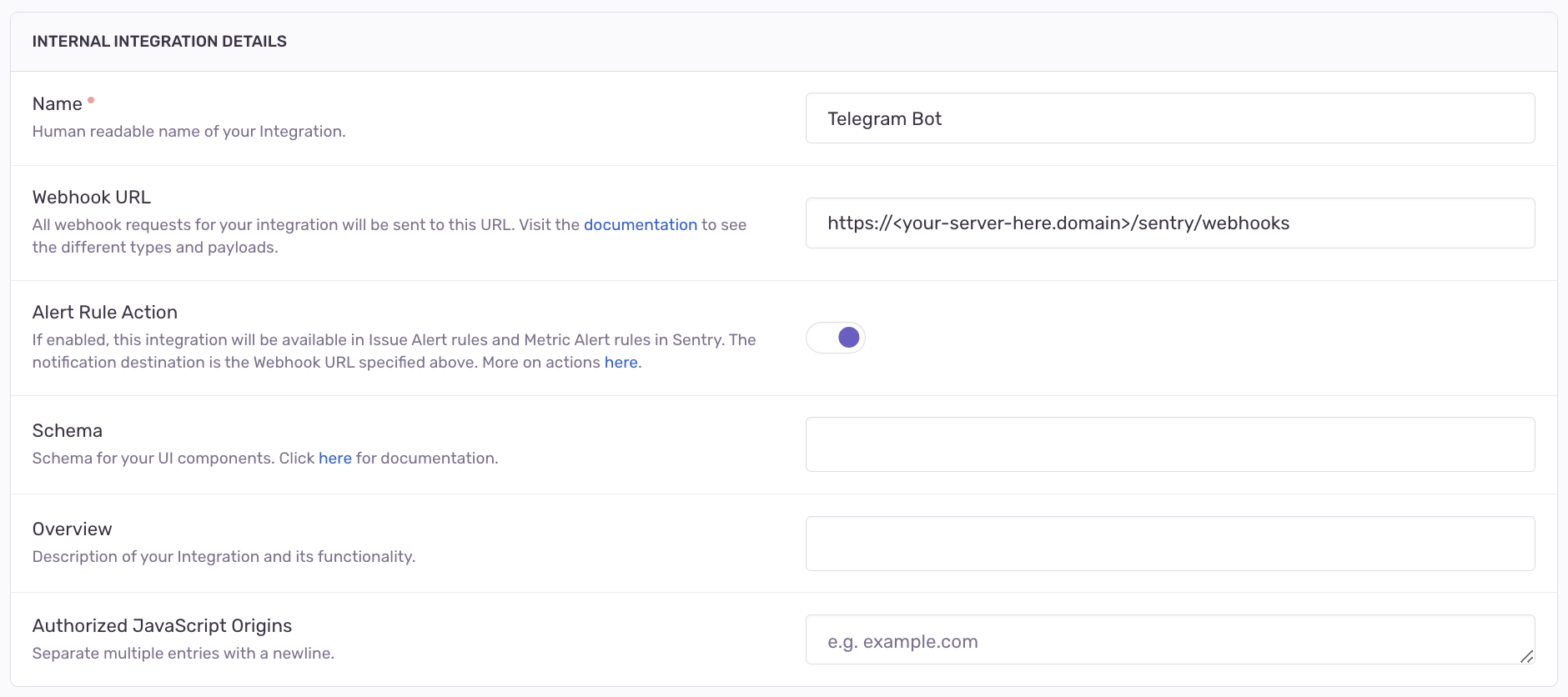
- And permission, that allow you trigger to you webhook.

Running the app (normal)
-
Clone
.env.templatefilecp .env.template .env -
Edit
.envfile with your value.LANGUAGE=en TELEGRAM_BOT_TOKEN=<get from bot father> TELEGRAM_GROUP_ID=<your telegram group id or telegram channel id> TELEGRAM_TOPIC_ID=<not require - your telegram topic (when enable Topics in group setting)> SENTRY_URL=<your Sentry URL, e.g. https://sentry.io or https://sentry.example.com for self-hosted> SENTRY_INTEGRATION_TOKEN=<token in Custom Integrations in Sentry Setting> SENTRY_ORGANIZATION_SLUG=<your Sentry org slug> SENTRY_PROJECT_SLUG_ALLOW_LIST=<your Project slug list (Not require - split with comma `,` character)> -
Run with npm
# development
$ npm run start

# watch mode
$ npm run start:dev

# production mode
$ npm run start:prod
Running the app with docker (Recommended)
Note: You don't need run npm install and setup nodejs.
- Run direct from docker hub: (don't need clone the repository)
-
Docker run - run direct with this command:
docker run \ -v /tmp/sentry-telegram-hook/logs:/code/logs \ -p 3000:3000 \ -e LANGUAGE=en \ -e TELEGRAM_BOT_TOKEN=<TELEGRAM_BOT_TOKEN> \ #get from bot father -e TELEGRAM_GROUP_ID=<TELEGRAM_GROUP_ID> \ #your telegram group id or telegram channel id -e TELEGRAM_TOPIC_ID=<TELEGRAM_TOPIC_ID> \ #not require - your telegram topic when enable Topics in group setting -e SENTRY_URL=<SENTRY_URL> \ #your Sentry URL (e.g. https://sentry.io or https://sentry.example.com for self-hosted) -e SENTRY_INTEGRATION_TOKEN=<SENTRY_INTEGRATION_TOKEN> \ #token in Custom Integrations in Sentry Setting -e SENTRY_ORGANIZATION_SLUG=<SENTRY_ORGANIZATION_SLUG> \ #your Sentry org slug -e SENTRY_PROJECT_SLUG_ALLOW_LIST=<SENTRY_PROJECT_SLUG_ALLOW_LIST> \ #your Project slug list (Not require - split with comma `,` character) tuanngocptn/sentry-telegram-webhook:latest -
Docker compose - create the compose file with below information. More details HERE.
Note: If you would like to use Gihub Container Registry (ghcr) instead of Docker hub. Please following THIS before run below docker compose
services:
  app:
    # Docker hub package
    image: tuanngocptn/sentry-telegram-webhook:latest
    # Github container registry (ghcr)
    # image: ghcr.io/tuanngocptn/sentry-telegram-webhook:latest
    environment:
      - LANGUAGE=en
      - TELEGRAM_BOT_TOKEN=<get from bot father>
      - TELEGRAM_GROUP_ID=<your telegram group id or telegram channel id>
      - TELEGRAM_TOPIC_ID=<not require - your telegram topic (when enable Topics in group setting)>
      - SENTRY_URL=<your Sentry URL, e.g. https://sentry.io or https://sentry.example.com for self-hosted>
      - SENTRY_INTEGRATION_TOKEN=<token in Custom Integrations in Sentry Setting>
      - SENTRY_ORGANIZATION_SLUG=<your Sentry org slug>
      - SENTRY_PROJECT_SLUG_ALLOW_LIST=<your Project slug list (Not require - split with comma `,` character)>
    ports:
      - 3000:3000
    volumes:
      - ./logs:/code/logs
- For running locally (debug):
-
Clone
docker-compose-template.ymlcp docker-compose-template.yml docker-compose.yml -
Edit environment variables:
environment: - LANGUAGE=en - TELEGRAM_BOT_TOKEN=<get from bot father> - TELEGRAM_GROUP_ID=<your telegram group id or telegram channel id> - TELEGRAM_TOPIC_ID=<not require - your telegram topic (when enable Topics in group setting)> - SENTRY_URL=<your Sentry URL, e.g. https://sentry.io or https://sentry.example.com for self-hosted> - SENTRY_INTEGRATION_TOKEN=<token in Custom Integrations in Sentry Setting> - SENTRY_ORGANIZATION_SLUG=<your Sentry org slug> - SENTRY_PROJECT_SLUG_ALLOW_LIST=<your Project slug list (Not require - split with comma `,` character)> -
Run with docker:
docker compose up
- For running production (release):
-
Clone
docker-compose-prod-template.ymlcp docker-compose-prod-template.yml docker-compose.yml -
Edit environment variables:
environment: - LANGUAGE=en - TELEGRAM_BOT_TOKEN=<get from bot father> - TELEGRAM_GROUP_ID=<your telegram group id or telegram channel id> - TELEGRAM_TOPIC_ID=<not require - your telegram topic (when enable Topics in group setting)> - SENTRY_URL=<your Sentry URL, e.g. https://sentry.io or https://sentry.example.com for self-hosted> - SENTRY_INTEGRATION_TOKEN=<token in Custom Integrations in Sentry Setting> - SENTRY_ORGANIZATION_SLUG=<your Sentry org slug> - SENTRY_PROJECT_SLUG_ALLOW_LIST=<your Project slug list (Not require - split with comma `,` character)> -
Run with docker:
docker compose up
License
Nest is MIT licensed.
Tag summary
Content type
Image
Digest
sha256:510274393…
Size
145.8 MB
Last updated
7 months ago
docker pull tuanngocptn/sentry-telegram-webhook