superng6/qbittorrentee
[全平台 x86-64、arm64、arm32] qBittorrent增强版,防吸血
Image
247
1M+
superng6/qbittorrentee repository overview
支持群晖、威联通等x64、arm64、arm32平台nas
博客:https://sleele.com/2020/01/09/docker-qbittorrent增强版,反迅雷吸血
GitHub:https://github.com/SuperNG6/Docker-qBittorrent-Enhanced-Edition
https://hub.docker.com/r/superng6/qbittorrentee
感谢以下项目:
https://github.com/qbittorrent/qBittorrent
https://github.com/c0re100/qBittorrent-Enhanced-Edition
https://github.com/ngosang/trackerslist
其他项目 Docker qBittorrent 中国优化版
https://github.com/SuperNG6/docker-qbittorrent https://hub.docker.com/r/superng6/qbittorrent
本镜像的一些优点
- 全平台架构
x86-64、arm64、armhf - 静态编译qbittorrentee
- 做了usermapping,使用你自己的账户权限来运行,这点对于群辉来说尤其重要
- 纯qBittorrent-Enhanced-Edition,没有包含多于的服务
- 默认上海时区 Asia/Shanghai
- qBittorrent-Enhanced-Edition屏蔽吸血客户端
- 内置优化过的conf文件,减少手工设置
- 默认中文
- 内置400条tracker方便在连接GitHub出错时使用
- 自动向所有tracker服务器汇报,加快下载速度,提升连接数
Architecture
qBittorrent Enhanced Edition v4.3.0.10
| Architecture | Tag |
|---|---|
| x86-64 | latest |
| arm64 | latest |
| armhf | latest |
Changelogs
2020/11/30
1、自动同步更新最新版本qBittorrent Enhanced Edition
2020/11/06
1、qBittorrent Enhanced Edition update to v4.3.0.10
2、x86-64、arm64、armhf由自编译转为官方静态编译版
3、减小镜像体积
2020/09/08
1、qBittorrent Enhanced Edition update to v4.2.5.16
2020/09/07
1、qBittorrent Enhanced Edition update to v4.2.5.15
2、libtorrent update to 1.2.10-0f0afec8c (Fix #127)
3、Optional Button for re-enable Torrent IP Filter (Tools>Enable Torrent IP Filter).
2020/08/21
1、更新LIBTORRENT v1.2.8,QBITTORRENT v4.2.5.13
2、更新base image
3、没别的更新了,已经很完善了
2020/01/13
  1、构建全平台架构镜像`x86-64`、`arm64`、`armhf`
  2、设置磁盘缓存,默认参数`x86-64:512M`、`arm64:128M`、`armhf:64M`
2020/01/12
  1、默认缓存设置参数为 x86-64:512M、arm64:64M,提升下载性能
  2、除了自动更新tracker外,内置400多条tracker,默认启用,以便于在GitHub连接有问题时使用
2020/01/06
  1、修改conf,优化参数,减少手动设置
  2、自动下载并更新tracker list
  3、默认中文
  4、基于qBittorrent-Enhanced-Edition 4.1.9.15 最新版的SSL有问题
注意:
- qBittorrent-Enhanced-Edition 增强版 需下载对应版本ipfilter.dat放入qBittorrent配置文件夹才能屏蔽离线下载 https://github.com/c0re100/qBittorrent-Enhanced-Edition/releases
关于群晖
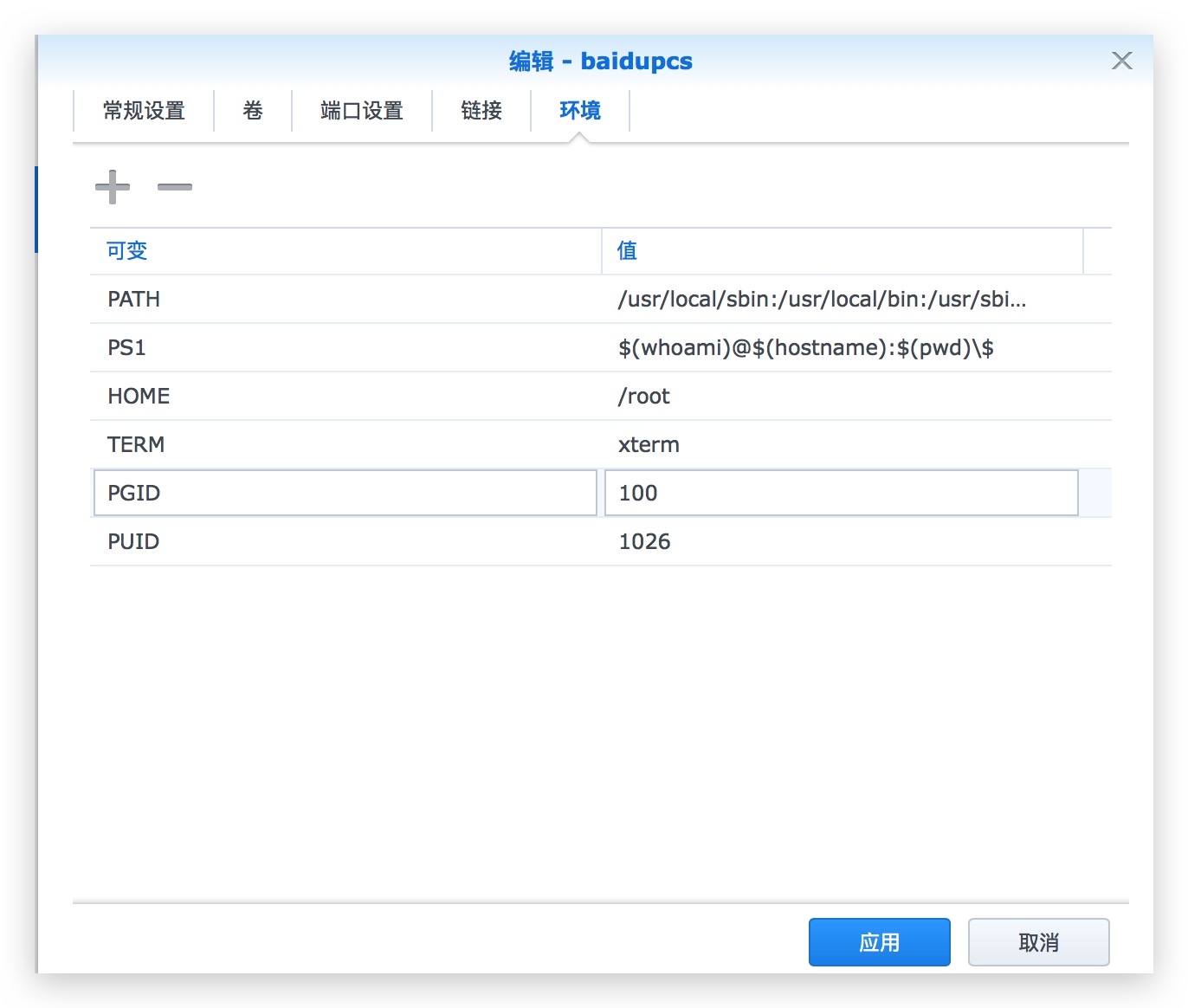
群晖用户请使用你当前的用户SSH进系统,输入 id 你的用户id 获取到你的UID和GID并输入进去
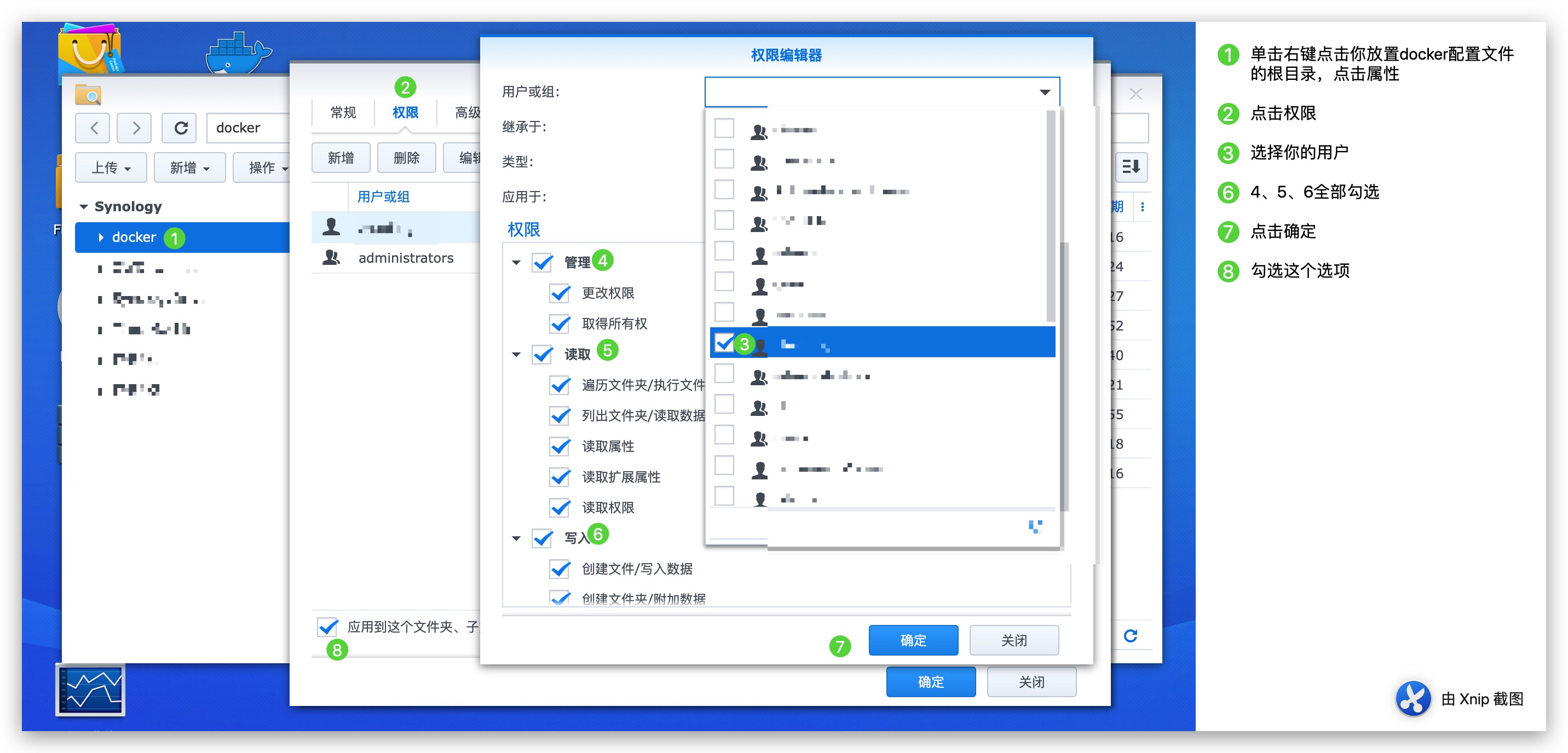
权限管理设置
对你的docker配置文件夹的根目录进行如图操作,你的下载文件夹的根目录进行相似操作,去掉管理这个权限,只给写入,读取权限
docker命令行设置:
- 创建qbittorrent容器
docker create  \
    --name=qbittorrentee  \
    -e WEBUIPORT=8080  \
    -e PUID=1026 \
    -e PGID=100 \
    -e TZ=Asia/Shanghai \
    -p 6881:6881  \
    -p 6881:6881/udp  \
    -p 8080:8080  \
    -v /配置文件位置:/config  \
    -v /下载位置:/downloads  \
    --restart unless-stopped  \
    superng6/qbittorrentee:latest
docker-compose
version: "2"
services:
  qbittorrentee:
    image: superng6/qbittorrentee
    container_name: qbittorrentee
    environment:
      - PUID=1026
      - PGID=100
      - TZ=Asia/Shanghai
    volumes:
      - /path/to/appdata/config:/config
      - /path/to/downloads:/downloads
    ports:
      - 6881:6881
      - 6881:6881/udp
      - 8080:8080
    restart: unless-stopped
变量:
| 参数 | 说明 |
|---|---|
--name=qbittorrentee | 容器名 |
-p 8080:8080 | web访问端口 IP:8080;(默认用户名:admin;默认密码:adminadmin);此端口需与容器端口和环境变量保持一致,否则无法访问 |
-p 6881:6881 | BT下载监听端口 |
-p 6881:6881/udp | BT下载DHT监听端口 |
-v /配置文件位置:/config | qBittorrent配置文件位置 |
-v /下载位置:/downloads | qBittorrent下载位置 |
-e WEBUIPORT=8080 | web访问端口环境变量 |
-e TZ=Asia/Shanghai | 系统时区设置,默认为Asia/Shanghai |
群晖docker设置:
- 卷
| 参数 | 说明 |
|---|---|
本地文件夹1:/downloads | qBittorrent下载位置 |
本地文件夹2:/config | qBittorrent配置文件位置 |
- 端口
| 参数 | 说明 |
|---|---|
本地端口1:6881 | BT下载监听端口 |
本地端口2:6881/udp | BT下载DHT监听端口 |
本地端口3:8080 | web访问端口 IP:8080;(默认用户名:admin;默认密码:adminadmin);此端口需与容器端口和环境变量保持一致,否则无法访问 |
- 环境变量:
| 参数 | 说明 |
|---|---|
TZ=Asia/Shanghai | 系统时区设置,默认为Asia/Shanghai |
WEBUIPORT=8080 | web访问端口环境变量 |
搜索:
开启:视图-搜索引擎:
说明:
- 自带 http://plugins.qbittorrent.org/ 部分搜索插件
- 全新安装默认只开启官方自带部分和一个中文搜索插件。其它可到 视图-搜索引擎-界面右侧搜索-搜索插件-启动栏(双击)开启
- 一些搜索插件网站需过墙才能用
- jackett搜索插件需配置jackett.json(位置config/qBittorrent/data/nova3/engines),插件需配合jackett服务的api_key。可自行搭建docker版jackett(例如linuxserver/jackett)。
Tag summary
Content type
Image
Digest
sha256:dde44700e…
Size
43.9 MB
Last updated
about 2 months ago
docker pull superng6/qbittorrentee