somleng/sms-gateway
Somleng SMS Gateway
1.5K
somleng/sms-gateway repository overview
Somleng SMS Gateway

Somleng SMS Gateway (part of The Somleng Project) is used to set up your own on-premise SMS gateway system and connect it to Somleng. This will give you the ability to take full control of your SMS infrastructure.
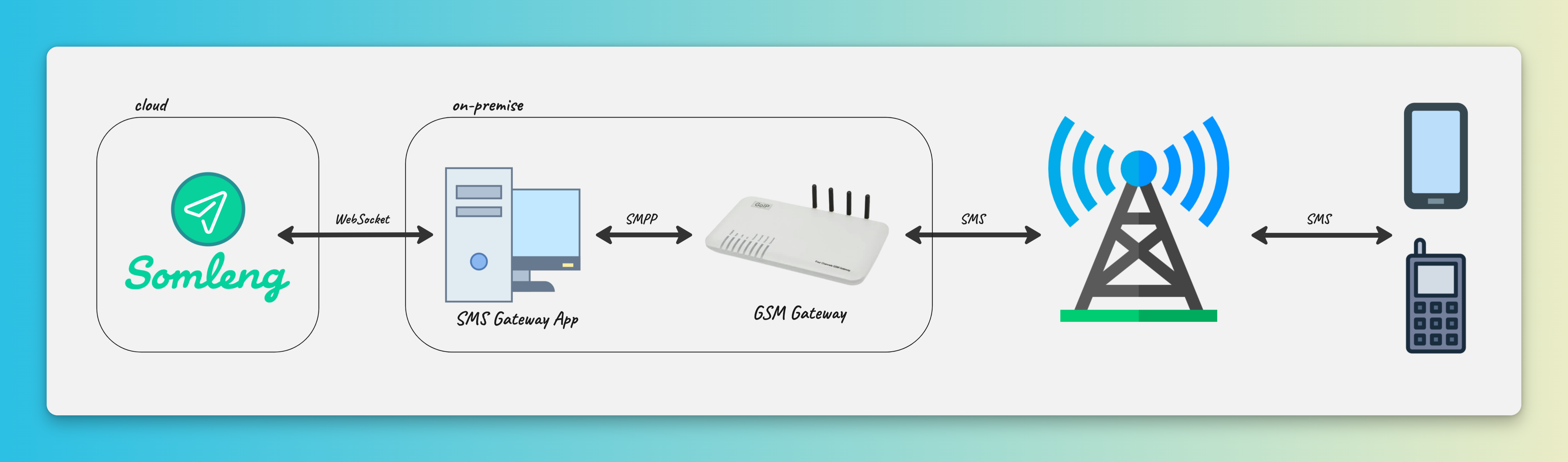
Downloading and Installing the SMS Gateway
Docker
docker pull somleng/sms-gateway
Downloading the binary
Download the latest release for your operating system.
Usage
Synopsis
Usage: somleng-sms-gateway [options] [command]

Options:
  -k, --key <value>               Device key
  -d, --domain <value>            Somleng Domain (default: "wss://app.somleng.org")
  -p, --http-server-port <value>  HTTP Server Port (default: "3210")
  -v, --verbose                   Output extra debugging
  -h, --help                      display help for command

Commands:
  goip [options]                  connect to GoIP Gateway
  smpp [options]                  connect to SMPP Gateway
  dummy                           connect to dummy Gateway
  help [command]                  display help for command
The application supports a number of connection modes including:
Running with Docker
docker run -p 3210:3210 somleng/sms-gateway somleng-sms-gateway [options] [command]
Web Interface
The Web interface displays connection information and configuration parameters. By default, it's available at http://localhost:3210.

Connection Modes
The documentation for running the SMS Gateway for each connection mode can be found below.
SMPP
The SMPP connection mode is used to connect to a single SMPP server.
Usage: somleng-sms-gateway smpp [options]

connect to SMPP Gateway

Options:
  --smpp-host <value>       SMPP host
  --smpp-port <value>       SMPP port (default: "2775")
  --smpp-system-id <value>  SMPP System ID
  --smpp-password <value>   SMPP password
  -h, --help                display help for command
GoIP (GSM Gateway)
The GoIP connection mode is used to connect to a GoIP GSM Gateway
GSM Gateway Configuration
Using the GoIP GSM Gateway web portal, configure the following:
Under Configurations -> Preferences:
- Set SMPP SMSC to Enable
- Fill in ID with an SMPP system ID
- Fill in Password with an SMPP password
- Fill in Port with an SMPP port
- Set Channel number to Enable
- Set ENROUTE status to Enable

Under Configurations -> SIM:
- Set Try to Get SIM Number from SIM Card to Disable
- For each channel on your gateway, enter the phone number for the SIM card in E.164 format.
Note: We recommend that you manually configure the phone numbers for each SIM in your gateway to ensure the format is in E.164. These numbers must exactly match the phone numbers that you configure on the Somleng Dashboard.

Start the SMS Gateway
Start the SMS Gateway in GoIP mode, ensuring that the configuration parameters match what you configured above.
Usage: somleng-sms-gateway goip [options]

connect to GoIP Gateway

Options:
  --goip-smpp-host <value>       SMPP host
  --goip-smpp-port <value>       SMPP port (default: "2775")
  --goip-smpp-system-id <value>  SMPP System ID
  --goip-smpp-password <value>   SMPP password
  --goip-channels <value>        Number of channels
  -h, --help                     display help for command
Dummy
The Dummy connection mode is used to test the connection between the SMS Gateway and Somleng. Outbound messages are simply output to stdout.
Usage: somleng-sms-gateway dummy [options]

connect to dummy Gateway

Options:
  -h, --help  display help for command
License
The software is available as open source under the terms of the MIT License.
Tag summary
Content type
Image
Digest
sha256:ac799d5bc…
Size
119.5 MB
Last updated
28 days ago
docker pull somleng/sms-gateway:v2.2.0