robrosa/rinnai2mqtt
Rinnai tankless water heater integration with Home Assistant
988
robrosa/rinnai2mqtt repository overview

Rinnai tankless water heater integration with Home Assistant
The purpose of this image is to provide an MQTT integration for Rinnai tankless water heaters in Home Assistant. Be aware that not all Rinnai tankless water heaters are supported - they must have some kind of "Wi-Fi module" attached. Besides that, this software was tested in a subset of models available - precisely the models of the so called "Digital Line": E17, E21, E27 and E33. These models are all made in Brazil, so it is very likely that this integration only works with devices made in Brazil.
Being a docker image, it is perfect for those who use Home Assistant in docker version: just install one more container and you're good to go (just like the container for MQTT that you probably already have). For those who use Home Assistant OS, Supervised or Core, it will be necessary to install docker in another VM or physical machine. It should be pretty easy, though.
Environment variables
This image needs some environment variables to run properly. They are listed below:
CHECK_UPDATES: Indicates whether the application should check for updates ["true" or "false"]. Default: ["true"].
DEVICE_ADDR: Water heater IP address.
DEVICE_MIN_TEMP: The minimum temperature in which the device operates (new in 1.4.2). Default [35].
DEVICE_MAX_TEMP: The maximum temperature in which the device operates (new in 1.4.2). Default [45].
LOCK_DEVICE_IN_USE: Indicates whether the device should be "locked" when in use (to avoid interference with the Rinnai mobile app) ["true" or "false"]. Default: ["false"].
MQTT_ADDR: MQTT server IP address.
MQTT_USER: MQTT server user (new in 1.3.6). Optional.
MQTT_PASS: MQTT server password (new in 1.3.6). Optional.
POLL_INTERVAL: Poll interval for requesting device status [seconds].
TZ: Your timezone.
The MQTT user/pass information is optional, and if not provided, the client will authenticate as "anonymous" (at least, in Mosquitto server).
Some extra explanation about the "LOCK_DEVICE_IN_USE:" variable: the Rinnai mobile app has a setting called "Priority", which supposedly works as a lock to prevent multiple users from changing settings while others are using the device (mostly the temperature). So, as this integration might coexist with the mobile app, there is this setting to automatically lock the device when in use, to prevent someone using the mobile app to change temperature, for example. This variable is said to support "true" or "false" values, but in fact only a "true" (lowercase) value will activate the setting - any other string will be a "false" equivalent. Also, this setting will remain in "locked" state after the device has ceased to be used.
And about the "CHECK_UPDATES" variable: just like the variable above, only a "false" (lowercase) value will disable the updates (since the default is "true"). Any other value (or absence of value) is considered a "true" equivalent. Besides that, when set to "false", the "update" sensor will be removed from HA, since there is no point in having a sensor that does nothing. Of course, the sensor will be recreated if the setting is changed back to "true".
The "DEVICE_XXX_TEMP" variables give a hint to Home Assistant about the temperature ranges in which the device operates. It's important to note that in some models (if not all - I don't know) the temperature jumps from 46 °C to 48 °C, and then to 50, 55 and 60 °C. There may exist other ranges, but this integration operates with this one.
Directory mappings
There are two directories that must be mapped:
/data (for storing the database file - new in 2.0.0)
/log (where the logfile rinnai2mqtt.log is located)
See more about the database mapping below, on the comments about the new sensors for Home Assistant.
Sensors
As seen in the screenshot below, this integration creates some sensors:
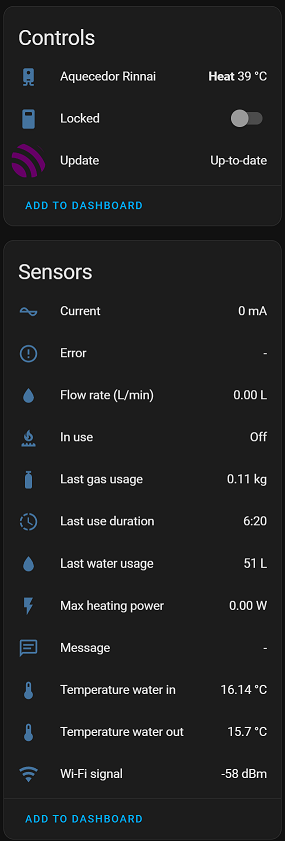
They're all reported by the device itself and are pretty self explanatory, but some clarification is needed:
The Last gas usage sensor is reported by the water heater using kcal. Since this unit doesn't mean anything to most people (including me), I thought it would have more meaning if it was converted to Kg. However, this is not a simple conversion, since it depends on the kind of gas used - propane has one conversion factor, butane has another one. And since most people in Brazil use water heaters on LPG (GLP in Brazil), and this kind of gas is actually a mixture of five gases, I took an average among their conversion factors. So, it's not accurate but I think it's a good aproximation.
The Max heating power sensor is reported by the water heater using kcal/min. Again, I chose to convert it to Watts, since it can give a better idea of the power produced by the device - especially comparing it with other heating generators.
The Last water usage sensor is reported in Liters.
Both Temperature water in and Temperature water out sensors are reported in Celsius.
The Message, Error and Update are not "real" sensors, but that's the way used to send information to HA. The Message sensor shows short informative messages regarding operations on the device - things that are not possible to do (like turn the device off while it is in use) or problems while trying to call the device API, etc. The Error sensor reports the same errors shown on the device LCD display. It's always a numeric code that indicates what kind of problem is happening. You need a "code table" to know what they mean. I believe that the device manual has such table, but I'm not sure. The most common error is code 12, which indicates "no gas" or very low pressure in such a way that the device can't turn on. In case of an error, the message stays visible for 24 hours. The Update sensor reports the current version of the application and if there is an update - just HA normal operation. The update check is done every 6 hours.
As of 2.0.0, there are two new sensors: Total water usage and Total gas usage. These sensors report the cumulative use of both water and gas. They are created with device_class = "energy" and state_class = "total_increasing" and can be used in the "Energy" dashboard of Home Assistant. The water sensor value reported is as precise as the water heater itself: it just stores the amount of water in each use, as reported by the device. The gas sensor, however, is a little bit tricky: since Rinnai devices use kcal to report gas usage, and Home Assistant expects values in m3 ou kWh, it's not a trivial process to convert between these two units. The same rules for the sensor "Last gas usage" apply here. Nevertheless, I think the conversion used is precise enough to give the user a good hint about gas utilization. After running this new version for the fisrt time, these sensors shall be visible in the "Energy" dashboard - after you click in "Add water source" and "Add gas source", of course.
These cumulative data are stored in a database in order to preserve them across application restarts. If you don't map the /data directory, then the database will reset each time the application starts, and it will report 0 (zero) to Home Assistant. This is not a problem per se, as Home Assistant will record the total in the "sum" field of the statistics, enabling it to show the correct cumulative value in the "Energy" dashboard. The only inconvenient is that the sensor will not report an ever increasing value since the first run - instead, it will start over from time to time. If that does not bother you, then it's ok.
Notes
The picture below shows the thermostat entity created by Home Assistant for this device:
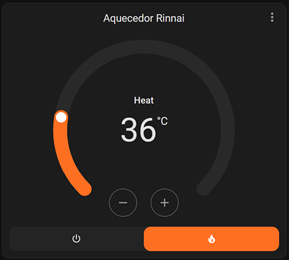
As said in the beginning of this description, this integration was tested in a subset of models called "Digital line". As far as I know, devices of this line of products have a temperature range going from 35 °C to 60 °C. And again: since this range is too broad for people in Brazil (even the ones living in the South, like me), the default range was set to 35 °C - 45 °C. These values can be overridden through the "DEVICE_XXX_TEMP" variables described above.
Home Assistant OS add-on
As of version 2.0.6, the application can be installed as an add-on in Home Assistant OS. To do that, follow the standard procedure for adding repositories to Home Assistant: click on Settings > Add-ons > Add-on Store (the button on the bottom right of the screen) and then click on the three dots on the upper right of the screen > Repositories and then add the link bellow:
https://github.com/rpr1972/rinnai2mqtt
Then, after the add-on is installed, go to the "Configuration" tab and fill the variables shown there (which are the same environment variables explained above) and start the application.
Versions (tags)
The tags for the versions have changed: now, there are always two tags for each version and one multiarch tag for the current version. There are versions for the AMD64 (amd64-[VERSION] and amd64-latest) and ARM64 (arm64-[VERSION] and arm64-latest). The tag containing only the [VERSION] is multiarch - meaning it can be used to install the correct version on the desired platform without the need to specify the architecture. The ARM64 versions are for the ARMv8 or AARCH64 platforms.
Changelog
You can find the changelog in https://github.com/rpr1972/rinnai2mqtt/blob/main/CHANGELOG.md
Docker image
To get the image, please go to https://hub.docker.com/r/robrosa/rinnai2mqtt
Tag summary
Content type
Image
Digest
sha256:0fbb2d9ed…
Size
75.4 MB
Last updated
2 months ago
docker pull robrosa/rinnai2mqtt:2.0.9