rizkikotet/mikhmon
Mikhmon, PHP-based application for monitoring and managing MikroTik hotspot services.
2.2K
rizkikotet/mikhmon repository overview
Mikhmon Docker
Docker image for Mikhmon (MikroTik Hotspot Monitor), a PHP-based application for monitoring and managing MikroTik hotspot services.
What is Mikhmon?
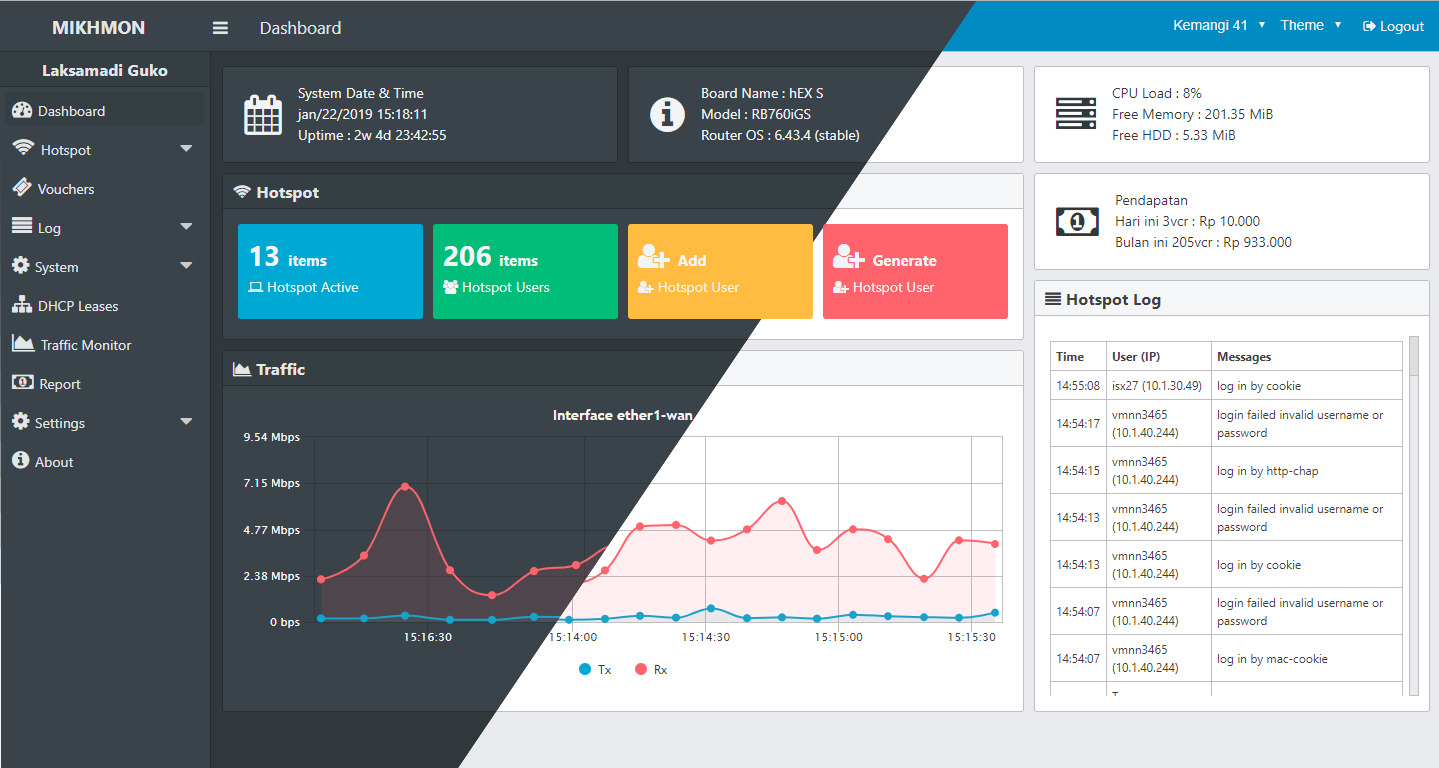
Mikhmon is a self-hosted PHP application designed to simplify management of MikroTik router hotspot services. It offers a user-friendly web interface for monitoring users, generating vouchers, viewing reports, and much more - all without requiring direct access to RouterOS.
Features
- 🖥️ User-friendly Dashboard: Monitor active users, traffic stats, and system status
- 🎫 Voucher Management: Generate, print and manage hotspot vouchers
- 👥 User Management: Create, edit, and delete hotspot users
- 📊 Reporting: Access usage data and revenue reports
- 🔄 Multi-Router Support: Manage multiple MikroTik devices from one interface
- 🛠️ Profile Settings: Create and manage bandwidth limitation profiles
- 🖨️ Print Templates: Customize voucher print templates
Quick Start
docker run -d \
  --name mikhmon \
  --pull always \
  -p 80:80 \
  -e PUID=1000 \
  -e PGID=1000 \
  -e TZ=Asia/Jakarta \
  --restart unless-stopped \
  rizkikotet/mikhmon:latest
Then access Mikhmon through your browser at http://localhost:80
Docker Compose
services:
  mikhmon:
    container_name: Mikhmon
    pull_policy: always
    image: rizkikotet/mikhmon:latest
    restart: unless-stopped
    ports:
      - "80:80"
      #- "443:443"
    environment:
      - PUID=1000
      - PGID=1000
      - TZ=Asia/Jakarta
Initial Setup
- Access Mikhmon via browser at
http://localhost:80 - Default login credentials:
- Username:
mikhmon - Password:
1234
- Username:
- Change the default password immediately
- Add your MikroTik router:
- Click "Add Router"
- Enter router name, IP address, API username and password
- Save settings
Requirements
- MikroTik router with active API
- API username and password for your router
- Network connection between the Docker host and MikroTik router
Tags
latest: Most recent stable builddev: Development build with newest features (may be unstable)
Source Code
The Dockerfile and related files for this image are available on GitHub.
Credits
This Docker image packages Mikhmon developed by laksa19.
License
This Docker image is licensed under MIT license, with respect to the original Mikhmon project license.
Tag summary
Content type
Image
Digest
sha256:ae5b3b9cd…
Size
69.2 MB
Last updated
about 1 year ago
docker pull rizkikotet/mikhmon