ozon08/openvpn-ui
Web User Interface for OpenVPN
Image
Networking
Security
Web servers
0
1.9K
ozon08/openvpn-ui repository overview
OpenVPN UI
Security-hardened fork of d3vilh/openvpn-ui, maintained by OZON08. Critical/high vulnerabilities fixed, dependencies updated, build reliability improved. Full details in CHANGELOG.md.
OpenVPN server web administration interface — quick to deploy, easy to use.
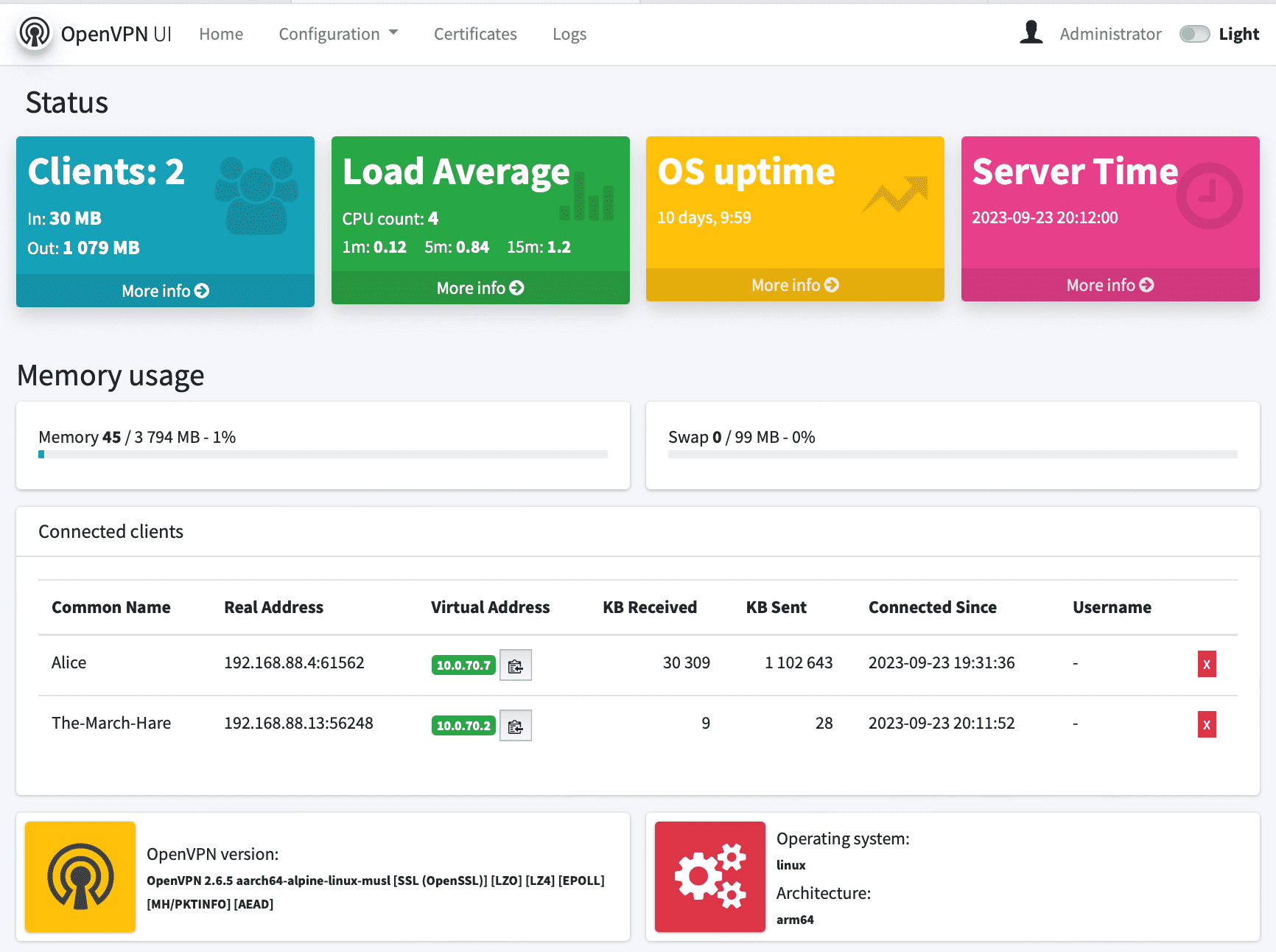


Features
- Status page with server statistics and connected clients list
- Supports tunnel (
dev tun) and bridge (dev tap) server configurations - Generate, download, renew, revoke, delete and view client certificates
- Client passphrase and static IP assignment during certificate generation
- Two-factor authentication (2FA/MFA) support
- Change EasyRSA vars including certificate and CRL expiration time
- Maintain EasyRSA PKI infrastructure (init, build-ca, gen-dh, build-crl, gen-ta, revoke)
- Change OpenVPN Server configuration via web interface
- Preview OpenVPN Server logs
- Grafana dashboards — three pre-configured dashboards auto-provisioned for live connection monitoring, traffic history, and per-user drill-down (requires InfluxDB 3 Core)
- Restart OpenVPN Server and OpenVPN UI from web interface
- User management — Admins have full access, regular users access certificates, logs and status only
- Admin credentials passed via environment variables
- Google OAuth 2.0 login support
- Alpine Linux base, Go 1.25.0, Beego 2.3.10, EasyRSA 3.x, OpenSSL 3.x
- v0.9.7.2: Security hardening — container now runs as a dedicated non-root user (
openvpn-ui, UID/GID 1000) viasu-exec. Mitigates privilege-escalation impact from host kernel vulnerabilities (e.g. CVE-2026-31431). Group write permissions ensure EasyRSA scripts continue to function without root. - v0.9.7.1: Bugfix — certificate create/revoke/renew/remove actions failed inside the container because the
easyrsahelper scripts readEasyRsaPath/OpenVpnPathvia a broken relative path. Paths are now injected as env vars from Go. Dockerfile COPY order also corrected so the container-variantapp.confis not overwritten by the dev-time copy. Light/dark toggle hidden in the topbar (dark mode forced). - dev: Several UX and correctness fixes for non-admin users — connected devices on the home page are now scoped to the user's own assigned certificates; non-admins can renew their own certificates (Revoke/Delete remain admin-only); profile tab state is preserved across page reloads; duplicate email addresses are rejected on user creation with a flash warning; the "Assign Certificate" dropdown hides already-assigned certs and enforces one-cert-one-user; the "Transfer Certificate" dropdown is populated with currently assigned certs; navbar and login icons that rendered as blank rectangles (Font Awesome FA4/FA5 class conflict) are fixed.
- dev: Grafana monitoring dashboards — three pre-configured dashboards (
grafana/provisioning/) auto-loaded at container start: Aktive Verbindungen (live, 1 min refresh), Traffic-Verlauf (30-day history), Nutzer-Detail (per-user drill-down). InfluxDB 3 Core datasource provisioned automatically via YAML; no manual Grafana setup required. - v0.9.7: Long-term user monitoring — per-user transfer volume, real/virtual IPs and connect/disconnect sessions persisted in SQLite with retention policy, with optional InfluxDB v3 export for Grafana dashboards. New Monitor page (Sessions / Users / Retention / InfluxDB tabs, admin-editable InfluxDB settings with hot-reload) +
/api/v1/monitor/*endpoints + optional OpenVPNclient-disconnectwebhook. UI refresh: AdminLTE sidebar layout with dark-mode default. - v0.9.6.1: CRLF line ending fix — container now starts correctly on all Linux hosts
- AMD64 and ARM images available
Security fixes in this fork
| Severity | Issue |
|---|---|
| Critical | Command injection in certificate/PKI management |
| Critical | Path traversal in certificate download endpoint |
| Critical | Path traversal in image display endpoint |
| Critical | CSRF via hardcoded OAuth state parameter |
| High | OAuth internal errors exposed to unauthenticated users |
| High | LDAP injection in authentication |
| High | SQL query logging of sensitive data in production |
| Medium | Race condition on global configuration state |
| Medium | World-readable client config files containing private keys |
| Medium | Weak password policy (minimum length raised 6 → 12) |
| Low | World-readable static IP config files |
Quick Start
docker-compose (recommended)
---
version: "3.5"

services:
  openvpn:
    container_name: openvpn
    image: ozon08/openvpn-server:latest
    privileged: true
    ports:
      - "1194:1194/udp"
    environment:
      TRUST_SUB: 10.0.70.0/24
      GUEST_SUB: 10.0.71.0/24
      HOME_SUB: 192.168.88.0/24
    volumes:
      - ./pki:/etc/openvpn/pki
      - ./clients:/etc/openvpn/clients
      - ./config:/etc/openvpn/config
      - ./staticclients:/etc/openvpn/staticclients
      - ./log:/var/log/openvpn
      - ./fw-rules.sh:/opt/app/fw-rules.sh
      - ./server.conf:/etc/openvpn/server.conf
    cap_add:
      - NET_ADMIN
    restart: always

  openvpn-ui:
    container_name: openvpn-ui
    image: ozon08/openvpn-ui:latest
    environment:
      - OPENVPN_ADMIN_USERNAME=admin
      - OPENVPN_ADMIN_PASSWORD=changeme
    privileged: true
    ports:
      - "8080:8080/tcp"
    volumes:
      - ./:/etc/openvpn
      - ./db:/opt/openvpn-ui/db
      - ./pki:/usr/share/easy-rsa/pki
      - /var/run/docker.sock:/var/run/docker.sock:ro
    restart: always
git clone https://github.com/OZON08/openvpn-server ~/openvpn-server
cd ~/openvpn-server
docker compose up -d
docker run
docker run \
  -v /etc/openvpn:/etc/openvpn \
  -v /etc/openvpn/db:/opt/openvpn-ui/db \
  -v /etc/openvpn/pki:/usr/share/easy-rsa/pki \
  -v /var/run/docker.sock:/var/run/docker.sock \
  -e OPENVPN_ADMIN_USERNAME='admin' \
  -e OPENVPN_ADMIN_PASSWORD='changeme' \
  -p 8080:8080/tcp \
  --privileged ozon08/openvpn-ui:latest
Environment Variables
| Variable | Description |
|---|---|
OPENVPN_ADMIN_USERNAME | Admin username (set on first start) |
OPENVPN_ADMIN_PASSWORD | Admin password — min 12 characters (set on first start) |
GOOGLE_CLIENT_ID | Google OAuth 2.0 client ID (optional) |
GOOGLE_CLIENT_SECRET | Google OAuth 2.0 client secret (optional) |
GOOGLE_REDIRECT_URL | Google OAuth 2.0 redirect URL (optional) |
ALLOWED_DOMAINS | Comma-separated list of allowed email domains for OAuth (optional) |
APP_ENV | Set to development to enable ORM debug logging (default: production) |
Configuration
OpenVPN UI is accessible at http://localhost:8080 (default).
After the first start:
- Log in with the credentials set via environment variables.
- Go to Configuration > OpenVPN Server and set your server options.
- Go to Configuration > EasyRSA vars and review PKI settings.
- Unset
OPENVPN_ADMIN_USERNAME/OPENVPN_ADMIN_PASSWORDenv vars after the first successful login.
Upgrade
docker pull ozon08/openvpn-ui:latest
docker rm openvpn-ui --force
docker compose up -d
The database schema is updated automatically on first start after upgrade.
Links
- GitHub: OZON08/openvpn-ui
- OpenVPN Server image: OZON08/openvpn-server
- Changelog: CHANGELOG.md
- License: MIT

Tag summary
Content type
Image
Digest
sha256:cdd0d4341…
Size
57.2 MB
Last updated
23 days ago
docker pull ozon08/openvpn-ui:dev