netlah/crushftp
CrushFTP 10 server https://github.com/NetLah/docker-crushftp
Image
Networking
Integration & delivery
2
100K+
netlah/crushftp repository overview
CrushFTP 10
CrushFTP 10 Server provides FTP, Implicit FTPS, SFTP, HTTP, or HTTPS
Docker Specifications
- Base: Alpine 3.13 Linux, OpenJDK 17,
microblink/java:17 - CrushFTP 10 (v10.1.0_62) (required commercial license pricing)
- Dockerfile: https://github.com/NetLah/docker-crushftp
This container hub.docker.com/r/netlah/crushftp is distributed under the MIT Licence.
Configuration
Volumes
- Configuration and binary volume:
/var/opt/crushftp - Volume ftproot can be mounted additional like
/ftproot
Ports
- FTP: 21
- Passive FTP Ports: 20000-20100
- SFTP: 2222
- HTTPS/WebDAV: 443
- HTTP/WebDAV: 8080
- HTTP Alt/WebDAV: 9090
Environments
- Admin user of CrushFTP
ADMIN_USER, defaultcrushadmin - Password for admin user
ADMIN_PASSWORD, default is random one time - Health check HTTP protocol
WEB_PROTOCOLhttp/https, defaulthttp - Health check HTTP port
WEB_PORT, default8080
Installation
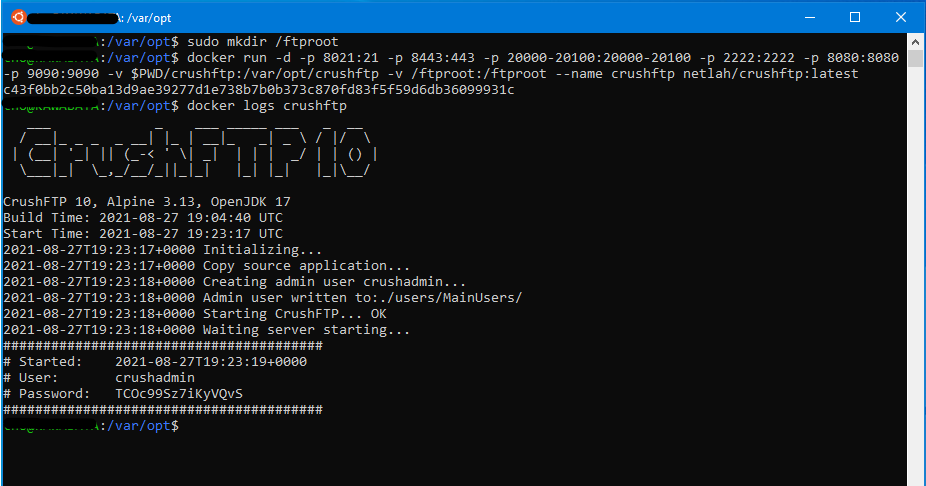
Run container and mount volume /var/opt/crushftp to the host in order to keep CrushFTP's configuration and binary persistent. Access browser to http://localhost:8080 with the admin user to complete the setup.
docker run -p 21:21 -p 443:443 -p 20000-20100:20000-20100 -p 2222:2222 -p 8080:8080 -p 9090:9090 -v <volume>:/var/opt/crushftp netlah/crushftp:latest
To view the random admin password or the log, use docker logs
docker logs <container_id/container_name>
References
- Visit the CrushFTP 10 Wiki
- Docker sample CrushFTP 10 Docker sample
- A CrushFTP 10 Dockerization
Tag summary
Content type
Image
Digest
sha256:d6eca9c6a…
Size
148.7 MB
Last updated
about 2 years ago
docker pull netlah/crushftp