netham45/screamrouter
ScreamRouter is a whole home audio routing system
4.1K
netham45/screamrouter repository overview
ScreamRouter: Advanced Audio Routing System
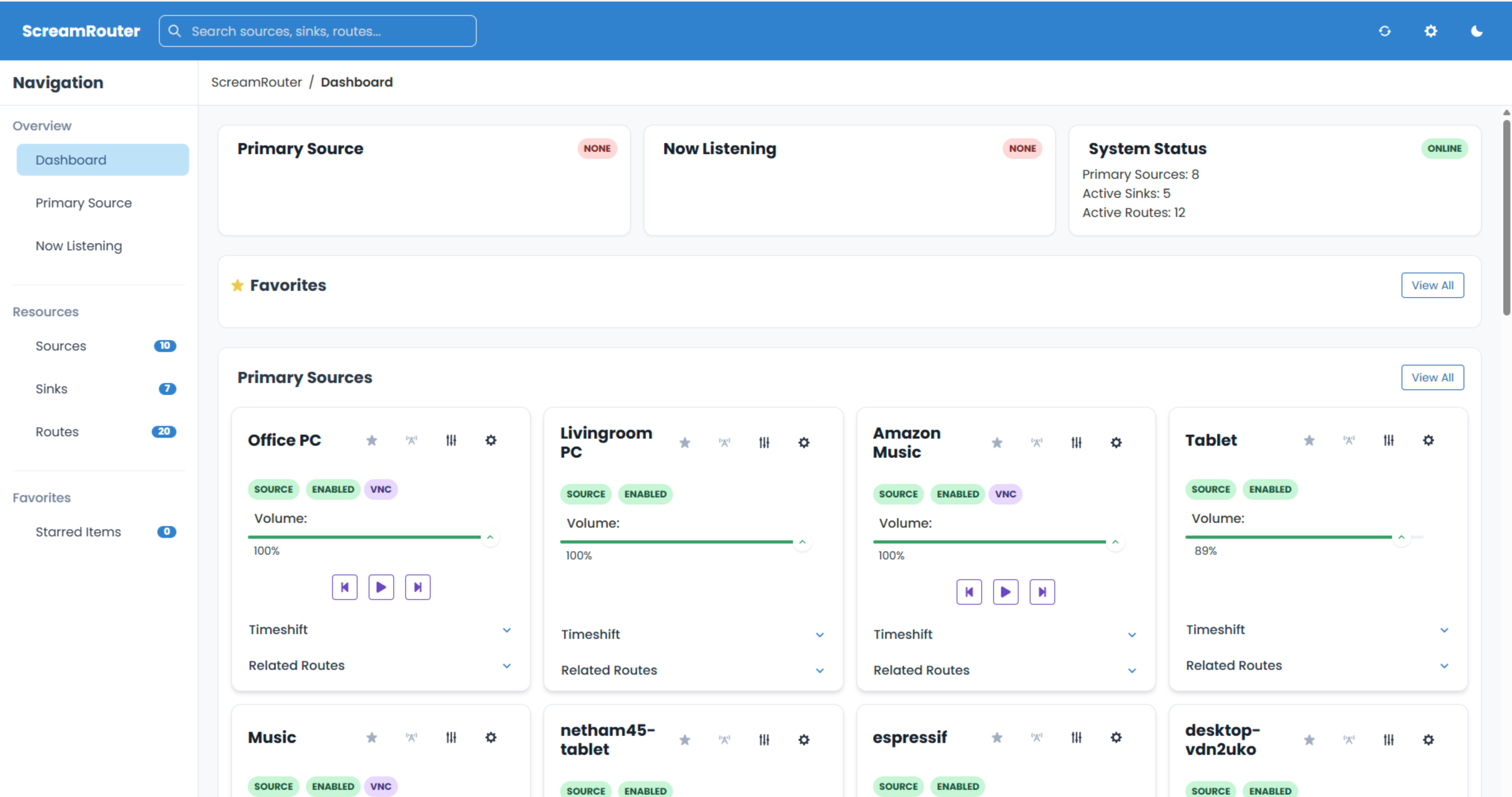
Overview
ScreamRouter is a versatile audio routing and management system with a Python frontend/configuration layer and C++ backend, designed for network audio streaming. It enables flexible audio distribution across your network, supporting Scream and RTP audio sources, Scream receivers, and web-based MP3 streamers.
Quick Start
# Run with host networking (required for Multicast, Linux only)
docker run -d --network host \
  -v ./config:/app/config \
  -v ./logs:/app/logs \
  -v ./cert:/app/cert \
  --name screamrouter \
  netham45/screamrouter:latest

# Access the web interface over https
# Run with port forwards (Multicast features won't work, compatible with Windows)
docker run -d \
  -p 443:443 \
  -p 16401:16401/udp \
  -p 40001:40001/udp \
  -p 4011-4020:4011-4020/udp \
  -v ./config:/app/config \
  -v ./logs:/app/logs \
  -v ./cert:/app/cert \
  --name screamrouter \
  netham45/screamrouter:latest
Key Features
Audio Routing and Configuration
- Flexible Source/Sink Management: Configure sources by IP address and customize sinks with bit depth, sample rate, channel layout, IP, and port.
- Advanced Routing: Set up routes between sources and sinks with fine-grained control.
- Grouping: Group sources and sinks for simultaneous control and playback.
- Multi-level Volume Control: Adjust volume at every level: source, route, sink, and group.
Audio Processing and Playback
- Low-latency Processing: Custom mixer/equalizer/channel layout processor implemented in both Python and C++.
- Equalization: Apply adjustable EQ to any sink, route, source, or group.
- Browser Streaming: MP3 stream exposure for browser-based listening of all sinks.
- URL Playback: Play audio from URLs through sinks or sink groups.
- Visualizations: Milkdrop visualizations via the Butterchurn project.
- Time-shifting: Rolling buffer of streams for rewinding and time-shifting audio.
Integration and System Management
- Home Assistant Integration: Custom component for managing configuration and media playback.
- Remote Control: Embedded noVNC for remote computer control.
- Configuration Management: Automatic YAML saving and advanced configuration management.
- Plugin System: Flexible plugin framework for extending functionality.
- API Access: Comprehensive API for programmatic control.
Container Details
Volumes
/app/config: Configuration files (persistent)/app/logs: Application logs (persistent)/app/cert: SSL certificates (persistent, auto-generated on first run)
Networking
On Linux and macOS, this container should use host networking mode for optimal audio streaming performance. This is required for proper functioning of multicast-based protocols like Scream.
On Windows, Docker's host networking has limitations. The port mapping approach works for basic functionality, but multicast-based features (like automatic Scream source discovery) won't work. For best results on Windows, use Docker with WSL2 backend.
SSL Certificates
Self-signed SSL certificates are automatically generated on first run if not found in the mounted certificate volume. To use your own certificates, place them in the cert volume as cert.pem and privkey.pem.
Supported Audio Sources
- RTP/Linux sources
- Windows Scream sources
- ESP32S3 USB Audio Card and Toslink senders
- Raspberry Pi Zero W / Raspberry Pi Zero 2 USB Gadget Sound Card senders
- Amazon Music, Firefox, and Spotify Docker containers
- Plugin-based sources and URL playback
Supported Receivers
- Windows receivers
- Raspberry Pi/Linux receivers
- ESP32/ESP32s3 SPDIF/USB UAC 1.0 audio receivers
- ESP32 A1S Audiokit receivers
- Android receivers
- Python-based receivers
- Any web browser (via MP3 streaming)
Environment Variables
Core Settings
TZ: Set the timezone (default: UTC)API_PORT: HTTPS port for the web interface (default: 443)HTTP_PORT: HTTP port for the web interface (default: 80)API_HOST: Host the web interface binds to (default: 0.0.0.0)
Network Ports
SCREAM_RECEIVER_PORT: Port to receive Scream audio data (default: 16401)RTP_RECEIVER_PORT: Port to receive RTP audio data (default: 40000)SINK_PORT: Base port for Scream Sink (default: 4010)
File Paths
LOGS_DIR: Directory where logs are stored (default: ./logs/)CERTIFICATE: Path to SSL certificate file (default: /root/screamrouter/cert/cert.pem)CERTIFICATE_KEY: Path to SSL private key file (default: /root/screamrouter/cert/privkey.pem)CONFIG_PATH: Path to the configuration file (default: config.yaml)EQUALIZER_CONFIG_PATH: Path to the equalizer configurations file (default: equalizers.yaml)
Logging Options
CONSOLE_LOG_LEVEL: Log level for stdout (DEBUG, INFO, WARNING, ERROR) (default: DEBUG)LOG_TO_FILE: Whether logs are written to files (default: True)LOG_ENTRIES_TO_RETAIN: Number of previous runs to retain logs for (default: 2)SHOW_FFMPEG_OUTPUT: Show ffmpeg output in logs (default: False)DEBUG_MULTIPROCESSING: Enable multiprocessing debug output (default: False)
Audio Features
TIMESHIFT_DURATION: Audio time-shifting buffer duration in seconds (default: 300)CONFIGURATION_RELOAD_TIMEOUT: Configuration reload timeout in seconds (default: 3)
Docker Compose
For more persistent setups, use Docker Compose as described in the GitHub repository.
Access
- Web Interface: http://localhost or https://localhost (SSL)
- API Documentation: http://localhost/docs
Documentation and Resources
Tag summary
Content type
Image
Digest
sha256:62c02cbbb…
Size
439.3 MB
Last updated
6 months ago
docker pull netham45/screamrouter:sha-4d3dc1f