nathandeamer/prometheus-alerts-to-statuspage
(Opinionated) prometheus alert to statuspage.io webhook receiver
10K+
nathandeamer/prometheus-alerts-to-statuspage repository overview

Prometheus Alerts to StatusPage.io
Do you have multiple alerts firing at once from Prometheus alertmanager that only effect one part of your system? And you only want to report one incident on a statuspage.io? Then give this opinionated solution a go!
Example:
Scenario: Ecommerce - Checkout
A problem with the checkout part of your system could be alerted in multiple ways to multiple teams:
- Team 1: A synthetic E2E UI checkout test could fail
- Team 2: A synthetic API test could fail.
- Team 3: A drop off in the number of orders being created
- Team 3: A drop off in the number of baskets being created.
But the underlying cause for most of these alerts is probably the same - e.g. a database problem!
Prerequisites
- A statuspage.io account
- Page and Components configured in statuspage.io and the page and component ids.
- Your statuspage.io API key
Usage:
1. Environment variables:
Required:
STATUSPAGE_APIKEY- Status page API Key
Optional:
If you want to override any of the handlebar templates (see 4. Status page: Configuring incident title and body)
STATUSPAGE_INCIDENT_TITLE_TEMPLATESTATUSPAGE_INCIDENT_CREATED_BODY_TEMPLATESTATUSPAGE_INCIDENT_UPDATED_BODY_TEMPLATESTATUSPAGE_INCIDENT_RESOLVED_BODY_TEMPLATE
2. Prometheus alerts
Configure your prometheus alerts with the statuePageIO labels and annotations
- alert: P1-Team1-Checkout-Customer-Alert1
  expr: vector(0) > 0
  labels:
    statusPageIO: true # Used for alert route to send to the status page
    statusPageIOPageId: abcd1234 # The status page id you want to update (from statuspage.io)
    statusPageIOComponentId: efgh9876 # The status page component you want to update (from statuspage.io)
  annotations:
    statusPageIOComponentName: Checkout (Customer) # Used for incident title on status page.
    statusPageIOStatus: identified # identified|investigating|monitoring|resolved
    statusPageIOImpactOverride: minor  # none|maintenance|minor|major|critical
    statusPageIOComponentStatus: partial_outage # none|operational|under_maintenance|degraded_performance|partial_outage|major_outage
    statusPageIOSummary: Customers are currently unable to checkout # Used for display text on status page
Hopefully, all the labels and annotations are self-explanatory.
3. AlertManager configuration
Configure your alert webhook route to group by statusPageIOPageId and statusPageIOComponentId.
- receiver: statuspage-webhook
groupBy: ['statusPageIOPageId', 'statusPageIOComponentId']
groupWait: 30s # Initial wait to group any other alerts which may trigger for the same group. (Default: 30s)
groupInterval: 1m # Don't send alert about new alerts in group for x (Default: 5m)
repeatInterval: 4h # Only resend the alert after x (Default: 4h)
matchers:
  - name: statusPageIO
    value: "true"
...
- name: statuspage-webhook
  webhookConfigs:
    - url: "http://prometheus-alerts-to-statuspage.default.svc.cluster.local:8080/alert"
4. Status page: Configuring incident title and body
The project uses handlebars.java for templating.
The AlertWrapper class is passed into the templates for referencing.
e.g. for the status page incident title we prepend with the statusPageIOComponentName annotation from the alert
{{#if (lookup this.commonAnnotations 'statusPageIOComponentName')}}
    {{lookup this.commonAnnotations 'statusPageIOComponentName'}} -
{{/if}}Uh oh, something has gone wrong
Output: Checkout (Customer) - uh oh, something has gone wrong
5. Status Page: Multiple grouped alerts
In the event that there are multiple alerts being grouped by prometheus either for the initial alert, or alerts which are added to the group later the...
-
Status of the incident will be kept up to date with the 'highest' status for ALL alerts in the group.
Order: investigating -> identified -> monitoring.
Default: identified. -
Impact Override of the incident will be kept up to date with the 'highest' impact override for ALL alerts in the group.
Order: none -> maintenance -> minor -> major -> critical.
Default: none. -
Components status will be kept up to date with the 'highest' component status for FIRING alerts in the group.
Order: none -> operational -> under_maintenance -> degraded_performance -> partial_outage -> major_outage
Default: none
How it works
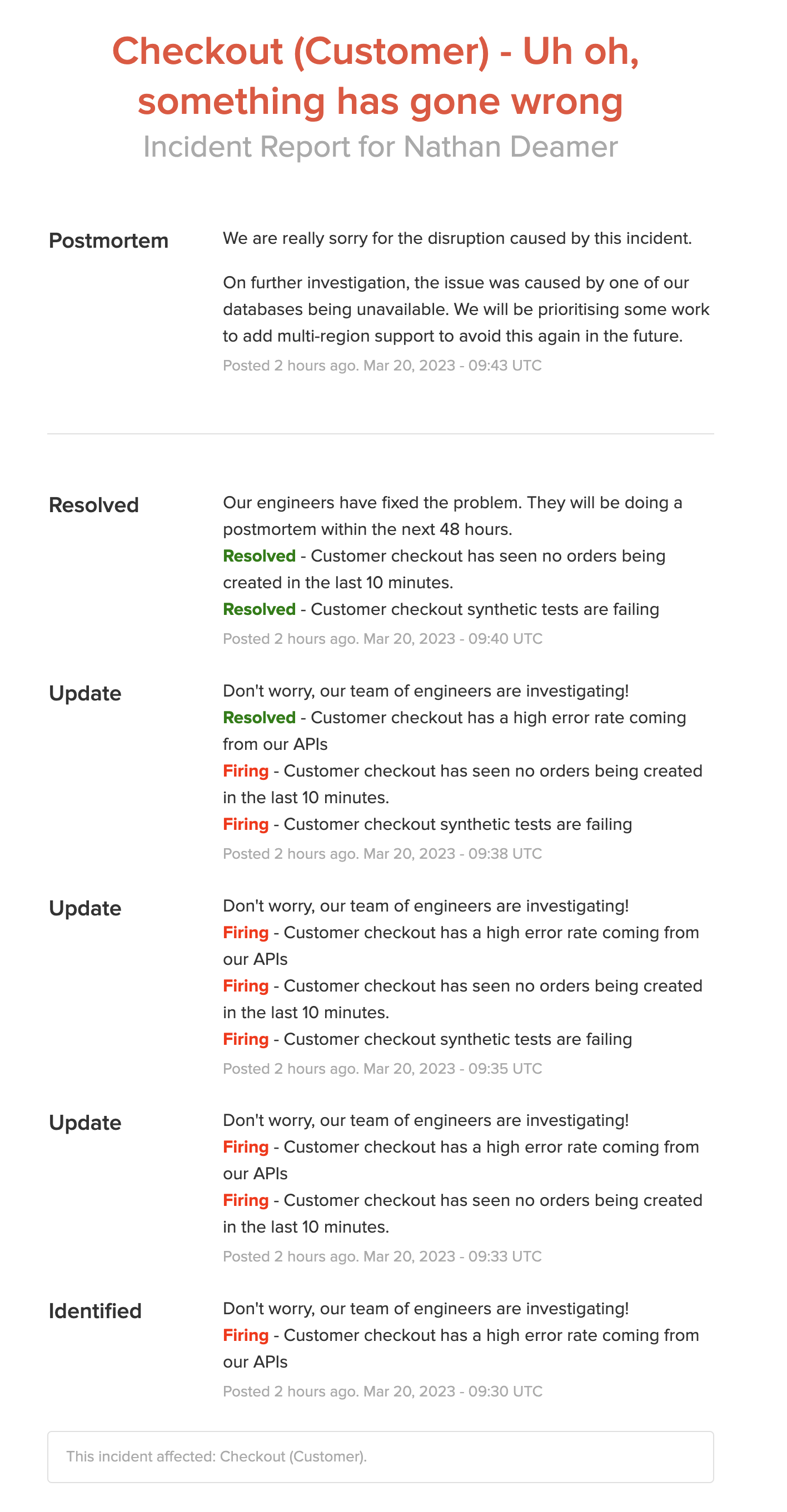
When an alert is triggered for the group, prometheus-alerts-to-statuspage will either create a new incident or update an existing incident depending if there is already one open.
Only when all alerts have stopped firing for the group in prometheus will the alert be marked as resolved on pager duty.
Example
- Team 1 alert fired (P1-Team1-Checkout-Customer-Alert1) and an incident was created.
- Team 2 alert fired 3 minutes after for the same grouping (P1-Team2-Checkout-Customer-Alert1) and the existing incident was updated to include the new firing alert
- Team 2 alert was resolved 3 minutes after and the existing incident was updated to show that this alert was now resolved, but incident is still open as there are still firing alerts
- Team 1 alert was resolved 3 minutes after and the existing incident was resolved as both alerts were now resolved
- The team did a post mortem
Tag summary
Content type
Helm
Digest
sha256:fa10a9aab…
Size
4.3 kB
Last updated
about 3 years ago
helm pull oci://registry-1.docker.io/nathandeamer/prometheus-alerts-to-statuspage --version 0.1.37