lfedge/edge-home-orchestration-go
2.6K
lfedge/edge-home-orchestration-go repository overview
Edge Orchestration






Introduction
The main purpose of Edge Orchestration project is to implement distributed computing between Docker Container enabled devices.
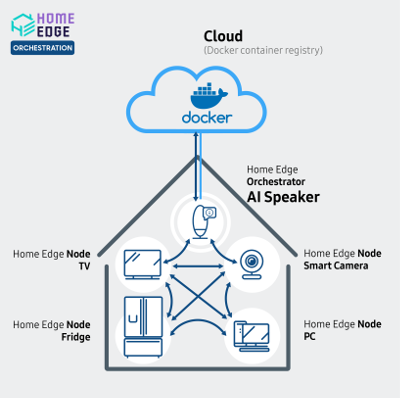
All the devices (TVs, fridges, washing machines, etc.) connected into Home Edge Network are considered Home Edge Devices. Some of the devices, possessing significant H/W resources and capable of running containerized applications, are called Home Edge Nodes. Tasks performed on devices of Home Edge Network are managed by Home Edge Orchestrator software. These tasks are called Home Edge Applications. They are assigned to specific Home Edge Nodes. As of now, Home Edge Orchestrator incessantly scans the Home Edge Network, forming lists of attached devices, and forms ratings of performance for them. Performance ratings are basis for deciding on which devices Home Edge Applications are to be run. If Home Edge Orchestrator cannot find device with rating higher than its own device rating, it will start the Home Edge Application locally. Home Edge Networks support distributed applications consisting of interacting Docker container instances. Docker containers offer quick deployment, easy management, safety and hardware independence. Applications that can run on Home Edge Network are deployed from cloud-based centralized storage as needed. Assortment of applications is determined by tasks that must be solved by Home Edge Network.
Quick start of the Edge Orchestration
Prerequisites
- At least one device (see Platforms supported) that can be a Home Edge Device (preferably more than one)
- Same network connected among the Home Edge Devices.
- Same Authentication key in /var/edge-orchestration/user/orchestration_userID.txt
The Edge Orchestration workflow is as follows:
- Run the Edge Orchestration container at Home Edge Nodes.
- Home Edge Device generates and sends a Service Execution request via the REST API to a host machine (currently itself).
- Then the host machine becomes an Home Edge Orchestrator.
- Other Home Edge Nodes receive the Service Execution request from Home Edge Orchestrator via REST API.
- The Home Edge Node gets and compares the scores from the other Home Edge Nodes.
- The Service Execution on the Home Edge Node that has the highest score.
Home Edge Orchestrator also gets and compares scores and if it has the highest score, the service is executed on Home Edge Orchestrator.
How to Run
This section provides how to download and run pre-built Docker image without building the project.
1. Install docker-ce
- docker-ce
- Version: 17.09 (or above)
- How to install
2. Download Docker image from Docker Hub
To download the image, you must execute the command: docker pull lfedge/edge-home-orchestration-go:{tag}, where {tag} is a release name.
docker pull lfedge/edge-home-orchestration-go:latest
If it succeeds, you can see the Docker image as follows:
docker images

REPOSITORY                            TAG           IMAGE ID            CREATED             SIZE
lfedge/edge-home-orchestration-go     latest        6669fd8eac0f        6 hours ago         190MB
3. Run with Docker image
docker run -it -d --privileged --network="host" --name edge-orchestration -v /var/edge-orchestration/:/var/edge-orchestration/:rw -v /var/run/docker.sock:/var/run/docker.sock:rw -v /proc/:/process/:ro lfedge/edge-home-orchestration-go:latest
4. Request to execute a service
RESTAPI
-
POST
-
IP:56001/api/v1/orchestration/services
-
BODY :
{ "ServiceName": "hello-world", "ServiceInfo": [ { "ExecutionType": "container", "ExecCmd": [ "docker", "run", "-v", "/var/run:/var/run:rw", "hello-world" ] }], "StatusCallbackURI": "http://localhost:8888/api/v1/services/notification" } -
Curl Example:
curl -X POST "IP:56001/api/v1/orchestration/services" -H "accept: application/json" -H "Content-Type: application/json" -d "{ \"ServiceName\": \"hello-world\", \"ServiceInfo\": [{ \"ExecutionType\": \"container\", \"ExecCmd\": [ \"docker\", \"run\", \"-v\", \"/var/run:/var/run:rw\", \"hello-world\"]}], \"StatusCallbackURI\": \"http://localhost:8888/api/v1/services/notification\"}" -
Result(Execution on itself)
docker logs -f edge-orchestration2019/06/07 05:41:03 externalhandler.go:75: [RestExternalInterface] APIV1RequestServicePost 2019/06/07 05:41:03 orchestration_api.go:70: [RequestService] container_service: [docker run -v /var/run:/var/run:rw hello-world] 2019/06/07 05:41:03 scoringmgr.go:131: [IN] getScoreLocalEnv 2019/06/07 05:41:03 scoringmgr.go:139: scoringmgr scoreValue : 7.481732534124991 2019/06/07 05:41:03 orchestration_api.go:90: [orchestrationapi] [{192.168.1.37 7.481732534124991}] 2019/06/07 05:41:03 route.go:87: POST /api/v1/orchestration/services APIV1RequestServicePost 272.182µs 2019/06/07 05:41:03 containerexecutor.go:75: [containerexecutor] container_service [docker run -v /var/run:/var/run:rw hello-world] 2019/06/07 05:41:03 containerexecutor.go:76: [containerexecutor] parameter length : 5 2019/06/07 06:46:12 route.go:87: POST /api/v1/orchestration/services APIV1RequestServicePost 396.063µs {"status":"Pulling from library/hello-world","id":"latest"} {"status":"Digest: sha256:0e11c388b664df8a27a901dce21eb89f11d8292f7fca1b3e3c4321bf7897bffe"} {"status":"Status: Image is up to date for hello-world:latest"} 2019/06/07 05:41:21 containerexecutor.go:90: [containerexecutor] create container : bb8c3425ec 2019/06/07 05:41:22 containerexecutor.go:108: [containerexecutor] container execution status : 0 2019-06-07T05:41:22.144893108Z 2019-06-07T05:45:35.717107646Z Hello from Docker! 2019-06-07T05:45:35.717110637Z This message shows that your installation appears to be working correctly. 2019-06-07T05:45:35.717112612Z 2019-06-07T05:45:35.717114418Z To generate this message, Docker took the following steps: 2019-06-07T05:45:35.717116284Z 1. The Docker client contacted the Docker daemon. 2019-06-07T05:45:35.717118076Z 2. The Docker daemon pulled the "hello-world" image from the Docker Hub. 2019-06-07T05:45:35.717120060Z (amd64) 2019-06-07T05:45:35.717121906Z 3. The Docker daemon created a new container from that image which runs the 2019-06-07T05:45:35.717123788Z executable that produces the output you are currently reading. 2019-06-07T05:45:35.717125570Z 4. The Docker daemon streamed that output to the Docker client, which sent it 2019-06-07T05:45:35.717127407Z to your terminal. 2019-06-07T05:45:35.717129190Z 2019-06-07T05:45:35.717130971Z To try something more ambitious, you can run an Ubuntu container with: 2019-06-07T05:45:35.717132780Z $ docker run -it ubuntu bash 2019-06-07T05:45:35.717134548Z 2019-06-07T05:45:35.717136249Z Share images, automate workflows, and more with a free Docker ID: 2019-06-07T05:45:35.717138053Z https://hub.docker.com/ 2019-06-07T05:45:35.717139826Z 2019-06-07T05:45:35.717141538Z For more examples and ideas, visit: 2019-06-07T05:45:35.717143307Z https://docs.docker.com/get-started/ 2019-06-07T05:45:35.717145081Z 2019/06/07 05:41:22 orchestration_api.go:163: [orchestrationapi] service status changed [appNames:container_service][status:Finished] -
Not supported docker run option [Args in Body]
--detach-keys
--disable-content-trust
--sig-proxy
--name
--platform
--help
--cpu-percent       (Windows only option)
--cpu-count         (Windows only option)
--io-maxbandwidth   (Windows only option)
--io-maxiops        (Windows only option)
Visit our website to learn more:
Home Page : https://www.lfedge.org/projects/homeedge
Github : https://github.com/lf-edge/edge-home-orchestration-go
Wiki : https://wiki.lfedge.org/display/HOME/Home+Edge+Project
License
The Edge Orchestration source code is distributed under the Apache License, Version 2.0open source license
Tag summary
Content type
Image
Digest
sha256:03c4f26b0…
Size
66.6 MB
Last updated
almost 4 years ago
docker pull lfedge/edge-home-orchestration-goThis week's pulls
Pulls:
265
Last week