kasmweb/redirector
932
kasmweb/redirector repository overview
Overview
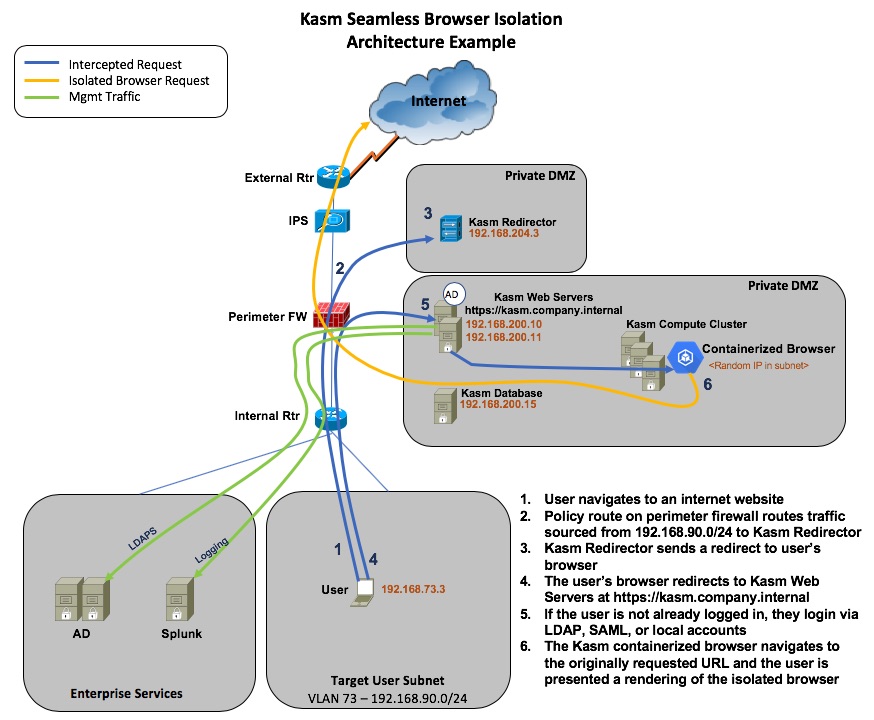
The Kasm redirector provides seamless browser isolation. When the user opens their local browser and navigates to any arbitrary website on the internet, the user is redirected to the on-premise or cloud SaaS Kasm installation where the isolated browser navigates to the originally requested URL. The user experiences a seamless transition.
The following diagram will be used throughout the documentation as an example for configuration.
Routing
Traffic must be routed to the Kasm Redirector. The diagram above uses policy routing, which is highly recommended. Policy routing allows you to select specific source traffic and send it to a different destination then specified by your layer 3 routes. In this example you would create a policy route for traffic sourced from 192.168.90.0/24 (Clients) going to any destination over port 80 or 443 and route it to 192.168.204.3 (Kasm Redirector). See your router or firewall documentation on how to implement policy routes. For policy routes to work, the Kasm Redirector must be on a subnet defined on the firewall/router that you are configuring the policy route on.
Kasm Redirector Installation
The instructions provided are for Ubuntu 16.0.4LTS but can be adapted for most Linux distros. Prerequisites are docker-ce and docker-compose.
 sudo sysctl -w net.ipv4.ip_forward=1
 sudo sed -i 's$#net.ipv4.ip_forward=1$net.ipv4.ip_forward=1$' /etc/sysctl.conf
 sudo iptables -t nat -A PREROUTING -p tcp -m tcp --dport 80 -j DNAT --to-destination 192.168.204.3:80 -s 192.168.0.0/24
 sudo iptables -t nat -A PREROUTING -p tcp -m tcp --dport 443 -j DNAT --to-destination 192.168.204.3:443 -s 192.168.0.0/24
 mkdir /opt/kasm_redirector
The two iptables commands will intercept traffic on ports 80 and 443 respectively and send it to itself where the proxy will intercept it. Replace 192.168.204.3 with the ip address of your Kasm Redirector and replace 192.168.90.0/24 with the subnet of your clients you want to send through Kasm. This should match your policy routes on your firewall/router.
Create the file /opt/kasm_redirector/docker-compose.yaml with the following contents.
 version: '3'
 services:
   redirector:
     image: kasmweb/redirector:latest
     volumes:
       - /opt/kasm_redirector/certs/:/usr/local/openresty/nginx/certs/
       - /opt/kasm_redirector/private/:/usr/local/openresty/nginx/private/
       - /opt/kasm_redirector/routing/:/usr/local/openresty/nginx/conf/sites/routing/
     ports:
       - "443:443"
       - "80:80"
     restart: always
     environment:
       KASM_URL: "https://kasm.company.internal"
       PROXY_RESOLVER: "8.8.4.4"
Replace the KASM_URL value with the url of your own installation. Replace the resolver IP address with a DNS server that the Kasm Redirector has access to.
 cd /opt/kasm_redirector
 sudo docker-compose up -d
Changes to the docker-compose.yaml file will require you to stop and remove the running container.
 cd /opt/kasm_redirector
 sudo docker-compose stop
 sudo docker-compose rm
 sudo docker-compose up -d
Tag summary
Content type
Image
Digest
Size
125.8 MB
Last updated
about 7 years ago
docker pull kasmweb/redirector:1.0.0This week's pulls
Pulls:
5
Last week