intel/flexran_l1_spree
10K+
intel/flexran_l1_spree repository overview
1. FlexRAN™ software reference stack
Intel® provides a vRAN reference architecture in the form of the FlexRAN™ software reference stack, which demonstrates how to optimize VDU software implementations using Intel® C++ class libraries,leveraging the Intel® Advanced Vector Extensions 512 (Intel® AVX-512) instruction set. The multi-threaded design allows a single VDU software implementation to scale to meet the requirements of multiple deployment scenarios, scaling from single small cells deployments, optimized D-RAN deployments or servicing large number of 5G cells in C-RAN pooled deployments.As a SW implementation, it is also capable of supporting LTE, 5G narrow band and 5G massive MIMO deployments all from the same SW stack using the O-RAN 7.2x split. The FlexRAN™ software reference solution framework by Intel® is shown in below diagram:
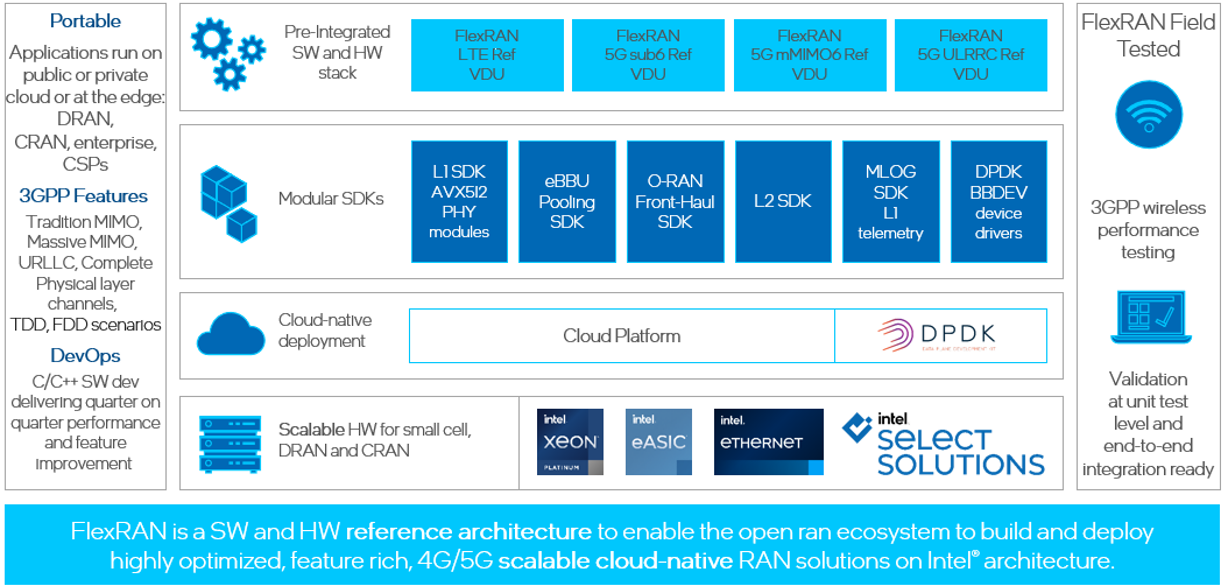
2. FlexRAN™ containerd image
Since 2022, Intel® FlexRAN team is publishing docker image to docker hub. From 2024, will publish container image. The purpose is to make more and more potential users can easily enter the door and play the game. The containerd image include only binaries, runtime dependency libraries, configure files and several typical cases. If downloader had already been a NDA customer of Intel®, They can get corresponding source code, more test cases and supports from Intel® FlexRAN team. If you are new entry users and just want to do a quick try, please follow below guides. if you have further intention, please contact Intel® FlexRAN Marketing team.
3. User Guide
3.1. HW list
| Category | Details |
|---|---|
| CPU | 4th Generation Intel® Xeon® Scalable Processor with vRAN Boost MCC 32 cores |
| Memory | 16*16GB DDR5 |
| Storage | 2TB INTEL® SSDPE2KX020T8 |
| NIC1 | Intel® Corporation I350(LoM to CPU-0) |
| NIC2 | Intel® Corporation Ethernet Controller E810-C for SFP |
| Baseband dev | vRAN Boost embeded in SPR-EE CPU Optional, use software mode only if not present |
3.2. SW list
| Category | Components | Details |
|---|---|---|
| Firmware | IFWI | Includes BIOS, BMC, ME as well as FRUSDR. |
| E810 | 4.50 0x8001d8b5 1.3597.0 | |
| OS | Ubuntu 24.04 | Ubuntu Server 24.04 Realtime kernel 6.8.1-1002 |
| Drivers | E810 | ice 1.14.11 |
| Cloudnative | Kubespray | 2.25.0 |
| kubernetes | 1.28.8 | |
| Container runtime | Containerd 1.7.16 | |
| DPDK | DPDK release | dpdk-23.11 |
3.3. Prequisition
3.3.1. RT kernel configuration
Ubuntu realtime kernel is available: https://ubuntu.com/realtime-kernel
Install TuneD:
$ apt install tuned
$ vim /etc/grub.d/00_tuned
Add following line to the end of this file
echo "export tuned_params"
Edit /etc/tuned/realtime-variables.conf to add isolated_cores=1-30, 33-62:
isolated_cores=1-30,33-62
Edit /usr/lib/tuned/realtime/tuned.conf to add add nohz, nohz_full and rcu_nocbs:
cmdline_realtime=+isolcpus=${managed_irq}${isolated_cores} nohz=on nohz_full=${isolated_cores} rcu_nocb_poll rcu_nocbs=${isolated_cores} nosoftlockup tsc=nowatchdog
Activate Real-Time Profile:
$ tuned-adm profile realtime
Modify /etc/default/grub
GRUB_CMDLINE_LINUX="intel_iommu=on iommu=pt vfio_pci.enable_sriov=1 vfio_pci.disable_idle_d3=1 usbcore.autosuspend=-1 selinux=0 enforcing=0 nmi_watchdog=0 crashkernel=auto softlockup_panic=0 audit=0 mce=off hugepagesz=1G hugepages=50 hugepagesz=2M hugepages=0 default_hugepagesz=1G irqaffinity=0,31,32,63" GRUB_CMDLINE_LINUX_DEFAULT="$tuned_params" GRUB_INITRD_OVERLAY="${GRUB_INITRD_OVERLAY:+$GRUB_INITRD_OVERLAY }$tuned_initrd"
$ sudo update-grub
$ sudo reboot
After configuration ,check the kernel parameter, which should look like:
$ cat /proc/cmdline
BOOT_IMAGE=/vmlinuz-6.8.1-1002-realtime root=/dev/mapper/ubuntu--vg-ubuntu--lv ro intel_iommu=on iommu=pt vfio_pci.enable_sriov=1 vfio_pci.disable_idle_d3=1 usbcore.autosuspend=-1 selinux=0 enforcing=0 nmi_watchdog=0 crashkernel=auto softlockup_panic=0 audit=0 tsc=nowatchdog mce=off hugepagesz=1G hugepages=50 hugepagesz=2M hugepages=0 default_hugepagesz=1G irqaffinity=0,31,32,63 skew_tick=1 isolcpus=managed_irq,domain,1-30,33-62 nohz=on nohz_full=1-30,33-62 rcu_nocb_poll rcu_nocbs=1-30,33-62 nosoftlockup rcupdate.rcu_normal_after_boot=1
3.3.2. Configure the CPU Frequency and cstate
Further improve the deterministic and power efficiency
$ cpupower frequency-set -g performance
Set cpu core frequency to 2.5Ghz
$ cpupower frequency-set -d 2500000 -u 2500000
3.3.3. Kubernetes and container installation
Make sure specific version of kubernetes and containerd and docker had been installed.
Configure Containerd to support root-less container device access
$ vim /etc/containerd/config.toml
[plugins]
[plugins."io.containerd.grpc.v1.cri"]
device_ownership_from_security_context = true

$ systemctl restart containerd.service
3.3.4. Kubernetes plugins installation
Except for kubernetes and container, below plugin is required (install from master):
- calico:
- follow calico instruction on offical website - http://docs.projectcalico.org
-SRIOV FEC operator (optional) -follow FEC operator on offical website -https://github.com/smart-edge-open/sriov-fec-operator
after SRIOV FEC operator deployed, display plugins as below
{ "intel.com/intel_fec_5g": "0", "intel.com/intel_fec_acc200": "1", }
- SRIOV (cni and network device plugin):
-
follow SRIOV instruction on SRIOV GitHub - https://github.com/k8snetworkplumbingwg/sriov-network-device-plugin.
-
SRIOV DP configuration
below is an example to cofigure SRIOV DP configure map, including FEC, DU and ORU needed resources. customer can configure according to the actual requirment.$ cd sriov-network-device-plugin $ cat <<EOF > deployments/configMap.yaml apiVersion: v1 kind: ConfigMap metadata: name: sriovdp-config namespace: kube-system data: config.json: | { "resourceList": [ { "resourceName": "intel_fec_5g", "deviceType": "accelerator", "selectors": { "vendors": ["8086"], "devices": ["57c1"] } }, { "resourceName": "intel_sriov_odu", "selectors": { "vendors": ["8086"], "devices": ["1889"], "drivers": ["vfio-pci"], "pfNames": ["ens9f1"] } }, { "resourceName": "intel_sriov_oru", "selectors": { "vendors": ["8086"], "devices": ["1889"], "drivers": ["vfio-pci"], "pfNames": ["ens9f0"] } } ] } EOF $ kubectl create -f deployments/configMap.yaml $ kubectl create -f deployments/sriovdp-daemonset.yaml
-
3.4. Prepare env
3.4.1. DPDK pakage
Download DPDK
$ cd /opt/
$ wget http://static.dpdk.org/rel/dpdk-23.11.tar.xz
$ tar xf /opt/dpdk-23.11.tar.xz
Configure FEC and FVL SRIOV (example as below)
$ RTE_SDK=/opt/dpdk-23.11
$ modprobe vfio-pci enable_sriov=1 disable_idle_d3=1
$ echo 1 | sudo tee /sys/module/vfio_pci/parameters/enable_sriov
$ echo 1 | tee /sys/module/vfio_pci/parameters/disable_idle_d3
$ $RTE_SDK/usertools/dpdk-devbind.py -b vfio-pci f7:00.0
$ export UUID=00112233-4455-6677-8899-aabbccddeeff
$ echo 1 > /sys/bus/pci/devices/0000:f7:00.0/sriov_numvfs
$ $RTE_SDK/usertools/dpdk-devbind.py -b vfio-pci 0000:f7:00.1
$ git clone https://github.com/intel/pf-bb-config.git
$ cd ./pf-bb-config
$ ./pf_bb_config VRB2 -v $UUID -c vrb2/vrb2_config_vf.cfg

$ echo 4 > /sys/bus/pci/devices/0000:4b:00.0/sriov_numvfs
$ ip link set ens9f0 vf 0 mac 00:11:22:33:00:00
$ ip link set ens9f0 vf 1 mac 00:11:22:33:00:10
$ ip link set ens9f0 vf 2 mac 00:11:22:33:00:20
$ ip link set ens9f0 vf 3 mac 00:11:22:33:00:30
$ $RTE_SDK/usertools/dpdk-devbind.py -b vfio-pci 0000:4b:02.0 0000:4b:02.1
$ $RTE_SDK/usertools/dpdk-devbind.py -b vfio-pci 0000:4b:02.2 0000:4b:02.3

$ echo 4 > /sys/bus/pci/devices/0000:4b:00.1/sriov_numvfs
$ ip link set ens9f1 vf 2 mac 00:11:22:33:00:21
$ ip link set ens9f1 vf 3 mac 00:11:22:33:00:31
$ ip link set ens9f1 vf 0 mac 00:11:22:33:00:01
$ ip link set ens9f1 vf 1 mac 00:11:22:33:00:11
$ $RTE_SDK/usertools/dpdk-devbind.py -b vfio-pci 0000:4b:0a.0 0000:4b:0a.1
$ $RTE_SDK/usertools/dpdk-devbind.py -b vfio-pci 0000:4b:0a.2 0000:4b:0a.3
$ $RTE_SDK/usertools/dpdk-devbind.py -s
After configuration, need to restart SRIOV docker container to make VF resource ready.
$ cat <<EOF > /opt/restart_sriov_container.sh
  #!/bin/bash

  docker ps | grep sriov
  docker kill `docker ps | grep sriov | head -n 1 | awk -F ' ' '{print $1}'`
  while ((`docker ps | grep sriov | wc -l` < 2 ))
  do
     sleep 3
     docker ps | grep sriov >/dev/null 2>&1
     echo "..."
  done
EOF
$chmod +x /opt/restart_sriov_container.sh; sh /opt/restart_sriov_container.sh
After restart sriov container, the resources can be seen thru below command:
$ sudo apt install jq
$ kubectl get node node-name -o json | jq '.status.allocatable'
{

  "intel.com/intel_fec_5g": "1",
  "intel.com/intel_sriov_odu": "4",
  "intel.com/intel_sriov_oru": "4",

}
label node
$ kubectl label node host_name testnode=worker1
3.5. container image prepare
$ docker pull intel/flexran_l1_spree:v24.07
$ docker save intel/flexran_l1_spree:v24.07 > flexran_image_24.03.tar
$ ctr -n k8s.io image import flexran_image_24.07.tar
3.6. Example yaml file for flexran timer mode test and xran mode test
below gives the diagram of the deployment for flexran timer mode and xRAN mode. based on that, following chapters give the example yaml file for deployment.
3.6.1. Example yaml file for flexran timer mode test
Support SRIOV FEC operator or use pf-bb-config to configure FEC device, below is an example of using SRIOV FEC opertor.
$ cat <<EOF > /opt/flexran_phycfg_timer.yaml
apiVersion: v1
kind: ConfigMap
metadata:
   name: flexran-configmap-timer
data:
   ENABLE_AUTO_CONFIG: "TRUE"
   ENABLE_CORE_ASSIGN: "FALSE"
   FEC_SRIOV_INFO_NAME: "PCIDEVICE_INTEL_COM_INTEL_FEC_ACC200_INFO"
   FEC_VF_TOKEN: "02bddbbf-bbb0-4d79-886b-91bad3fbb510"
   flexranPhyCfg: |
      {
         "DPDK": {
         "dpdkIovaMode": 1,
         "dpdkBasebandFecMode": 1
         }
      }
EOF
if you use pf-bb-configure then can modify below parameters in flexran_phycfg_timer.yaml and change "intel_fec_acc200" to "intel_fec_5g" in flexran_phycfg_timer.yaml
FEC_SRIOV_INFO_NAME: "PCIDEVICE_INTEL_COM_INTEL_FEC_5G_INFO" FEC_VF_TOKEN: "00112233-4455-6677-8899-aabbccddeeff"
$ kubectl apply -f flexran_phycfg_timer.yaml
$ cat <<EOF > /opt/flexran_timer_mode.yaml
apiVersion: v1
kind: Pod
metadata:
  labels:
    app: flexran-binary-release
  name: flexran-binary-release
spec:
  securityContext:
    fsGroup: 1250
  nodeSelector:
     testnode: worker1
  containers:
  - securityContext:
      runAsNonRoot: true
      runAsUser: 1250
      capabilities:
        add:
          - IPC_LOCK
          - SYS_NICE
          - DAC_READ_SEARCH
    command: [ "/bin/bash", "-c", "--"]
    args: ["sleep infinity"]
    tty: true
    stdin: true
    env:
    - name: LD_LIBRARY_PATH
      value: /opt/oneapi/lib/intel64
    envFrom:
    - configMapRef:
        name: flexran-configmap-timer
    image: docker.io/intel/flexran_l1_spree:v24.07
    imagePullPolicy: IfNotPresent
    name: flexran-du
    resources:
      requests:
        memory: "44Gi"
        intel.com/intel_fec_acc200: '1'
        hugepages-1Gi: 30Gi
      limits:
        memory: "44Gi"
        intel.com/intel_fec_acc200: '1'
        hugepages-1Gi: 30Gi
    volumeMounts:
    - name: hugepage
      mountPath: /hugepages
      readOnly: false
    - name: varrun
      mountPath: /tmp/dpdk
      readOnly: false
      readOnly: false
  volumes:
  - name: hugepage
    emptyDir:
      medium: HugePages
  - name: varrun
    emptyDir: {}
EOF

$ kubectl apply -f /opt/flexran_timer_mode.yaml
customer can choose test cases according to server platform, below is an example of test on SPR-MCC
In the first terminal, run the following command:
$ kubectl exec -it flexran-binary-release -- bash
$ cd flexran/bin/nr5g/gnb/l1/
$ ./l1.sh -e

In the second terminal, run the following command or other mcc cases in the same path

$ kubectl exec -it flexran-binary-release -- bash
$ cd flexran/bin/nr5g/gnb/testmac
$ ./l2.sh --testfile=spr-sp-mcc/sprsp_mcc_mu0_10mhz_4x4_hton.cfg
3.6.2. Example yaml file for xran mode test
xRAN mode scenario will involve two hosts, DU host and RU host.
For DU setup, need intel_fec_5g/intel_fec_acc200 and intel_sriov_odu resources,customer can use flexran_phycfg_xran_du.yaml file to configure DU parameters aotumatically, also support set "ENABLE_AUTO_CONFIG" to FALSE manually configure DU paramters.
$ cat <<EOF > /opt/flexran_phycfg_xran_du.yaml
apiVersion: v1
kind: ConfigMap
metadata:
   name: flexran-configmap-du
data:
   ENABLE_AUTO_CONFIG: "TRUE"
   ENABLE_CORE_ASSIGN: "FALSE"
   FEC_SRIOV_INFO_NAME: "PCIDEVICE_INTEL_COM_INTEL_FEC_ACC200_INFO"
   FEC_VF_TOKEN: "02bddbbf-bbb0-4d79-886b-91bad3fbb510"
   sriovMappingTable: |
    {
      "DU_Local_PCI_01": {
        "peerMAC": "00:11:22:33:00:01",
        "tag": "fronthaul_du",
        "index": "0"
      },
      "<DU_Local_PCI_02": {
        "peerMAC": "00:11:22:33:00:11",
        "tag": "fronthaul_du",
        "index": "1"
      },
      "<DU_Local_PCI_03": {
        "peerMAC": "00:11:22:33:00:21",
        "tag": "fronthaul_du",
        "index": "2"
      },
      "<DU_Local_PCI_04": {
        "peerMAC": "00:11:22:33:00:31",
        "tag": "fronthaul_du",
        "index": "3"
      }
    }
   flexranPhyCfg: |
      {
         "DPDK": {
         "dpdkIovaMode": 1,
         "dpdkBasebandFecMode": 1
         }
      }
EOF

$ kubectl create -f /opt/flexran_phycfg_xran_du.yaml

$ cat <<EOF > /opt/flexran_xran_mode_du.yaml
apiVersion: v1
kind: Pod
metadata:
  labels:
    app: flexran-vdu
  name: flexran-vdu
spec:
  securityContext:
     fsGroup: 1250
  nodeSelector:
     testnode: worker1
  containers:
  - securityContext:
      runAsNonRoot: true
      runAsUser: 1250
      capabilities:
        add:
          - IPC_LOCK
          - SYS_NICE
          - DAC_READ_SEARCH
    command: [ "/bin/bash", "-c", "--" ]
    args: ["sleep infinity"]
    tty: true
    stdin: true
    env:
    - name: LD_LIBRARY_PATH
      value: /opt/oneapi/lib/intel64
    envFrom:
    - configMapRef:
        name: flexran-configmap-du
    image: docker.io/intel/flexran_l1_spree:v24.07
    name: flexran-vdu
    resources:
      requests:
        memory: "32Gi"
        intel.com/intel_fec_acc200: '1'
        intel.com/intel_sriov_odu: '4'
        hugepages-1Gi: 40Gi
      limits:
        memory: "32Gi"
        intel.com/intel_fec_acc200: '1'
        intel.com/intel_sriov_odu: '4'
        hugepages-1Gi: 40Gi
    volumeMounts:
    - name: hugepage
      mountPath: /hugepages
    - name: varrun
      mountPath: /var/run/dpdk
      readOnly: false
  volumes:
  - name: hugepage
    emptyDir:
      medium: HugePages
  - name: varrun
    emptyDir: {}
EOF

$ kubectl create -f /opt/flexran_xran_mode_du.yaml
For RU setup, for container setup need intel_sriov_oRu resources, here is an example for ORU deployment file
$ cat <<EOF > /opt/flexran_phycfg_xran_ru.yml
apiVersion: v1
kind: ConfigMap
metadata:
  name: flexran-configmap-ru
data:
  ENABLE_AUTO_CONFIG: "TRUE"
  ENABLE_CORE_ASSIGN: "FALSE"
  ORU_SRIOV_NAME: "PCIDEVICE_INTEL_COM_INTEL_SRIOV_ORU"
  sriovMappingTable: |
    {
      "RU_Local_PCI_01": {
        "peerMAC": "00:11:22:33:00:00",
        "tag": "fronthaul_ru",
        "index": "0"
      },
      "RU_Local_PCI_02": {
        "peerMAC": "00:11:22:33:00:10",
        "tag": "fronthaul_ru",
        "index": "1"
      },
      "RU_Local_PCI_03": {
        "peerMAC": "00:11:22:33:00:20",
        "tag": "fronthaul_ru",
        "index": "2"
      },
      "RU_Local_PCI_04": {
        "peerMAC": "00:11:22:33:00:30",
        "tag": "fronthaul_ru",
        "index": "3"
      }
    }
  flexranPhyCfg: |
    {
      "DPDK": {
        "dpdkIovaMode": 1,
        "dpdkBasebandFecMode": 1
      }
    }

$ cat <<EOF > /opt/flexran_xran_mode_ru.yaml
apiVersion: v1
kind: Pod
metadata:
  labels:
    app: flexran-oru
  name: flexran-oru
spec:
  securityContext:
    fsGroup: 1250
  nodeSelector:
     testnode: worker1
  containers:
  - securityContext:
      runAsNonRoot: true
      runAsUser: 1250
      capabilities:
        add:
          - IPC_LOCK
          - SYS_NICE
          - DAC_READ_SEARCH
    command: [ "/bin/bash", "-c", "--" ]
    args: ["sleep infinity"]
    tty: true
    stdin: true
    env:
    - name: LD_LIBRARY_PATH
      value: /opt/oneapi/lib/intel64
    image: flexran.docker.registry/flexran_vdu:24.07
    name: flexran-oru
    resources:
      requests:
        memory: "24Gi"
        intel.com/intel_sriov_oru: '4'
        hugepages-1Gi: 20Gi
      limits:
        memory: "24Gi"
        intel.com/intel_sriov_oru: '4'
        hugepages-1Gi: 20Gi
    volumeMounts:
    - name: hugepage
      mountPath: /hugepages
    - name: varrun
      mountPath: /tmp/dpdk
      readOnly: false
  volumes:
  - name: hugepage
    emptyDir:
      medium: HugePages
  - name: varrun
    emptyDir: {}
EOF

$ kubectl create -f /opt/flexran_phycfg_xran_ru.yml
$ kubectl create -f /opt/flexran_xran_mode_ru.yaml
Below are configuration of the fronthaul PCI addresses on RU side
$ vim FLEXRAN_SRC_RU_HOST/bin/nr5g/gnb/l1/spree_mcc/sub3_mu0_20mhz_4x4/oru/run_o_ru.cfg
#!/bin/bash
num_eth_vfs=1
vf_addr_o_xu_a=<RU_Local_PCI_01>
Update the fronthaul MAC addresses on DU side
$ vim $FLEXRAN_SRC_RU_HOST/bin/nr5g/gnb/l1/spree_mcc/sub3_mu0_20mhz_4x4/oru/usecase_ru.cfg
# remote O-XU 0 Eth Link 0
oXuRem0Mac0=00:11:22:33:00:00
oXuRem0Mac1=00:11:22:33:00:10
oXuRem1Mac0=00:11:22:33:00:20
oXuRem1Mac1=00:11:22:33:00:30
iovaMode=1
Below chapter give the steps to run xRAN mode test case: "sub3_mu0_20mhz_4x4"
Open a new terminal on DU side, run the following command:
$ kubectl exec -it pod-name -- bash
$ cd flexran/bin/nr5g/gnb/l1/spree_mcc/sub3_mu0_20mhz_4x4/gnb/
update the file phycfg_xran.xml for FEC address and token , xrancfg_sub6_oru.xml for vf-pci address if using manually configurations
$ ./l1.sh -oru
Open another new terminal, run the following command:
$ kubectl exec -it pod-name -- bash
$ cd flexran/bin/nr5g/gnb/testmac
$ ./l2.sh --testfile=../l1/spree_mcc/sub3_mu0_20mhz_4x4/gnb/testmac_spree_mu0_20mhz_hton_oru.cfg

# in RU part,run the following command in container as an example:
$ kubectl exec -it pod-name -- bash

$ cd ~/flexran/bin/nr5g/gnb/oru
$ ./run_o_ru.sh -r spree_mcc sub3_mu0_20mhz_4x4
You can run the same for other two test cases "sub3_mu0_10mhz_4x4" and "sub6_mu1_100mhz_4x4"
3.7. Core pining
Intel docker image also provide the support of core pining feature. In order to enable this feature, you need to make below configuration and change of yaml file.
3.7.1. Configuration
Enable core pining feature:
#!/bin/bash
pathfile=/etc/kubernetes/kubelet-config.yaml
sed -i 's/cpuManagerReconcilePeriod: 0s/cpuManagerReconcilePeriod: 10s/g' $pathfile

cat >> $pathfile << EOF
cpuManagerPolicy: static
systemReserved:
  cpu: 2000m
  memory: 2000Mi
kubeReserved:
  cpu: 1000m
  memory: 1000Mi
EOF
rm -rf /var/lib/kubelet/cpu_manager_state
systemctl restart kubelet
copy above code line to a file and execute:
$ sh core_pining_kubelet_config.sh
Disable core pining feature:
#!/bin/bash

pathfile=/etc/kubernetes/kubelet-config.yaml
#pathfile=config.yaml
sed -i 's/cpuManagerReconcilePeriod: 10s/cpuManagerReconcilePeriod: 0s/g' $pathfile

sed -i 's/cpuManagerPolicy: static/ /g' $pathfile
sed -i 's/systemReserved:/ /g' $pathfile
sed -i 's/cpu: 2000m/ /g' $pathfile
sed -i 's/memory: 2000Mi/ /g' $pathfile
sed -i 's/kubeReserved:/ /g' $pathfile
sed -i 's/cpu: 1000m/ /g' $pathfile
sed -i 's/memory: 1000Mi/ /g' $pathfile
rm -rf /var/lib/kubelet/cpu_manager_state
systemctl restart kubelet
copy above code line into a file and execute:
$ sh uncore_pining_kubelet_config.sh
3.7.2. Example yaml file for flexran timer mode test (with core pining)
Modify 3.6.1 /opt/flexran_phycfg_timer.yaml set ENABLE_CORE_ASSIGN to true.
$ cat <<EOF > /opt/flexran_phycfg_timer.yaml
...
data:
   ENABLE_CORE_ASSIGN: "TRUE"
...

$ cat <<EOF > /opt/flexran_timer_mode.yaml
......
    name: flexran-du
    resources:
      requests:
        cpu: 30
......
      limits:
        cpu: 30
......
EOF

$ kubectl create -f /opt/flexran_timer_mode.yaml
for timer mode, case procedure is the same as the one without core pining. configure the max required cores when hyper thread on to ensure high performance cases can pass.if customer needn't run high performance cases, can manually adjust cpu core count in yaml file according to case configurations.
3.7.3. Example yaml file for xran mode test (with core pining)
the same modification with timer mode.
3.8. Legal Disclaimer
For GPL/LGPL open source libs/components used by flexran docker image at run time. User can find the used version in below git hub repo: https://github.com/intel/flexRAN-docker-image-dependencies
3.9. Customer Support Declare
For further support, please contact Intel® flexRAN marketing team and FAE/PAE team and Engineering team.
Note:
Since 23.11 release, the same docker image is also validated by E2E test rather than only component test (timer mode and xRAN mode, described above) . If customer want to know detail on E2E test, please contact Intel® flexRAN marketing team and FAE/PAE team and Engineering team.
Tag summary
Content type
Image
Digest
sha256:d2e4d2e0c…
Size
1.9 GB
Last updated
11 months ago
docker pull intel/flexran_l1_spreeThis week's pulls
Pulls:
256
Last week