iblocker/kbac repository overview
KeePass Based Access Control
Upload your KeePass .kdbx database to kbac Docker container, and access your Passwords/PIN(s)/Secrets from smartphone, PC, tablet.
Optional, access could be restricted via iBlocker VPN.
Installation
services:
 kbac:
    image: iblocker/kbac:v2.0.2
    ports:
    - "8087:443"
    container_name: conkbac
    restart: always
    uts: host
    logging:
      options:
        max-size: "100m"
Open in browser http://localhost:8087
Note: v1.0.X is for amd64, v2.0.X is for arm
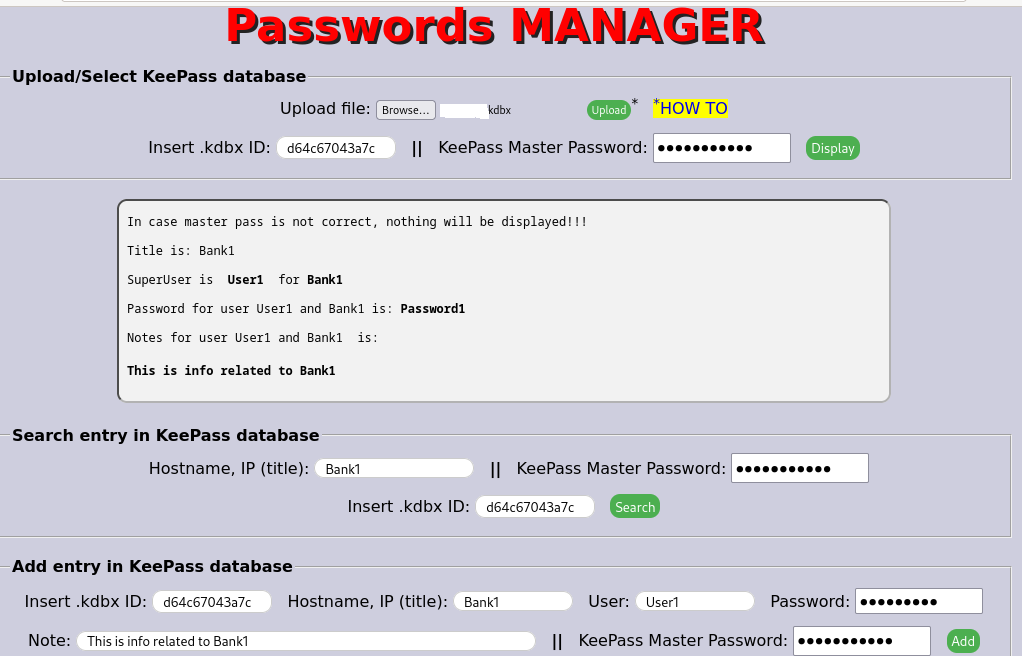
Then the user can upload his own .kdbx file, can add/delete/view his information.
Tag summary
Content type
Image
Digest
sha256:02608fdd2…
Size
102 MB
Last updated
4 months ago
docker pull iblocker/kbac:v2.0.2