guyneale/speedtest-monitor
Periodically runs configurable speed tests, WebUI with graphs, stores results in a database
795
guyneale/speedtest-monitor repository overview
Speedtest Monitor
A self-hosted, Docker-based application that periodically runs internet speed tests, stores the results in a database, and provides a clean web interface to visualize the data over time.

Addtional screenshots below
Features
- Automated Speed Tests: Uses a background
cronjob to run Ookla speed tests at user-configurable intervals. - Persistent Data Storage: All test results are stored in a SQLite database within a persistent Docker volume.
- Multi-Architecture Support: The public Docker image supports multiple CPU architectures, including
amd64(standard PCs) andarm64(Raspberry Pi, Apple Silicon). - Interactive Web Dashboard: A clean, responsive web UI built with Pico.css to visualize network performance.
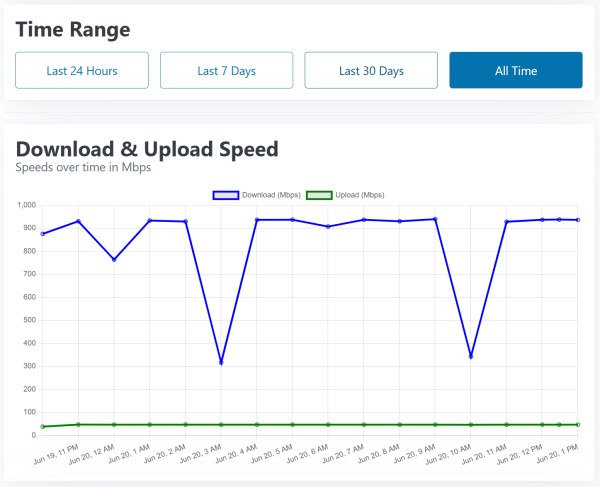
- Charts for Download, Upload, Ping, Jitter, and Packet Loss.
- Time-range filters to view data from the last 24 hours, 7 days, 30 days, or all time.
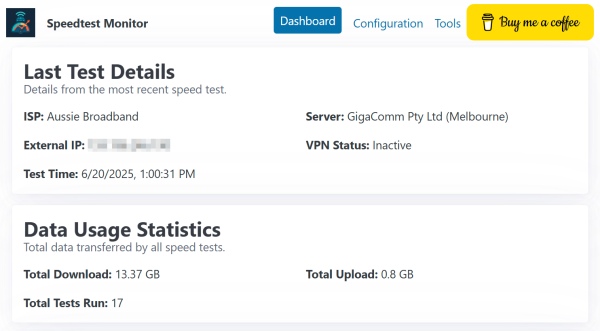
- "Last Test Details" and "Data Usage" summary cards.
- Comprehensive Configuration Page:
- Enable/disable and set the schedule for automated tests.
- Toggle combined or separate graphs for key metrics.
- Set a data retention policy (e.g., keep data for 7, 30, or 90 days).
- Manually delete all test history.
- Network Diagnostic Tools: Includes a page with
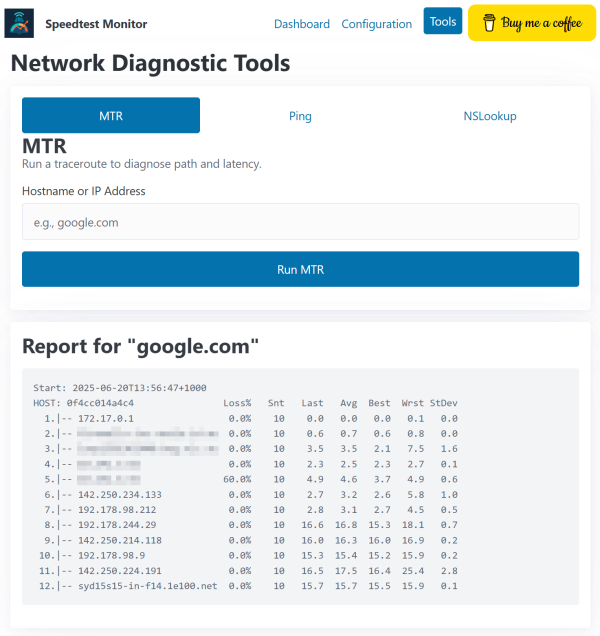
ping,nslookupand themtrutility to run network path analysis on demand.
How to Run
This application is designed to be run as a Docker container. You can pull the pre-built image directly from Docker Hub.
Prerequisites
- Docker installed on your system.
1. Create a Persistent Volume
You only need to run this command once. It creates a dedicated volume on your host machine to store the application's database and configuration.
docker volume create speedtest-data
2. Run the Container
This command will pull the latest image from Docker Hub and start the application.
Note on Ookla's Terms: By setting
-e ACCEPT_LICENSE=trueand-e ACCEPT_GDPR=true, you are acknowledging that you have read and accepted the Ookla End User License Agreement and Privacy Policy. The speed test will not run without these variables set totrue.
docker run -d \
  -p 5000:5000 \
  -v speedtest-data:/app/data \
  -e ACCEPT_LICENSE=true \
  -e ACCEPT_GDPR=true \
  --name speedtest-monitor \
  guyneale/speedtest-monitor:latest
Command Breakdown:
-d: Runs the container in detached mode (in the background).-p 5000:5000: Maps port 5000 on your host to port 5000 in the container.-v speedtest-data:/app/data: Attaches the persistent volume to store your test data.-e ACCEPT_LICENSE=true: Accepts the Ookla License terms.-e ACCEPT_GDPR=true: Accepts the Ookla GDPR terms.--name speedtest-monitor: Gives the container a convenient name.
Once running, you can access the web interface at http://<your-host-ip>:5000.
You can stop and start the container using its name:
# Stop the container
docker stop speedtest-monitor

# Start the container again
docker start speedtest-monitor
Web Interface
The application provides a simple web interface with three main pages.
Dashboard Page
The main page displays a series of cards and charts showing the latest test details and historical performance data. You can use the "Time Range" filter to view data from the last 24 hours, 7 days, 30 days, or all time.
Configuration Page
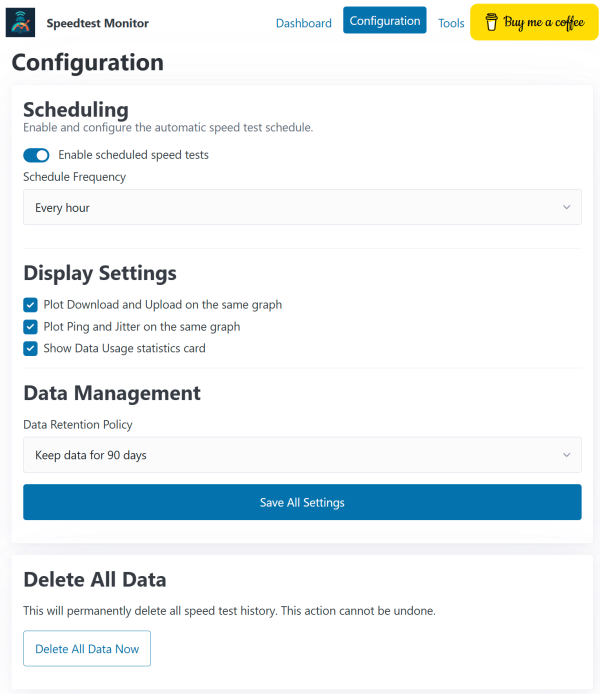
The configuration page allows you to customize the application's behaviour. The settings are divided into three sections:
- Scheduling: Enable or disable the automated speed tests and set the frequency, from every 30 minutes to once a day.
- Display Settings: Control how data is displayed on the dashboard. You can toggle combined graphs for speed/latency and show or hide summary cards.
- Data Management: Set an automated data retention policy to keep the database from growing too large. You can also permanently delete all test history from this section.
Tools Page
The tools page provides on-demand network diagnostic utilities. Enter a hostname or IP address to run a ping, nslookup, or mtr test. The results are displayed as a simple text report.
Generating Test Data
For comprehensive testing of the dashboard and data pruning features, you can use the built-in data generation script. This script must be run from inside the container.
1. Get a Shell Inside the Container
First, open an interactive shell in your running container:
docker exec -it speedtest-monitor /bin/sh
This will give you a command prompt that looks like /app #.
2. Run the Generator Script
From the container's shell, you can now run the generate_test_data.py script with different arguments.
Arguments:
--period: The total time period to generate data for. Choices:day,week,month,year.--interval: The interval in minutes between each data point.
Example Commands:
-
Generate data for the last 24 hours, with one test every 30 minutes:
python3 generate_test_data.py --period day --interval 30 -
Generate data for the last 7 days, with one test every 6 hours (360 minutes):
python3 generate_test_data.py --period week --interval 360 -
Generate data for the last 30 days, with one test every 12 hours (720 minutes):
python3 generate_test_data.py --period month --interval 720
After running the script, refresh the dashboard in your browser to see the newly generated data.
Acknowledgments
This project utilizes the official Speedtest CLI provided by Ookla® to perform internet connection speed tests.
Your use of the Speedtest CLI is subject to Ookla's terms and policies, which can be found here:
Screenshots
Dashboard


Configuration
Tools
Tag summary
Content type
Image
Digest
sha256:f666c03d2…
Size
29.5 MB
Last updated
about 1 year ago
docker pull guyneale/speedtest-monitor:test