eqalpha/keydb
KeyDB is a multithreaded open source key-value store that functions as a data structure server.
5M+
eqalpha/keydb repository overview



Quick Reference
- KeyDB Documentation and Learning Center
- KeyDB Community Forum
- View a copy of the Dockerfiles
- Open an Issue on github
- KeyDB Website
- Visit our Github Page
- Subscribe to the KeyDB mailing list
- helm chart for multi-master
Tags:
x86_64_vx.x.xis the x86 Ubuntu18.04 build based off the stated version releasearm64_vx.x.xis the Arm Ubuntu18.04 build based off the stated version releaselatesttag is a manifest and will pull either the ubuntu18.04 x86_64_vx.x.x or the ubuntu18.04 arm64_vx.x.x imagealpinedocker images are currently experimental, and KeyDB still requires a bit of work to fully support Alpine Buildsunstableis a nightly build of the unstable branch of KeyDB and only for ubuntu18.04 x86_64_vx.x.x
What is KeyDB?
KeyDB is a high performance alternative to Redis with a focus on multithreading, memory efficiency, and high throughput. In addition to multithreading, KeyDB also has features such as multi-master configuration, subkey expires, and cron. For additional features such as FLASH storage for large datasets, non-blocking queries, or just additional performance, check out KeyDB Cloud or KeyDB Enterprise.
Compatibility
KeyDB maintains full compatibility with the Redis protocol, modules, and scripts. This includes the atomicity guarantees for scripts and transactions. Because KeyDB keeps in sync with Redis development KeyDB is a superset of Redis functionality, making KeyDB a drop in replacement for existing Redis deployments.
On the same hardware KeyDB can achieve significantly higher throughput than Redis. Active-Replication simplifies hot-spare failover allowing you to easily distribute writes over replicas and use simple TCP based load balancing/failover. KeyDB's higher performance allows you to do more on less hardware which reduces operation costs and complexity.
The chart below compares several KeyDB and Redis setups, including the latest Redis6 io-threads option, and TLS benchmarks.
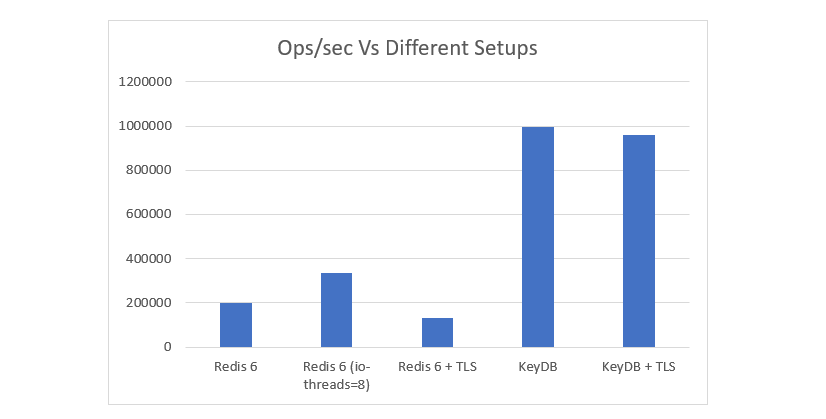
See the full benchmark results and setup information here: https://docs.keydb.dev/blog/2020/09/29/blog-post/
How to use this image
If you need a brushup on any of the docker commands you can check out dockers documentation here
Start a KeyDB instance
docker run --name some-keydb -d eqalpha/keydb
You can also run simply with docker run eqalpha/keydb. The above command simply specifies a name to the container and that it is 'detached' or runs in the background.
Pass configuration parameters to KeyDB on boot:
docker run -name some-keydb -d eqalpha/keydb keydb-server /etc/keydb/keydb.conf --server-threads 4 --requirepass password
Make sure you specify the program you are running (keydb-server) for which to modify the parameters for. Next specify the config parameter you would like to modify when starting the container with --parameter-name value.
You can see the full set of configuration options here
Bind port
If you want to bind the container to the node/machine so it is accessible externally pass the parameter -p 6379:6379
If you would like to use your own config file
$ docker run -v /path-to-config-file/keydb.conf:/etc/keydb/keydb.conf --name mykeydb -d eqalpha/keydb
If you are using your own config file remember to comment out "bind 127.0.0.1", change "protected-mode" from yes to no.
you can grab a copy of the default config file off our github page and modify as you see fit.
Symlinks
As requested by users for Redis compatibility, we have included symbolic links for both redis-cli and redis.conf so they are linked to keydb-cli and keydb.conf respectively.
Start with persistent storage
$ docker run --name some-keydb -d eqalpha/keydb keydb-server /etc/keydb/keydb.conf --appendonly yes
This enables data to be saved every second. Read up more about AOF configuration options here to modify persistence options further.
If persistence is enabled, data is stored in the VOLUME /data, which can be used with --volumes-from some-volume-container or -v /docker/host/dir:/data (see docs.docker volumes).
Connect to it from an application
$ docker run --name some-app --link some-keydb:eqalpha/keydb -d application-that-uses-keydb
Or connect via keydb-cli (also compantible with redis-cli)
you can grab the ip of the container with docker inspect --format '{{ .NetworkSettings.IPAddress }}' mycontainername then run the following:
docker run -it --rm eqalpha/keydb keydb-cli -h <ipaddress-from-above> -p 6379
alternatively you can link to it
$ docker run -it --link some-keydb:eqalpha/keydb --rm eqalpha/keydb keydb-cli -h keydb -p 6379
Keydb specific configuration options that differ from Redis
server-threads N
server-thread-affinity [true/false]
scratch-file-path /tmp/
multi-master yes
active-replica yes
Nightly build:
If you keep up to date with KeyDB and want to check out features in the making prior to an official release, you can pull with the unstable tags. This will grab the latest version (automatically updated daily at 4am Eastern). These tags are for x86-64 (amd-64) only.
Pull the latest image with docker pull eqalpha/keydb:unstable
Follow us
To keep up to date with KeyDB including product, feature & release updates, be sure to follow us on one of our channels below:
Tag summary
Content type
Image
Digest
sha256:7b04aa003…
Size
86.6 MB
Last updated
about 2 years ago
docker pull eqalpha/keydb:unstable