dyadin/windows-wordpress-php
1 of 3 images for wordpress demo app
10K+
dyadin/windows-wordpress-php repository overview
Why WordPress on windows container?
Well, it's purely experimental, if you can, why not ? Besides, there aren't many demo apps for windows container, especially for kubetnetes with windows container.
Topology
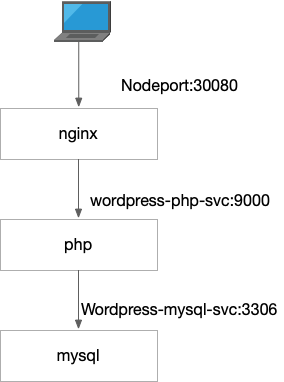
How to use
You can import the following YAML to your kubernetes cluster using kubectl apply -f YAMLFILENAME
apiVersion: v1
kind: Secret
metadata:
  name: mysql-pass
  namespace: wordpress
type: Opaque
stringData:
  password: Admin@12345
---
#application/wordpress/mysql-deployment.yaml
apiVersion: v1
kind: Namespace
metadata:
  name: wordpress
---
apiVersion: v1
kind: Service
metadata:
  name: wordpress-mysql-svc
  namespace: wordpress
  labels:
    app: wordpress
spec:
  ports:
    - port: 3306
      protocol: TCP
      targetPort: 3306
  selector:
    app: wordpress
    tier: mysql
  clusterIP: None
---
apiVersion: apps/v1
kind: Deployment
metadata:
  name: wordpress-mysql
  namespace: wordpress
  labels:
    app: wordpress
    tier: mysql
spec:
  selector:
    matchLabels:
      app: wordpress
      tier: mysql
  template:
    metadata:
      labels:
        app: wordpress
        tier: mysql
    spec:
      containers:
      - image: dyadin/windows-wordpress-mysql:latest
        imagePullPolicy: IfNotPresent
        name: mysql
        env:
        - name: DBHOST
          value: wordpress-mysql-svc
        - name: DBPASSWORD
          valueFrom:
            secretKeyRef:
              name: mysql-pass
              key: password
        ports:
        - containerPort: 3306
          name: mysql
        stdin: true
        tty: true
---
apiVersion: v1
kind: Service
metadata:
  name: wordpress-php-svc
  namespace: wordpress
  labels:
    app: wordpress
spec:
  ports:
    - port: 9000
      protocol: TCP
      targetPort: 9000
  selector:
    app: wordpress
    tier: php
  clusterIP: None

---
apiVersion: apps/v1
kind: Deployment
metadata:
  name: wordpress-php
  namespace: wordpress
  labels:
    app: wordpress
    tier: php
spec:
  selector:
    matchLabels:
      app: wordpress
      tier: php
  template:
    metadata:
      labels:
        app: wordpress
        tier: php
    spec:
      containers:
      - image: dyadin/windows-wordpress-php:latest
        imagePullPolicy: IfNotPresent
        name: wordpress-php
        env:
        - name: DBHOST
          value: wordpress-mysql-svc
        - name: DBPASSWORD
          valueFrom:
            secretKeyRef:
              name: mysql-pass
              key: password
        ports:
        - containerPort: 9000
          name: wordpress-php
---
apiVersion: v1
kind: Service
metadata:
  name: wordpress-svc
  namespace: wordpress
  labels:
    app: wordpress
spec:
  ports:
    - port: 80
      protocol: TCP
      targetPort: 80
      nodePort: 30080
  selector:
    app: wordpress
    tier: frontend
  type: NodePort
---
apiVersion: apps/v1
kind: Deployment
metadata:
  name: wordpress-nginx
  namespace: wordpress
  labels:
    app: wordpress
    tier: frontend
spec:
  selector:
    matchLabels:
      app: wordpress
      tier: frontend
  template:
    metadata:
      labels:
        app: wordpress
        tier: frontend
    spec:
      containers:
      - image: dyadin/windows-wordpress-nginx:latest
        imagePullPolicy: IfNotPresent
        name: wordpress-nginx
        env:
        - name: DBHOST
          value: wordpress-mysql-svc
        - name: PHPHOST
          value: wordpress-php-svc
        - name: DBPASSWORD
          valueFrom:
            secretKeyRef:
              name: mysql-pass
              key: password
        ports:
        - containerPort: 80
          name: wordpress-nginx
        stdin: true
        tty: true
Source code
See : https://github.com/zm1990s/CNA-Demos/
Known issues
After some of tests, I found out this demo app isn't stable enough, it can't handle PHP failure. if your PHP container has failed and restarted, you'll have to restart nginx as well.
Temporary fix: I added some failure detection method, it's quite simple, if Nginx‘s error.log is extending , then restart nginx. But the issue came with this fix is you can only deloy one nginx (Is this the limitation of nginx+php? To be frank there aren't many cases which decouple nginx and PHP)
Tag summary
Content type
Image
Digest
Size
1.8 GB
Last updated
about 6 years ago
docker pull dyadin/windows-wordpress-php