duracellko/bunny-bracelet
Bunny Bracelet program relays messages between multiple RabbitMQ instances over HTTP protocol.
985
duracellko/bunny-bracelet repository overview
Tags and references
Supported tags
1.0,latest
References
What is Bunny Bracelet
Bunny Bracelet program relays messages between multiple RabbitMQ instances over HTTP protocol.
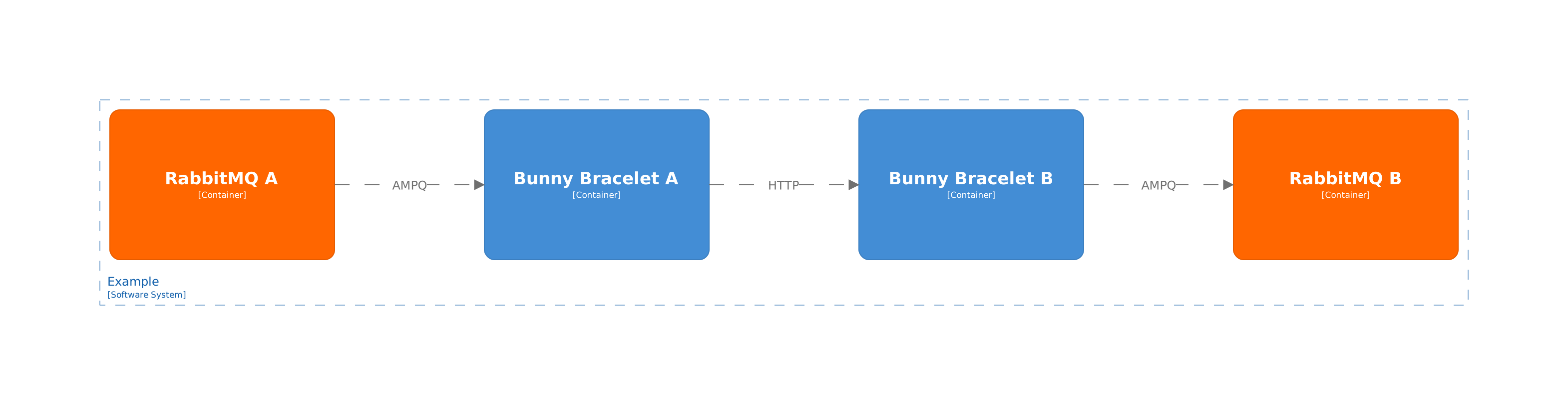
Previous example shows setup of 2 RabbitMQ instances and 2 Bunny Bracelet instances. Program Bunny Bracelet A consumes messages from RabbitMQ A and forwards them to Bunny Bracelet B over HTTP protocol. Then program Bunny Bracelet B publishes the messages to RabbitMQ B.
Single Bunny Bracelet program can relay messages to multiple instances or from multiple instances.
How to use
Check Tutorial to see Bunny Bracelet in action.
RabbitMQ is a message broker that accepts and forwards messages. One or more publishing applications may send messages to a RabbitMQ exchange. From the exchange the messages are distributed to one or more queues. Then the messages may be consumed by an outbound Bunny Bracelet that forwards the messages to one or more inbound Bunny Bracelets, also called endpoints. Each inbound Bunny Bracelet then publishes the messages on another RabbitMQ exchange.
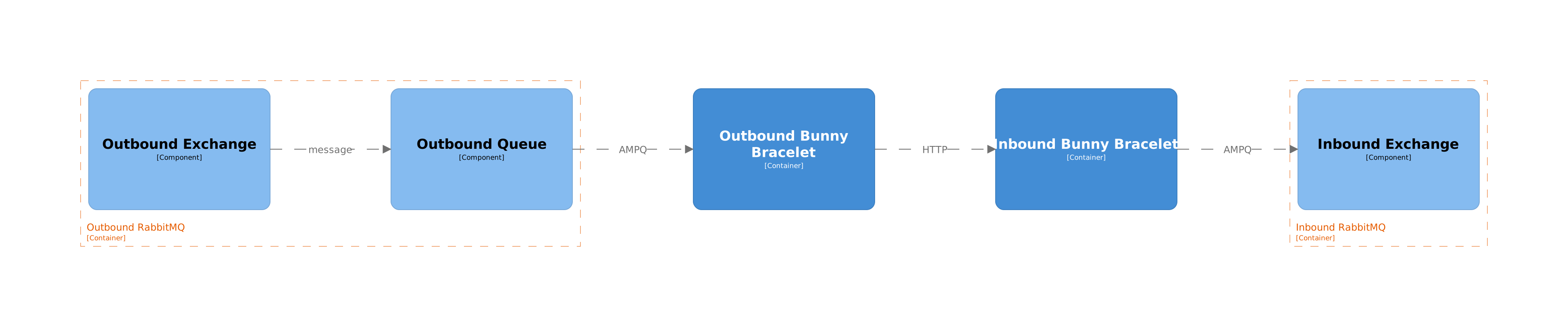
Note: Single Bunny Bracelet program can be in both roles inbound and outbound.
Outbound Bunny Bracelet
Outbound Bunny Bracelet consumes messages from RabbitMQ and forwards them to a remote Bunny Bracelet instance. The program must have configured RabbitMQ URI, outbound exchange and URL of a remote Bunny Bracelet that the messages should be forwarded to.
Following command runs Bunny Bracelet program that consumes messages published to exchange my-outbound on RabbitMQ amqp://guest:guest@rabbitmq and forwards the messages to http://inbound-bunny.remote.
docker run -e BunnyBracelet__RabbitMQUri=amqp://guest:guest@rabbitmq -e BunnyBracelet__OutboundExchange__Name=my-outbound -e BunnyBracelet__Endpoints__0__Uri=http://inbound-bunny.remote duracellko/bunny-bracelet
The previous example forwards messages to single endpoint (remote Bunny Bracelet) with index 0.
It is possible to specify a queue name that should be used to forward messages to an endpoint. And the queue can be configured to continue collecting messages, while Bunny Bracelet restarts. This is specified by setting AutoDelete value to false.
docker run -e BunnyBracelet__RabbitMQUri=amqp://guest:guest@rabbitmq -e BunnyBracelet__OutboundExchange__Name=my-outbound -e BunnyBracelet__Endpoints__0__Uri=http://inbound-bunny.remote -e BunnyBracelet__Endpoints__0__Queue__Name=outbound-queue -e BunnyBracelet__Endpoints__0__Queue__AutoDelete=false duracellko/bunny-bracelet
And the following example presents how to configure outbound Bunny Bracelet forwarding messages to 2 endpoints (remote Bunny Bracelets): http://inbound-bunny-1.remote and http://inbound-bunny-2.remote.
docker run -e BunnyBracelet__RabbitMQUri=amqp://guest:guest@rabbitmq -e BunnyBracelet__OutboundExchange__Name=my-outbound -e BunnyBracelet__Endpoints__0__Uri=http://inbound-bunny-1.remote -e BunnyBracelet__Endpoints__1__Uri=http://inbound-bunny-2.remote duracellko/bunny-bracelet
When the receiving inbound Bunny Bracelet requires authentication it is possible to specify a shared key that should be used to sign the messages relayed by outbound Bunny Bracelet. The key is encoded using Base64. It is also required to specify, whether the key 1 or 2 should be used.
docker run -e BunnyBracelet__RabbitMQUri=amqp://guest:guest@rabbitmq -e BunnyBracelet__OutboundExchange__Name=my-outbound -e BunnyBracelet__Endpoints__0__Uri=http://inbound-bunny.remote -e BunnyBracelet__Authentication__Key1=Vi8rjMaNa3D92SepImiJiUjJUt3kyUc70w0tT+7+ztTV5QKQqzEfWmHIe9/CSOVIsc/fjADbQ7+ueuqjW42vUw== -e BunnyBracelet__Authentication__UseKeyIndex=1 duracellko/bunny-bracelet
Inbound Bunny Bracelet
Inbound Bunny Bracelet receives messages from an outbound Bunny Bracelet on the specified network interface and port. Then all received messages are published to specified exchange on RabbitMQ.
Following command runs Bunny Bracelet program that receives messages on port 8080 and publishes them to exchange my-inbound on RabbitMQ amqp://guest:guest@rabbitmq.
docker run -p 8080:8080 -e BunnyBracelet__RabbitMQUri=amqp://guest:guest@rabbitmq -e BunnyBracelet__InboundExchange__Name=my-inbound duracellko/bunny-bracelet
And the following example presents running of Bunny Bracelet program in both roles as inbound and outbound.
docker run -p 8080:8080 -e BunnyBracelet__RabbitMQUri=amqp://guest:guest@rabbitmq:5672 -e BunnyBracelet__InboundExchange__Name=my-inbound -e BunnyBracelet__OutboundExchange__Name=my-outbound -e BunnyBracelet__Endpoints__0__Uri=http://inbound-bunny.remote duracellko/bunny-bracelet
It is possible to configure message authentication. It means that only messages signed by a shared key would be accepted by inbound Bunny Bracelet. The key is encoded using Base64.
docker run -p 8080:8080 -e BunnyBracelet__RabbitMQUri=amqp://guest:guest@rabbitmq -e BunnyBracelet__InboundExchange__Name=my-inbound -e BunnyBracelet__Authentication__Key1=Vi8rjMaNa3D92SepImiJiUjJUt3kyUc70w0tT+7+ztTV5QKQqzEfWmHIe9/CSOVIsc/fjADbQ7+ueuqjW42vUw== duracellko/bunny-bracelet
Configuration
All configuration options can be found in documentation.
License
Tag summary
Content type
Image
Digest
sha256:48b7aa307…
Size
63.7 MB
Last updated
about 1 month ago
docker pull duracellko/bunny-bracelet