diyhue/core
This image allows you to create your own Philips Hue system with most smart lights
5M+
diyhue/core repository overview
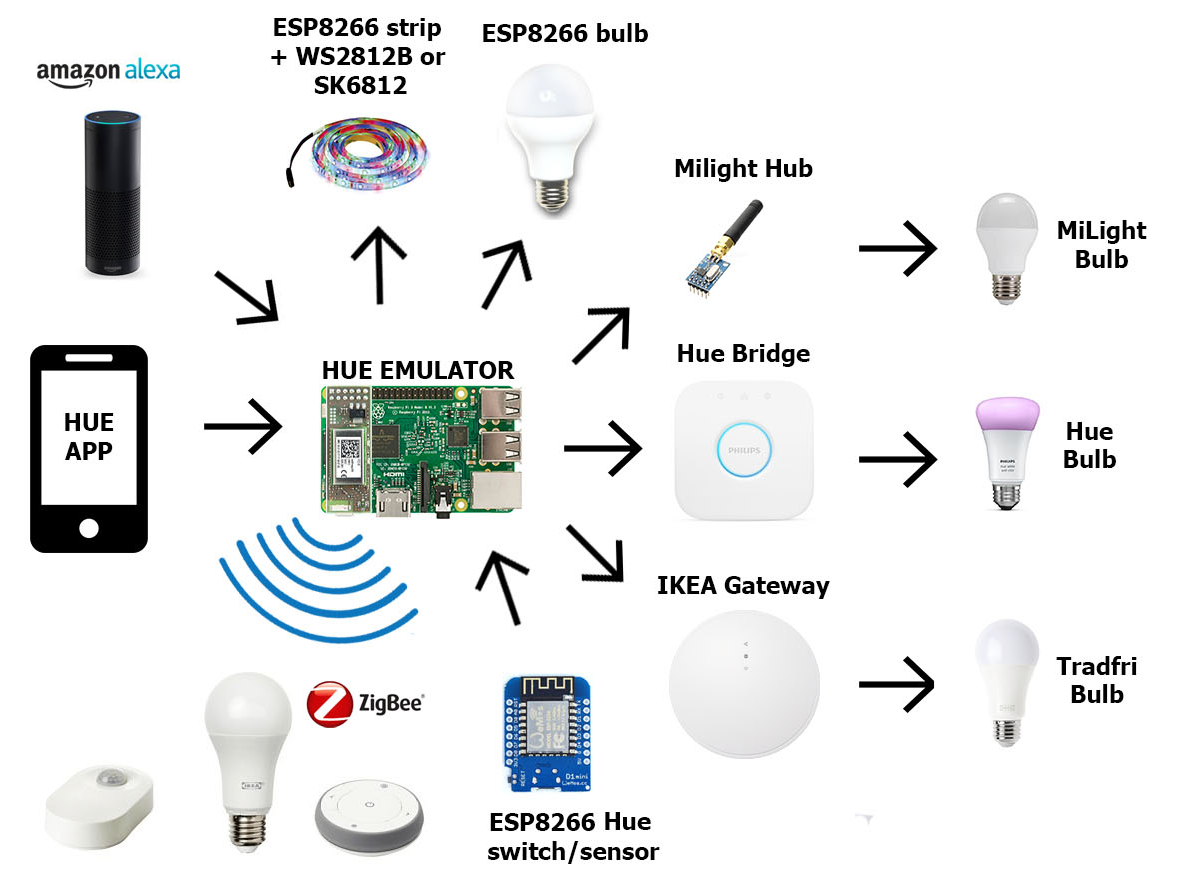
This project allows you to create your own Philips Hue system easily and at a much lower cost, plus some extra features such as email notifications when a motion sensor is triggered. By default it works just with WiFi lights and sensors based on the ESP8266 platform, but it can be extended to also controll ZigBee devices using the RaspBee module, or it can control ZigBee lights via Ikea Tradfri Gateway and the original Philips Hue Bridge. With the Raspbee module it is possible to directly control all ZigBee lights (without a second bridge) and to use a number of ZigBee switches and sensors. I have put more attention into supporting the IKEA Tradfri devices because they have an accessible price and can be found in a large number of countries.
Install
Currently the docker image has been tested with x86 systems and ARMv7 systems (Raspberry Pi 2 and later). Currently the ARM image has only been tested with a Raspberry Pi 3b+ If you have other ARM based devices and can test the image, please let us know on our Slack chat or in an issue. The images can be run with both host and bridge network modes. I recommend using the host network mode for ease, however this will give you less control over your docker networks. Using bridge mode allows you to control the traffic in and out of the container but requires more options to setup.
To run the container with the host network mode:
docker run -d --name "diyHue" --network="host" -v '/mnt/hue-emulator/export/':'/opt/hue-emulator/export/':'rw' diyhue/core:latest
When running with the bridge network mode you must provide the IP and MAC address of the host device. Four ports are also opened to the container. These port mappings must not be changed as the hue ecosystem expects to communicate over specific ports.
To run the container with bridge network mode:
docker run -d --name "diyHue" --network="bridge" -v '/mnt/hue-emulator/export/':'/opt/hue-emulator/export/':'rw' -e 'MAC=XX:XX:XX:XX:XX:XX' -e 'IP=XX.XX.XX.XX' -p 80:80/tcp -p 443:443/tcp -p 1900:1900/udp -p 2100:2100/udp diyhue/core:latest
These commands will run the latest image available, however if you have automated updates enabled with a service such as watchtower then using latest is not recommended. The images are automatically rebuilt upon a new commit to this repo. As such, larges changes could occur and updates will be frequent. Each image is also tagged with the comit hash. For example diyhue/core:391cc642072aac70d544fd428864f74bf9eaf636. It is then suggested you use one of these images instead and manually update every so often.
The mount directory /mnt/hue-emulator/export/ can be changed to any directory you wish. Backups of the config.json and cert.pem are saved here when changes are made to these files. They are then restored upon container reboot. If you need to make manual changes to these files, do so with the files mounted on the host (rather than the files in the container) and then restart the container to import your changes. To perform a manual export at any time, visit http://{emualtor ip}/save If there are no files in the mounted directory then they will be regenerated at container start.
Tag summary
Content type
Image
Digest
sha256:866499bd6…
Size
87.8 MB
Last updated
4 months ago
docker pull diyhue/core:armv6-master