crowdsecurity/cloudflare-bouncer repository overview
cloudflare-bouncer
A bouncer that syncs the decisions made by CrowdSec with CloudFlare's firewall. Manages multi user, multi account, multi zone setup. Supports IP, Country and AS scoped decisions.
Initial Setup
docker run crowdsecurity/cloudflare-bouncer \
 -g <CLOUDFLARE_TOKEN1> <CLOUDFLARE_TOKEN2> > cfg.yaml # auto-generate cloudflare config for provided space separated tokens
vi cfg.yaml # review config and set `crowdsec_lapi_key`
The crowdsec_lapi_key can be obtained by running the following:
sudo cscli -oraw bouncers add cloudflarebouncer # -oraw flag can discarded for human friendly output.
The crowdsec_lapi_url must be accessible from the container.
Run the bouncer
  docker run \
  -v $PWD/cfg.yaml:/etc/crowdsec/bouncers/crowdsec-cloudflare-bouncer.yaml \
  -p 2112:2112 \
  crowdsecurity/cloudflare-bouncer
Configuration
Configuration file must be at /etc/crowdsec/bouncers/crowdsec-cloudflare-bouncer.yaml
# CrowdSec Config
crowdsec_lapi_url: http://localhost:8080/
crowdsec_lapi_key: ${API_KEY}
crowdsec_update_frequency: 10s

#Cloudflare Config.
cloudflare_config:
  accounts:
  - id:
    token:
    ip_list_prefix: crowdsec
    default_action: challenge
    zones:
    - actions:
      - challenge # valid choices are either of challenge, js_challenge, block
      zone_id:

  update_frequency: 30s # the frequency to update the cloudflare IP list

# Bouncer Config
daemon: false
log_mode: file
log_dir: /var/log/
log_level: info # valid choices are either debug, info, error

prometheus:
  enabled: true
  listen_addr: 127.0.0.1
  listen_port: 2112
Cloudflare Configuration
Background: In Cloudflare, each user can have access to multiple accounts. Each account can own/access multiple zones. In this context a zone can be considered as a domain. Each domain registered with cloudflare gets a distinct zone_id.
For obtaining the token:
- Sign in as a user who has access to the desired account.
- Go to Tokens and create the token. The bouncer requires the follwing permissions to function.
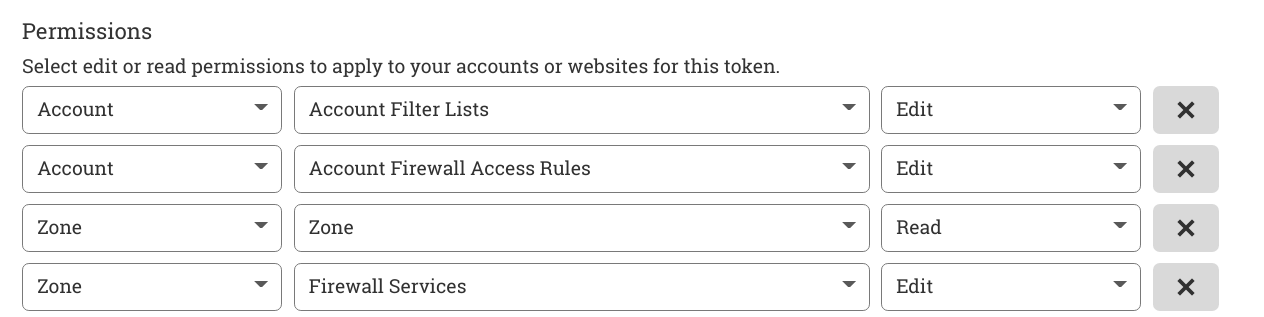
To automatically generate config for cloudflare check the helper section below.
:::note If the zone is subscribed to a paid Cloudflare plan then it can be configured to support multiple types of actions. For free plan zones only one action is supported. The first action is applied as default action. :::
Helpers
The bouncer's binary has built in helper scripts to do various operations.
Auto config generator
Generates bouncer config by discovering all the accounts and the zones associated with provided list of tokens.
Example Usage:
docker run crowdsecurity/cloudflare-bouncer -g <TOKEN_1>,<TOKEN_2>... > cfg.yaml
After reviewing the config you can bind mount it to the container at path /etc/crowdsec/bouncers/crowdsec-cloudflare-bouncer.yaml as shown in the setup gude.
:::note
This script only generates cloudflare related config. By default it refers to the config at /etc/crowdsec/bouncers/crowdsec-cloudflare-bouncer.yaml for crowdsec configuration.
:::
Using custom config:
docker run crowdsecurity/cloudflare-bouncer -c /cfg.yaml -g <TOKEN_1>,<TOKEN_2>... -v $PWD/cfg.yaml:/cfg.yaml
Make sure that the custom config is mounted in the container.
Cloudflare Setup
This only creates the required IP lists and firewall rules at cloudflare and exits.
Example Usage:
  docker run \
  -v $PWD/cfg.yaml:/etc/crowdsec/bouncers/crowdsec-cloudflare-bouncer.yaml \
  -p 2112:2112 \
  crowdsecurity/cloudflare-bouncer -s
Cloudflare Cleanup
This deletes all IP lists and firewall rules at cloudflare which were created by the bouncer.
Example Usage:
  docker run \
  -v $PWD/cfg.yaml:/etc/crowdsec/bouncers/crowdsec-cloudflare-bouncer.yaml \
  -p 2112:2112 \
  crowdsecurity/cloudflare-bouncer -s
How it works
The service polls the CrowdSec Local API for new decisions. It then makes API calls to Cloudflare to update IP lists and firewall rules depending upon the decision.
Troubleshooting
- Metrics are exposed at port 2112
Tag summary
Content type
Image
Digest
sha256:39719a070…
Size
7.8 MB
Last updated
almost 2 years ago
docker pull crowdsecurity/cloudflare-bouncer