composelint/compose-lint
Security-focused linter for Docker Compose files
3.7K
composelint/compose-lint repository overview
compose-lint
Security-focused linter for Docker Compose files. Catches dangerous misconfigurations before they reach production. Grounded in OWASP and the CIS Docker Benchmark.





Static-analysis checks for docker-compose.yml and compose.yaml, covering privileged containers, unpinned images, host-network sharing, sensitive bind mounts, hard-coded credentials, and more.
In a scan of 6,444 public Docker Compose files on GitHub, 91% of those that parse had at least one security finding (68% HIGH or CRITICAL) — nearly all skip basic capability restrictions, 52% run images without a pinned digest, and 58% bind ports to all interfaces. compose-lint catches these in CI before they ship. Read the full State of Docker Compose Security report →
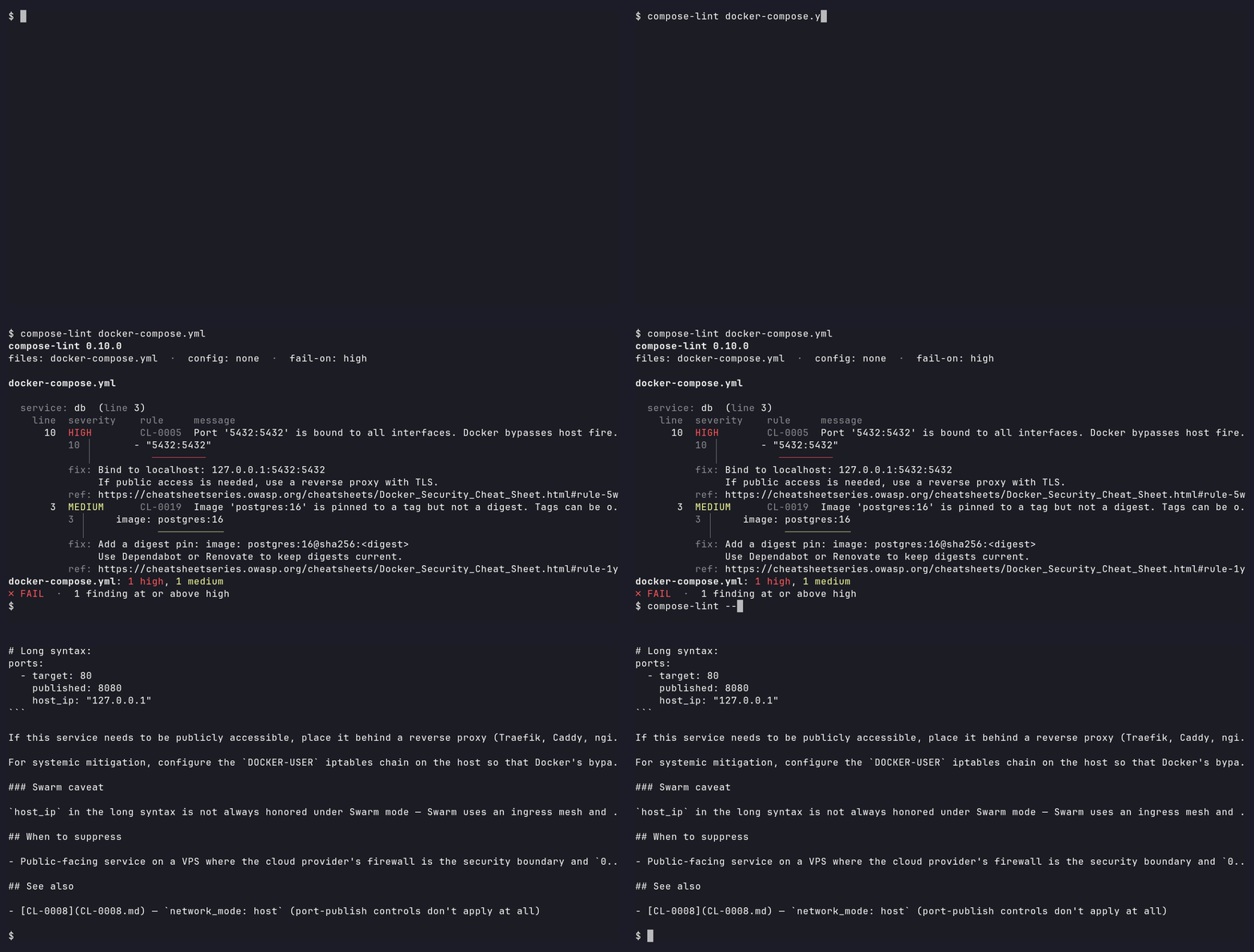
What it catches:
- Privilege flaws —
privileged: true, missingcap_drop,no-new-privilegesnot set, root user, host namespace sharing - Network exposure — wildcard port binds,
network_mode: host - Supply-chain — unpinned images, missing digest pins
- Filesystem and credential leaks — Docker socket mounts, sensitive host paths, plaintext credentials in
environment:
Use it if you ship Compose to production, want defense in depth in a homelab, or want a fast pre-merge gate on infrastructure-as-code. Fits the same niche as Hadolint, the Dockerfile linter and dclint, the Compose schema linter: zero-config, opinionated, fast, and grounded in the OWASP Docker Security Cheat Sheet and CIS Docker Benchmark.
Installation
pip
pip install compose-lint
Docker — composelint/compose-lint
docker run --rm -v "$(pwd):/src" composelint/compose-lint
The Docker image is distroless, multi-arch, and runs nonroot — see Security posture below for SLSA, Sigstore, and OpenVEX details.
Running with full hardening
Want to dogfood compose-lint's own rules against the container that runs it? See docs/hardening.md for the fully-hardened docker run invocation, the flag-to-rule mapping, and digest-pinning instructions.
Quick Start
Run without arguments to auto-detect compose.yml, compose.yaml, docker-compose.yml, or docker-compose.yaml in the current directory:
compose-lint
Or pass files explicitly:
compose-lint docker-compose.yml docker-compose.prod.yml
Don't recognize a rule ID in the output? --explain prints the full rule doc — what it catches, why it matters, the fix, and the OWASP/CIS reference — without leaving the terminal:
compose-lint --explain CL-0005
Docker equivalent:
docker run --rm -v "$(pwd):/src" composelint/compose-lint docker-compose.prod.yml
Compose compatibility
compose-lint targets the Compose Specification used by Compose v2 and v3. Compose v1 files (services declared at the top level) are skipped with a stderr note rather than failing the run — Docker retired Compose v1 in 2023. Structural fragments (files containing only volumes: / networks: / configs: / secrets: / x-* keys, typically merged via -f overlay.yml) are skipped for the same reason. Genuinely unrecognised shapes still exit 2.
Python 3.10+ is required for the pip install path; the Docker image is self-contained.
Example Output
Given this docker-compose.yml:
services:
  traefik:
    image: traefik:v3.0@sha256:aaaabbbbccccddddeeeeffff00001111222233334444555566667777888899990
    read_only: true
    cap_drop: [ALL]
    security_opt:
      - no-new-privileges:true
    volumes:
      - /var/run/docker.sock:/var/run/docker.sock
    ports:
      - "8080:80"
and this .compose-lint.yml (suppressing CL-0001 for traefik with a tracked reason):
rules:
  CL-0001:
    exclude_services:
      traefik: "SEC-1234 approved — socket proxy planned for 2026-Q3"
running compose-lint docker-compose.yml produces:
files: docker-compose.yml  ·  config: .compose-lint.yml  ·  fail-on: high

docker-compose.yml

  service: traefik  (line 9)
    line  severity  rule     message
       9  SUPPRESSED  CL-0001  Docker runtime socket mounted via '/var/run/docker.sock:/var/run/docker.sock'. This gives the container full control over the Docker runtime — equivalent to root on the host.
          reason: SEC-1234 approved — socket proxy planned for 2026-Q3
       9  HIGH      CL-0013  Service mounts sensitive host path '/var/run/docker.sock' (under /var/run). This exposes host system files to the container.
          9 │       - /var/run/docker.sock:/var/run/docker.sock
            │         ────────────────────
          fix: Remove the bind mount for /var/run/docker.sock. If the container needs specific files, copy them into the image at build time or use a named volume with only the required data.
          ref: https://cheatsheetseries.owasp.org/cheatsheets/Docker_Security_Cheat_Sheet.html#rule-8-set-filesystem-and-volumes-to-read-only
      11  HIGH      CL-0005  Port '8080:80' is bound to all interfaces. Docker bypasses host firewalls (UFW/firewalld), potentially exposing this port to the public internet.
          11 │       - "8080:80"
             │          ───────
          fix: Bind to localhost: 127.0.0.1:8080:80
               If public access is needed, use a reverse proxy with TLS.
          ref: https://cheatsheetseries.owasp.org/cheatsheets/Docker_Security_Cheat_Sheet.html#rule-5a-be-careful-when-mapping-container-ports-to-the-host-with-firewalls-like-ufw

docker-compose.yml: 2 high  ·  1 suppressed (not counted)
✗ FAIL  ·  2 findings at or above high
Exit code is 1 (two findings at or above the default --fail-on high threshold). Suppressed findings are shown for auditability but do not count toward the threshold. Findings are grouped by service and ordered highest-severity first within each service; the fix block and reference URL print only once per rule id per file — pass -v / --verbose to repeat them on every finding, or -q / --quiet for one compact line per finding.
How it compares
| Tool | Compose security rules | Scope | Zero config |
|---|---|---|---|
| compose-lint | Yes | Docker Compose | Yes |
| KICS | Yes | Broad IaC (Terraform, K8s, Compose, ...) | No |
| Hadolint | No — Dockerfile only | Dockerfile | Yes |
| dclint | Yes — schema/structure only | Docker Compose | Yes |
| Trivy | No — image/CVE + IaC misconfig scanning, no dedicated Compose ruleset | Dockerfiles, images, IaC | Yes |
| Checkov | No — no dedicated Compose ruleset | Broad IaC (Terraform, K8s, ...) | No |
If you need broad IaC coverage across Terraform, Kubernetes, and more, KICS covers Docker Compose and is worth evaluating. If you want a lightweight, focused tool with zero config and actionable fix guidance for Compose files specifically, this is it.
Not in scope: compose-lint does not validate Compose schema, scan images for CVEs, lint Dockerfiles, or rewrite files. Pair it with dclint for schema/structure, Hadolint for Dockerfiles, and Trivy for image CVEs.
Rules
| ID | Severity | Description | OWASP | CIS |
|---|---|---|---|---|
| CL-0001 | CRITICAL | Container runtime socket mounted | Rule #1 | 5.32 |
| CL-0002 | CRITICAL | Privileged mode enabled | Rule #3 | 5.5 |
| CL-0003 | MEDIUM | Privilege escalation not blocked | Rule #4 | 5.26 |
| CL-0004 | MEDIUM | Image not pinned to version | Rule #13 | 5.28 |
| CL-0005 | HIGH | Ports bound to all interfaces | Rule #5a | 5.14 |
| CL-0006 | MEDIUM | No capability restrictions | Rule #3 | 5.4 |
| CL-0007 | MEDIUM | Filesystem not read-only | Rule #8 | 5.13 |
| CL-0008 | HIGH | Host network mode | Rule #5 | 5.10 |
| CL-0009 | HIGH | Security profile disabled | Rule #6 | 5.2, 5.3, 5.22 |
| CL-0010 | HIGH | Host namespace sharing | Rule #3 | 5.16, 5.17, 5.21, 5.31 |
| CL-0011 | HIGH | Dangerous capabilities added | Rule #3 | 5.4 |
| CL-0012 | MEDIUM | PIDs cgroup limit disabled | — | 5.29 |
| CL-0013 | HIGH | Sensitive host path mounted | Rule #8 | 5.6 |
| CL-0014 | MEDIUM | Logging driver disabled | — | — |
| CL-0015 | LOW | Healthcheck disabled | — | 4.6, 5.27 |
| CL-0016 | HIGH | Dangerous host device exposed | — | 5.18 |
| CL-0017 | MEDIUM | Shared mount propagation | — | 5.20 |
| CL-0018 | MEDIUM | Explicit root user | Rule #2 | — |
| CL-0019 | MEDIUM | Image tag without digest | Rule #13 | — |
| CL-0020 | HIGH | Credential-shaped env key with literal value | Rule #12 | — |
| CL-0021 | HIGH | Credential embedded in connection-string env value | Rule #12 | — |
| CL-0022 | LOW | tmpfs mount re-enables exec/suid/dev | Rule #8 | — |
Severity Levels
Findings are rated LOW, MEDIUM, HIGH, or CRITICAL based on exploitability and impact scope. See docs/severity.md for the full scoring matrix.
Configuration
Create .compose-lint.yml to disable rules, exclude specific services, or adjust severity:
rules:
  CL-0001:
    enabled: false
    reason: "SEC-1234 — approved 2026-07-01"
  CL-0003:
    exclude_services:
      minecraft: "entrypoint switches users via su-exec"
  CL-0005:
    severity: medium
Disabled and excluded findings still appear marked SUPPRESSED with the reason flowing to JSON's suppression_reason and SARIF's justification (recognized by GitHub Code Scanning) — they do not affect exit code. Pass --skip-suppressed to hide them.
See docs/configuration.md for per-service exclusion semantics, precedence rules, and the full output-format mapping.
CLI Reference
compose-lint [check] [OPTIONS] [FILE ...]   Lint files (default; bare invocation works)
compose-lint fix [OPTIONS] [FILE ...]       Auto-remediate safe findings
compose-lint init [OPTIONS] FILE            Generate a starter .compose-lint.yml

check options:
  --format {text,json,sarif}   Output format (default: text)
  --fail-on {low,medium,high,critical}
                               Minimum severity to trigger exit 1 (default: high)
  -v, --verbose                Repeat the fix block and reference on every finding (text mode)
  -q, --quiet                  One line per finding — no fix, reference, or excerpt (text mode)
  --skip-suppressed            Hide suppressed findings from output
  --config PATH                Path to config file (default: .compose-lint.yml)
  --explain CL-XXXX            Print the full documentation for a single rule
  --version                    Show version and exit

init options:
  -o, --output PATH            Where to write the config (default: .compose-lint.yml)
  --force                      Overwrite an existing config file
Fixing findings
compose-lint fix auto-remediates the findings that have a safe, unambiguous
edit — adding read_only: true, no-new-privileges:true, dropping a bare
latest tag, binding a published port to 127.0.0.1, and similar. It is
dry-run by default: it prints a unified diff and writes nothing.
compose-lint fix docker-compose.yml            # preview the diff, write nothing
compose-lint fix --apply docker-compose.yml    # write the fixes in place
compose-lint fix --only CL-0007 --apply .      # restrict to one rule
- Dry-run by default;
--applywrites in place via an atomic swap that preserves the file's permission bits — an interrupted write never corrupts the Compose file. - Only safe, mechanical fixes are applied. Findings whose remediation is context-dependent (e.g. CL-0006 capability lists, CL-0001 socket mounts) are reported as needing manual review, never auto-edited.
- Suppressed findings are never touched —
.compose-lint.ymldisables and per-service excludes are honored. - Refuses unsafe edits. Files using YAML anchors, merge keys, or
${VAR}interpolation in the affected region are skipped rather than risk a wrong rewrite, and every apply is re-parsed and re-linted before it is written — anything that wouldn't round-trip clean is refused with the diff surfaced for diagnosis. - Diff is data, status is human. The diff goes to stdout; progress and
warnings go to stderr, so
compose-lint fix file.yml > changes.diffcaptures exactly the patch.
Structured fixes also ride in SARIF output: compose-lint check --format sarif
populates fixes[].artifactChanges, which GitHub Code Scanning renders as an
inline suggested change on the pull request.
Generating a starter config
compose-lint init turns a file's current findings into a .compose-lint.yml
you then triage, so you don't have to hand-author suppressions from the schema:
compose-lint init docker-compose.yml          # writes ./.compose-lint.yml
compose-lint init docker-compose.yml -o ci.yml # write somewhere else
compose-lint init docker-compose.yml --force   # overwrite an existing config
Each finding becomes a per-service exclude_services entry with a placeholder
reason — never a global enabled: false, so a service you add later still trips
the rule instead of being silently uncovered. It refuses to overwrite an
existing config without --force, writes nothing for a clean file, and sends
status to stderr. Replace each TODO reason with a real justification or delete
the entry and fix the issue. See
docs/configuration.md
for the full behavior.
Versioning & stability
compose-lint follows Semantic Versioning. From 1.0, the CLI, exit codes, config schema, and JSON/SARIF output are stable. New and tightened rules ship in MINOR releases, so pin a version or use --fail-on if you need deterministic CI. See docs/compatibility.md for the full stability promise and deprecation policy.
Color is on when stdout is a terminal. Set NO_COLOR to disable it (even on a
terminal) or FORCE_COLOR to force it through a pipe — e.g. into less -R or a
CI log that renders ANSI.
Exit Codes
| Code | Meaning |
|---|---|
| 0 | No findings at or above the --fail-on threshold |
| 1 | One or more findings at or above the --fail-on threshold |
| 2 | compose-lint couldn't run (invalid args, file not found, invalid Compose file, or a rule crashed) |
The default threshold is high — medium and low findings don't fail CI unless you opt in:
compose-lint --fail-on low docker-compose.yml   # fail on everything
compose-lint --fail-on critical docker-compose.yml  # only critical
CI Integration
GitHub Actions
The easiest path — runs compose-lint and uploads findings to GitHub Code Scanning. Pinned to immutable SHAs for reproducible CI; Renovate keeps the pins current:
# .github/workflows/lint.yml
name: Compose Lint
on: [push, pull_request]

jobs:
  compose-lint:
    runs-on: ubuntu-latest
    steps:
      - uses: actions/checkout@de0fac2e4500dabe0009e67214ff5f5447ce83dd # v6.0.2
      - uses: tmatens/compose-lint@94ddcaae5c63b7326ff34f4d0dd5115dbedbd7db # v0.10.0
        with:
          sarif-file: results.sarif
Or install from PyPI directly:
      - uses: actions/setup-python@v6
        with:
          python-version: "3.13"
      - run: pip install compose-lint
      - run: compose-lint docker-compose.yml
Forgejo Actions
Forgejo Actions runs GitHub-Actions-compatible workflows via act_runner, with two practical differences: cross-instance action refs need full URLs (https://code.forgejo.org/...), and most default runner configs don't support container: jobs — so install via apt + pip rather than a Python base image:
# .forgejo/workflows/validate.yml
name: Validate
on:
  pull_request:
    branches: [main]
  workflow_dispatch:

jobs:
  compose-lint:
    runs-on: docker
    steps:
      - uses: https://code.forgejo.org/actions/checkout@v4
      - name: Install compose-lint
        run: |
          apt-get update -qq
          apt-get install -yqq --no-install-recommends python3-pip
          pip3 install --break-system-packages --no-cache-dir compose-lint==0.10.0
      - name: Run compose-lint
        run: compose-lint --fail-on high
Forgejo has no SARIF UI today — --format sarif still produces a valid document, but there's no security-tab equivalent to render it. Verified on Forgejo 11.0.12, April 2026.
SARIF output
compose-lint --format sarif docker-compose.yml > results.sarif
Pre-commit
# .pre-commit-config.yaml
repos:
  - repo: https://github.com/tmatens/compose-lint
    rev: v0.10.0
    hooks:
      - id: compose-lint
Security posture
compose-lint is built to be safe to depend on:
- Runtime image: distroless Python on Debian, multi-arch (
linux/amd64+linux/arm64), nonroot UID 65532, no shell or package manager at runtime. See ADR-009. - Supply chain: every release ships SLSA build provenance and Sigstore attestations. Published to PyPI via Trusted Publishers (OIDC) — no manual
twine upload, no long-lived API tokens. - Vulnerability transparency: each release ships an OpenVEX document declaring known pip CVEs
not_affectedwith justificationvulnerable_code_not_present— pip code is stripped from the runtime venv and only.dist-infometadata is retained for SCA scanner attribution. - External audit: tracked on OpenSSF Scorecard and OpenSSF Best Practices Baseline 2; CodeQL, Docker Scout, and ClusterFuzzLite run on every PR.
- Reporting vulnerabilities: see SECURITY.md.
Contributing
See CONTRIBUTING.md for development setup and how to add rules.
License
Tag summary
Content type
Image
Digest
sha256:a74de0762…
Size
22.6 MB
Last updated
15 days ago
docker pull composelint/compose-lint