bunkerity/bunkerweb-ui
Web UI for BunkerWeb 🛡️
100K+
bunkerity/bunkerweb-ui repository overview







🌐 Website
|
📓 Documentation
|
👨💻 Demo
|
🛡️ Examples
|
💬 Chat
|
📝 Forum
⚙️ Configurator
|
🗺️ Threatmap
🛡️ Make security by default great again !
BunkerWeb

BunkerWeb is a next-generation and open-source Web Application Firewall (WAF).
Being a full-featured web server (based on NGINX under the hood), it will protect your web services to make them "secure by default". BunkerWeb integrates seamlessly into your existing environments (Linux, Docker, Swarm, Kubernetes, …) and is fully configurable (don't panic, there is an awesome web UI if you don't like the CLI) to meet your own use-cases . In other words, cybersecurity is no more a hassle.
BunkerWeb contains primary security features as part of the core but can be easily extended with additional ones thanks to a plugin system.
Why BunkerWeb ?
- Easy integration into existing environments : support for Linux, Docker, Swarm, Kubernetes, Ansible, Vagrant, ...
- Highly customizable : enable, disable and configure features easily to meet your use case
- Secure by default : offers out-of-the-box and hassle-free minimal security for your web services
- Awesome web UI : keep control of everything more efficiently without the need of the CLI
- Plugin system : extend BunkerWeb to meet your own use-cases
- Free as in "freedom" : licensed under the free AGPLv3 license
Security features
A non-exhaustive list of security features :
- HTTPS support with transparent Let's Encrypt automation
- State-of-the-art web security : HTTP security headers, prevent leaks, TLS hardening, ...
- Integrated ModSecurity WAF with the OWASP Core Rule Set
- Automatic ban of strange behaviors based on HTTP status code
- Apply connections and requests limit for clients
- Block bots by asking them to solve a challenge (e.g. : cookie, javascript, captcha, hCaptcha or reCAPTCHA)
- Block known bad IPs with external blacklists and DNSBL
- And much more ...
Learn more about the core security features in the security tuning section of the documentation.
Demo
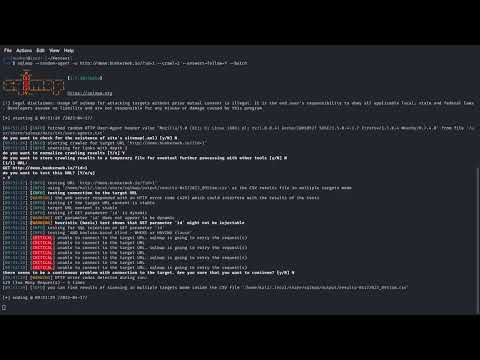
A demo website protected with BunkerWeb is available at demo.bunkerweb.io. Feel free to visit it and perform some security tests.
Concepts

You will find more information about the key concepts of BunkerWeb in the documentation.
Integrations
The first concept is the integration of BunkerWeb into the target environment. We prefer to use the word "integration" instead of "installation" because one of the goals of BunkerWeb is to integrate seamlessly into existing environments.
The following integrations are officially supported :
Settings
Once BunkerWeb is integrated into your environment, you will need to configure it to serve and protect your web applications.
The configuration of BunkerWeb is done by using what we call the "settings" or "variables". Each setting is identified by a name such as AUTO_LETS_ENCRYPT or USE_ANTIBOT. You can assign values to the settings to configure BunkerWeb.
Here is a dummy example of a BunkerWeb configuration :
SERVER_NAME=www.example.com
AUTO_LETS_ENCRYPT=yes
USE_ANTIBOT=captcha
REFERRER_POLICY=no-referrer
USE_MODSECURITY=no
USE_GZIP=yes
USE_BROTLI=no
You will find an easy to use settings generator at config.bunkerweb.io.
Multisite mode
The multisite mode is a crucial concept to understand when using BunkerWeb. Because the goal is to protect web applications, we intrinsically inherit the concept of "virtual host" or "vhost" (more info here) which makes it possible to serve multiple web applications from a single (or a cluster of) instance.
By default, the multisite mode of BunkerWeb is disabled which means that only one web application will be served and all the settings will be applied to it. The typical use case is when you have a single application to protect : you don't have to worry about the multisite and the default behavior should be the right one for you.
When multisite mode is enabled, BunkerWeb will serve and protect multiple web applications. Each web application is identified by a unique server name and have its own set of settings. The typical use case is when you have multiple applications to protect and you want to use a single (or a cluster depending of the integration) instance of BunkerWeb.
Custom configurations
Because meeting all the use cases only using the settings is not an option (even with external plugins), you can use custom configurations to solve your specific challenges.
Under the hood, BunkerWeb uses the notorious NGINX web server, that's why you can leverage its configuration system for your specific needs. Custom NGINX configurations can be included in different contexts like HTTP or server (all servers and/or specific server block).
Another core component of BunkerWeb is the ModSecurity Web Application Firewall : you can also use custom configurations to fix some false positives or add custom rules for example.
Database
State of the current configuration of BunkerWeb is stored in a backend database which contains the following data :
- Settings defined for all the services
- Custom configurations
- BunkerWeb instances
- Metadata about jobs execution
- Cached files
The following backend database are supported : SQLite, MariaDB, MySQL and PostgreSQL
Scheduler
To make things automagically work together, a dedicated service called the scheduler is in charge of :
- Storing the settings and custom configurations inside the database
- Executing various tasks (called jobs)
- Generating a configuration which is understood by BunkerWeb
- Being the intermediary for other services (like web UI or autoconf)
In other words, the scheduler is the brain of BunkerWeb.
Setup
Docker

We provide ready to use prebuilt images for x64, x86, armv7 and arm64 platforms on Docker Hub.
Docker integration key concepts are :
- Environment variables to configure BunkerWeb
- Scheduler container to store configuration and execute jobs
- Networks to expose ports for clients and connect to upstream web services
You will find more information in the Docker integration section of the documentation.
Docker autoconf

The downside of using environment variables is that the container needs to be recreated each time there is an update which is not very convenient. To counter that issue, you can use another image called autoconf which will listen for Docker events and automatically reconfigure BunkerWeb in real-time without recreating the container.
Instead of defining environment variables for the BunkerWeb container, you simply add labels to your web applications containers and the autoconf will "automagically" take care of the rest.
You will find more information in the Docker autoconf section of the documentation.
Swarm

To automatically configure BunkerWeb instances, a special service, called autoconf will listen for Docker Swarm events like service creation or deletion and automatically configure the BunkerWeb instances in real-time without downtime.
Like the Docker autoconf integration, configuration for web services is defined using labels starting with the special bunkerweb. prefix.
You will find more information in the Swarm section of the documentation.
Kubernetes

The autoconf acts as an Ingress controller and will configure the BunkerWeb instances according to the Ingress resources. It also monitors other Kubernetes objects like ConfigMap for custom configurations.
You will find more information in the Kubernetes section of the documentation.
Linux

List of supported Linux distros :
- Debian 12 "Bookworm"
- Ubuntu 22.04 "Jammy"
- Fedora 39
- RHEL 8.9
Repositories of Linux packages for BunkerWeb are available on PackageCloud, they provide a bash script to automatically add and trust the repository (but you can also follow the manual installation instructions if you prefer).
You will find more information in the Linux section of the documentation.
Ansible

List of supported Linux distros :
- Debian 12 "Bookworm"
- Ubuntu 22.04 "Jammy"
- Fedora 39
- RHEL 8.9
Ansible is an IT automation tool. It can configure systems, deploy software, and orchestrate more advanced IT tasks such as continuous deployments or zero downtime rolling updates.
A specific BunkerWeb Ansible role is available on Ansible Galaxy (source code is available here).
You will find more information in the Ansible section of the documentation.
Vagrant
We maintain ready to use Vagrant boxes hosted on Vagrant cloud for the following providers :
- virtualbox
- libvirt
You will find more information in the Vagrant section of the documentation.
Quickstart guide
Once you have setup BunkerWeb with the integration of your choice, you can follow the quickstart guide that will cover the following common use cases :
- Protecting a single HTTP application
- Protecting multiple HTTP application
- Retrieving the real IP of clients when operating behind a load balancer
- Adding custom configurations
- Protecting generic TCP/UDP applications
- In combination with PHP
Security tuning
BunkerWeb offers many security features that you can configure with settings. Even if the default values of settings ensure a minimal "security by default", we strongly recommend you to tune them. By doing so you will be able to ensure a security level of your choice but also manage false positives.
You will find more information in the security tuning section of the documentation.
Settings
To help you tuning BunkerWeb we have made an easy to use settings generator tool available at config.bunkerweb.io.
As a general rule when multisite mode is enabled, if you want to apply settings with multisite context to a specific server you will need to add the primary (first) server name as a prefix like www.example.com_USE_ANTIBOT=captcha or myapp.example.com_USE_GZIP=yes for example.
When settings are considered as "multiple", it means that you can have multiple groups of settings for the same feature by adding numbers as suffix like REVERSE_PROXY_URL_1=/subdir, REVERSE_PROXY_HOST_1=http://myhost1, REVERSE_PROXY_URL_2=/anotherdir, REVERSE_PROXY_HOST_2=http://myhost2, ... for example.
Check the settings section of the documentation to get the full list.
Web UI

The "Web UI" is a web application that helps you manage your BunkerWeb instance using a user-friendly interface instead of the command-line one.
- Start, stop, restart and reload your BunkerWeb instance
- Add, edit and delete settings for your web applications
- Add, edit and delete custom configurations for NGINX and ModSecurity
- Install and uninstall external plugins
- Explore the cached files
- Monitor jobs execution
- View the logs and search pattern
You will find more information in the Web UI section of the documentation.
Plugins
BunkerWeb comes with a plugin system to make it possible to easily add new features. Once a plugin is installed, you can manage it using additional settings defined by the plugin.
Here is the list of "official" plugins that we maintain (see the bunkerweb-plugins repository for more information) :
| Name | Version | Description | Link |
|---|---|---|---|
| ClamAV | 1.2 | Automatically scans uploaded files with the ClamAV antivirus engine and denies the request when a file is detected as malicious. | bunkerweb-plugins/clamav |
| Coraza | 1.2 | Inspect requests using a the Coraza WAF (alternative of ModSecurity). | bunkerweb-plugins/coraza |
| CrowdSec | 1.2 | CrowdSec bouncer for BunkerWeb. | bunkerweb-plugins/crowdsec |
| Discord | 1.2 | Send security notifications to a Discord channel using a Webhook. | bunkerweb-plugins/discord |
| Slack | 1.2 | Send security notifications to a Slack channel using a Webhook. | bunkerweb-plugins/slack |
| VirusTotal | 1.2 | Automatically scans uploaded files with the VirusTotal API and denies the request when a file is detected as malicious. | bunkerweb-plugins/virustotal |
| WebHook | 1.2 | Send security notifications to a custom HTTP endpoint using a Webhook. | bunkerweb-plugins/slack |
You will find more information in the plugins section of the documentation.
Support
Professional
We offer professional services related to BunkerWeb like :
- Consulting
- Support
- Custom development
- Partnership
Please contact us at [email protected] if you are interested.
Community
To get free community support you can use the following media :
- The #help channel of BunkerWeb in the Discord server
- The help category of GitHub discussions
- The /r/BunkerWeb subreddit
- The Server Fault and Super User forums
Please don't use GitHub issues to ask for help, use it only for bug reports and feature requests.
License
This project is licensed under the terms of the GNU Affero General Public License (AGPL) version 3.
Contribute
If you would like to contribute to the plugins you can read the contributing guidelines to get started.
Security policy
We take security bugs as serious issues and encourage responsible disclosure, see our security policy for more information.
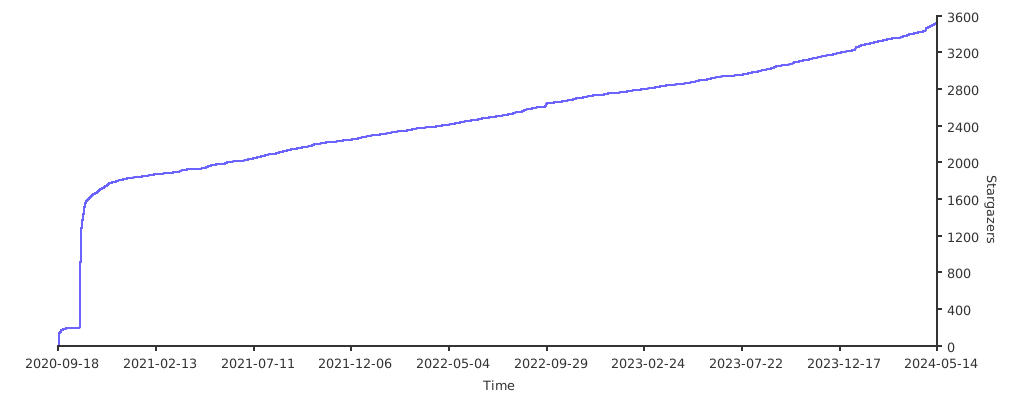
Stargazers over time
Tag summary
Content type
Image
Digest
sha256:a20731bed…
Size
112.4 MB
Last updated
1 day ago
docker pull bunkerity/bunkerweb-ui:dev