bluegrassiot/mqttprobe
The MQTT diagnostic tool built for IIoT. With built-in Sparkplug B support!
7.2K
bluegrassiot/mqttprobe repository overview
MQTTProbe
The MQTT diagnostic tool built for IIoT — native Sparkplug B decode, live charts, and a built-in edge node emulator.
Website · Documentation · Source on GitHub · Report an issue
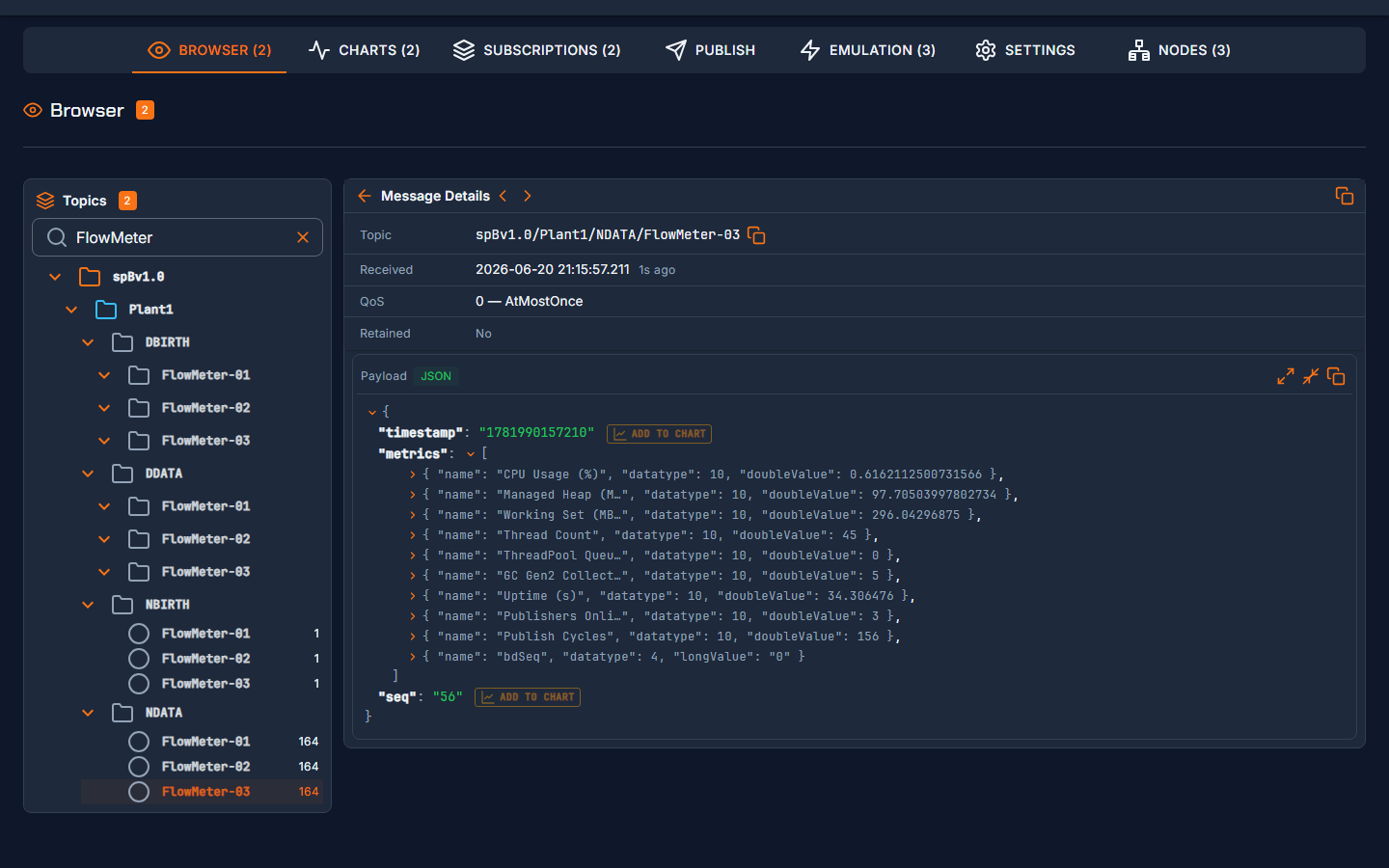
MQTTProbe decodes Sparkplug B messages natively — NBIRTH, DBIRTH, NDATA, DDATA, and DCMD show up as metric names, types, values, and aliases instead of protobuf hex dumps. It resolves aliases back to metric names, requests rebirths automatically, and gives you a live Nodes view of every EoN node on the broker.
Features
- Sparkplug B decode with alias → name resolution and automatic rebirth requests
- Sparkplug Nodes view — live topology of EoN nodes, devices, and current metric values
- Live topic browser with payload inspection (JSON, Sparkplug B, MessagePack, hex, plain text)
- Real-time charts — plot numeric fields from JSON or Sparkplug B payloads as they arrive
- Built-in emulator — generate Sparkplug B or generic MQTT traffic without other clients
- Built-in authentication — login with cookie sessions; broker passwords encrypted at rest
- Small and secure — Alpine-based ASP.NET image (~65 MB compressed), runs as a non-root user
Quick start
docker run -d \
  --name mqttprobe \
  -p 8080:8080 \
  -v mqttprobe-config:/app/config \
  bluegrassiot/mqttprobe:latest
Open http://localhost:8080 and complete the first-run setup (create your admin password), then add a connection to your broker.
Docker Compose
services:
  mqttprobe:
    image: bluegrassiot/mqttprobe:latest
    ports:
      - "8080:8080"
    volumes:
      - mqttprobe-config:/app/config
    restart: unless-stopped

volumes:
  mqttprobe-config:
The repository ships two ready-made Compose files:
docker-compose.yml— MQTTProbe plus an optional local Mosquitto broker for evaluationdocker-compose.prod.yml— adds a Caddy reverse proxy with automatic TLS for LAN/team access
Note: the authentication cookie is
Secureby default, so browsers only send it over HTTPS (orlocalhost). To access MQTTProbe from other machines, put it behind a TLS-terminating reverse proxy — see Docker Deployment.
Connecting to a broker in the same Compose stack
Set Host to the broker's service name (e.g. mosquitto) and use its internal port (typically 1883). Broker ports only need publishing to the host when clients outside Docker connect to them.
Persistence
All configuration lives in a single volume mounted at /app/config:
| Path | Contents |
|---|---|
/app/config/appsettings.json | Connections, auth, preferences, charts, emulators |
/app/config/secrets.dat | Encrypted MQTT broker passwords |
/app/config/dp-keys/ | ASP.NET Data Protection keys |
Back it up with:
docker compose cp mqttprobe:/app/config ./backup
Ports and environment
| Value | Description | |
|---|---|---|
| Port | 8080 | HTTP UI (set via ASPNETCORE_HTTP_PORTS) |
| Volume | /app/config | Persistent configuration |
| Health check | GET /health | Built in — every 30 s, 5 s timeout |
Image details
- Base:
mcr.microsoft.com/dotnet/aspnet:10.0-alpine - Runs as non-root user
appuser(uid 1000) - Multi-stage build, ~65 MB compressed
Documentation
- Getting Started
- Connection Setup — TLS, WebSocket, authentication
- Sparkplug B Decode
- Emulation
- Docker Deployment — reverse proxy, TLS, production Compose
- Troubleshooting
License
MQTTProbe is open source under the Apache 2.0 license.
Tag summary
Content type
Image
Digest
sha256:a749df9dc…
Size
64.6 MB
Last updated
1 day ago
docker pull bluegrassiot/mqttprobe