apache/sedona
Apache Sedona (https://sedona.apache.org/)
10K+
apache/sedona repository overview















| Download statistics | Maven | PyPI | Conda-forge | CRAN | DockerHub |
|---|---|---|---|---|---|
| Apache Sedona | 330k/month |   |  |  | |
| Archived GeoSpark releases | 10k/month |   |
What is Apache Sedona?
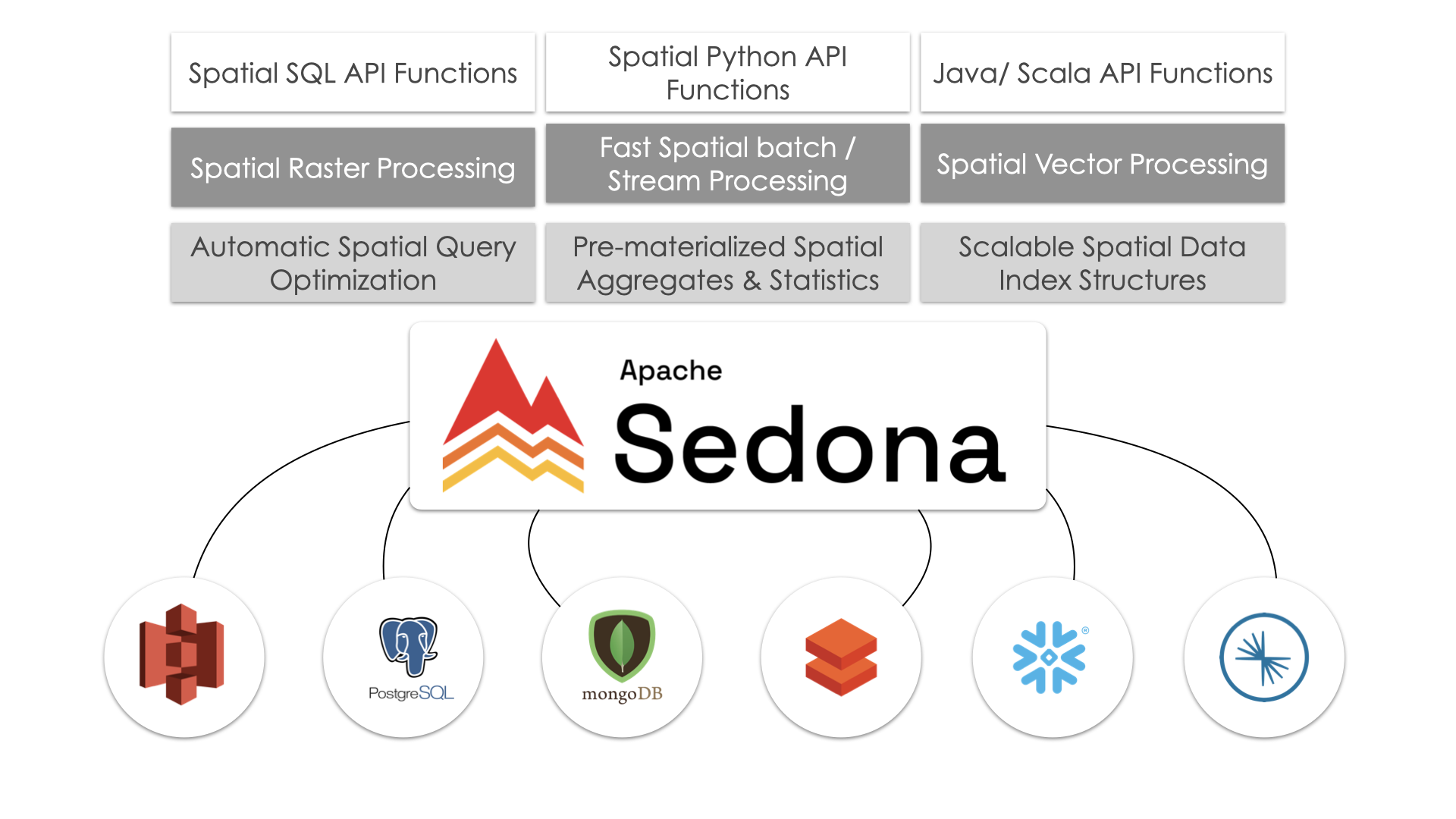
Apache Sedona™ is a spatial computing engine that enables developers to easily process spatial data at any scale within modern cluster computing systems such as Apache Spark and Apache Flink. Sedona developers can express their spatial data processing tasks in Spatial SQL, Spatial Python or Spatial R. Internally, Sedona provides spatial data loading, indexing, partitioning, and query processing/optimization functionality that enable users to efficiently analyze spatial data at any scale.
Features
Some of the key features of Apache Sedona include:
- Support for a wide range of geospatial data formats, including GeoJSON, WKT, and ESRI Shapefile.
- Scalable distributed processing of large vector and raster datasets.
- Tools for spatial indexing, spatial querying, and spatial join operations.
- Integration with popular geospatial python tools such as GeoPandas.
- Integration with popular big data tools, such as Spark, Hadoop, Hive, and Flink for data storage and querying.
- A user-friendly API for working with geospatial data in the SQL, Python, Scala and Java languages.
- Flexible deployment options, including standalone, local, and cluster modes.
These are some of the key features of Apache Sedona, but it may offer additional capabilities depending on the specific version and configuration.
We provide a Docker image for Apache Sedona with Python JupyterLab, Apache Zeppelin and 1 master node and 1 worker node.
How to use
Pull the image from DockerHub
Format:
docker pull apache/sedona:<sedona_version>
Example 1: Pull the latest image of Sedona master branch
docker pull apache/sedona:latest
Example 2: Pull the image of a specific Sedona release
docker pull apache/sedona:{{ sedona.current_version }}
Start the container
Format:
docker run -d -e DRIVER_MEM=<driver_mem> -e EXECUTOR_MEM=<executor_mem> -p 8888:8888 -p 8080:8080 -p 8081:8081 -p 4040:4040 -p 8085:8085 apache/sedona:<sedona_version>
Driver memory and executor memory are optional. If their values are not given, the container will take 4GB RAM for the driver and 4GB RAM for the executor. The -d (or --detach) flag ensures the container runs in detached mode, allowing it to run in the background.
Example 1:
docker run -d -e DRIVER_MEM=6g -e EXECUTOR_MEM=8g -p 8888:8888 -p 8080:8080 -p 8081:8081 -p 4040:4040 -p 8085:8085 apache/sedona:latest
This command will start a container with 6GB RAM for the driver and 8GB RAM for the executor and use the latest Sedona image. The container will run in detached mode.
This command will bind the container's ports 8888, 8080, 8081, 4040, 8085 to the host's ports 8888, 8080, 8081, 4040, 8085 respectively.
Example 2:
docker run -d -e -p 8888:8888 -p 8080:8080 -p 8081:8081 -p 4040:4040 -p 8085:8085 apache/sedona:{{ sedona.current_version }}
This command will start a container with 4GB RAM for the driver and 4GB RAM for the executor and use Sedona {{ sedona.current_version }} image.
This command will bind the container's ports 8888, 8080, 8081, 4040, 8085 to the host's ports 8888, 8080, 8081, 4040, 8085 respectively.
Example 3: Persisting /opt (Jupyter & Zeppelin Data) with Docker Volume
To ensure that Jupyter workspace, Zeppelin notebooks, and configurations persist, mount /opt as a Docker volume:
docker run -d -e DRIVER_MEM=6g -e EXECUTOR_MEM=8g \
    -p 8888:8888 -p 8080:8080 -p 8081:8081 -p 4040:4040 -p 8085:8085 \
    -v sedona_opt:/opt \
    apache/sedona:latest
- The
-v sedona_opt:/optflag creates (if not existing) and mounts a Docker volume namedsedona_optto the/optdirectory inside the container. - This ensures that Jupyter and Zeppelin notebooks, configurations, and workspaces persist even if the container is stopped or removed.
Start coding
Open your browser and go to http://localhost:8888/ to start coding with Sedona in Jupyter Notebook. You can also access Apache Zeppelin at http://localhost:8085/classic/ using your browser.
Notes
- This container assumes you have at least 8GB RAM and takes all your CPU cores and 8GM RAM. The 1 worker will take 4GB and the Jupyter program will take the remaining 4GB.
- Sedona in this container runs in the cluster mode. Only 1 notebook can be run at a time. If you want to run another notebook, please shut down the kernel of the current notebook first (How?).
Documentation
Please visit Apache Sedona website for detailed information
Join the community
Everyone is welcome to join our community events. We have a community office hour every 4 weeks. Please register to the event you want to attend: https://bit.ly/3UBmxFY
Please join our Discord community!
- Apache Sedona@LinkedIn
- Apache Sedona@X
- Sedona JIRA: bug reports and feature requests
- Sedona GitHub Issues: bug reports and feature requests
- Sedona GitHub Discussion: project development and general questions
- Sedona Mailing Lists: [email protected]: project development and general questions
For the mailing list, Please first subscribe and then post emails. To subscribe, please send an email (leave the subject and content blank) to [email protected]
Our users and code contributors are from:

Powered by

Tag summary
Content type
Image
Digest
sha256:bdfb15ede…
Size
2.8 GB
Last updated
about 14 hours ago
docker pull apache/sedonaThis week's pulls
Pulls:
529
Last week