antonsmt/amneziawg-go repository overview
AmneziaWG-Go Docker Container
Userspace implementation of AmneziaWG for containerized deployments, optimized for use in RouterOS.
Mode Explanation
Despite the underlying WireGuard protocol being stateless (no server/client distinction), for ease of configuration this container has added modes that set NAT and add routes differently.
The container supports three operational modes via the AWG_MODE environment variable:
Client Mode (AWG_MODE=client, default): Masquerades all local traffic through the AmneziaWG interface. Used to protect your local traffic and route it to another VPN endpoint. The container acts as a VPN client. Configuration via environment variables, use with single peer (all traffic routes through one endpoint).
Server Mode (AWG_MODE=server): Masquerades all incoming traffic from VPN clients to the local network and internet. Useful when you want clients to connect to this device and route their traffic through it. The container acts as a VPN server/gateway. Configuration via environment variables, supports multiple clients/peers.
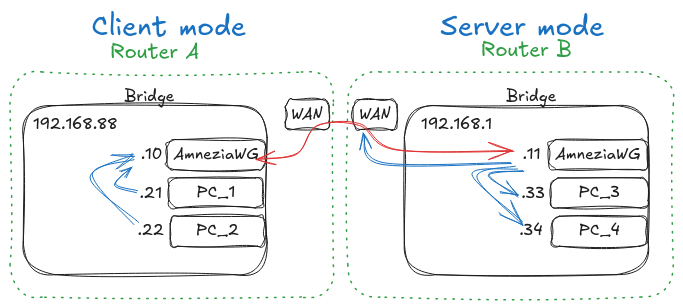
Custom Mode (AWG_MODE=custom): Uses a WireGuard-style configuration file at /etc/amneziawg/awg0.conf (or /etc/amneziawg/<interface>.conf if using a custom interface name). Supports multiple peers, PostUp/PostDown commands, and advanced configurations. All other environment variables are ignored in this mode.
Note on Obfuscation
The default obfuscation parameters (all set to 0 or 1-4) are compatible with standard WireGuard servers but provide no DPI protection. It's recommended to change these values on both client and server sides to match, as they must be identical on both ends. More information is available in AmneziaWG official documentation.
Quick Start - RouterOS Apps
Supported on ARM64, x86, and CHR
Enable container support as per MikroTik documentation: https://help.mikrotik.com/docs/spaces/ROS/pages/84901929/Container
Enable app:
/app enable amneziawg-go
Check container logs for your PUBKEY.
/container print logs
Edit ENV variables with other end's public key and endpoint (AWG_PEER_PUBLIC_KEY, AWG_PEER_ENDPOINT), use your public key on the other end. Set correct mode and change obfuscation parameters.
Now traffic that needs to be packed inside AmneziaWG tunnel can be routed through - [accessIP]
Quick Start - RouterOS Container
Supported on ARM64, ARM32, x86, and CHR
Enable container support as per MikroTik documentation: https://help.mikrotik.com/docs/spaces/ROS/pages/84901929/Container
Add env variables:
/container envs
add key=AWG_MODE list=amn value=client
add key=AWG_PRIVATE_KEY value="generate_new_private_key"
add key=AWG_LISTEN_PORT value=51820
add key=AWG_ADDRESS list=amn value=10.66.66.2/32
add key=AWG_PEER_PUBLIC_KEY list=amn value="peer_pub_key"
add key=AWG_PEER_ENDPOINT list=amn value=10.10.1.1:1234
add key=AWG_INTERFACE list=amn value=awg0
add key=AWG_PEER_ALLOWED_IPS list=amn value=0.0.0.0/0
add key=AWG_PEER_PERSISTENT_KEEPALIVE list=amn value=25
add key=AWG_ENABLE_MASQUERADE list=amn value=true
# Obfuscation Parameters
add key=AWG_JC list=amn value=0
add key=AWG_JMIN list=amn value=0
add key=AWG_JMAX list=amn value=0
add key=AWG_S1 list=amn value=0
add key=AWG_S2 list=amn value=0
add key=AWG_H1 list=amn value=1
add key=AWG_H2 list=amn value=2
add key=AWG_H3 list=amn value=3
add key=AWG_H4 list=amn value=4
Add mounts (replace disk with your storage device):
/container mounts
add list=amnezia src=disk/amneziawg-data dst=/etc/amneziawg
Add veth interface, for ease of configuration add it into bridge:
/interface veth add name=amn-veth dhcp=yes
/interface bridge port add interface=amn-veth bridge=bridge1
Add container (replace disk with your storage device):
/container add remote image=antonsmt/amneziawg-go:latest envlist=amn mountlists=amnezia root-dir=disk/amnezia interface=amn-veth
Check container logs for your public key:
/container logs print
Edit ENV variables with other end's public key and endpoint (AWG_PEER_PUBLIC_KEY, AWG_PEER_ENDPOINT), use your public key on the other end. Set correct mode and change obfuscation parameters.
Route traffic through veth interfaces IP address.
Quick Start with Podman/Docker
Supported on ARM64, ARM32, and x86_64
Single Peer (Client Mode)
podman run --privileged \
  --device /dev/net/tun \
  -v amneziawg-data:/etc/amneziawg \
  -e AWG_MODE="client" \
  -e AWG_PRIVATE_KEY="generate_new_private_key" \
  -e AWG_LISTEN_PORT="51820" \
  -e AWG_ADDRESS="10.66.66.2/32" \
  -e AWG_PEER_PUBLIC_KEY="peer_pub_key" \
  -e AWG_PEER_ENDPOINT="10.155.1.1:1234" \
  -e AWG_INTERFACE="awg0" \
  -e AWG_PEER_ALLOWED_IPS="0.0.0.0/0" \
  -e AWG_PEER_PERSISTENT_KEEPALIVE="25" \
  -e AWG_ENABLE_MASQUERADE="true" \
  -e AWG_JC="0" \
  -e AWG_JMIN="0" \
  -e AWG_JMAX="0" \
  -e AWG_S1="0" \
  -e AWG_S2="0" \
  -e AWG_H1="1" \
  -e AWG_H2="2" \
  -e AWG_H3="3" \
  -e AWG_H4="4" \
  antonsmt/amneziawg-go:latest
Multiple Peers (Server Mode)
podman run --privileged \
  --device /dev/net/tun \
  -v amneziawg-data:/etc/amneziawg \
  -e AWG_MODE="server" \
  -e AWG_PRIVATE_KEY="generate_new_private_key" \
  -e AWG_LISTEN_PORT="51820" \
  -e AWG_ADDRESS="10.66.66.1/24" \
  -e AWG_PEER_1_PUBLIC_KEY="client1_pub_key" \
  -e AWG_PEER_1_ALLOWED_IPS="10.66.66.2/32" \
  -e AWG_PEER_2_PUBLIC_KEY="client2_pub_key" \
  -e AWG_PEER_2_ALLOWED_IPS="10.66.66.3/32" \
  -e AWG_PEER_3_PUBLIC_KEY="client3_pub_key" \
  -e AWG_PEER_3_ALLOWED_IPS="10.66.66.4/32" \
  -e AWG_ENABLE_MASQUERADE="true" \
  antonsmt/amneziawg-go:latest
Note: In server mode, peer endpoints are optional (clients connect to server). You can add as many peers as needed using AWG_PEER_n_* variables where n is any number.
Custom Mode (Config File)
When using AWG_MODE=custom, create a configuration file at /etc/amneziawg/awg0.conf:
[Interface]
PrivateKey = <your_private_key>
Address = 10.66.66.1/24
ListenPort = 51820
# AmneziaWG obfuscation parameters (example values)
Jc = 3
Jmin = 50
Jmax = 1000
S1 = 15
S2 = 15
H1 = 1
H2 = 2
H3 = 3
H4 = 4
# Optional: PostUp/PostDown commands for custom routing
PostUp = iptables -A FORWARD -i %i -j ACCEPT
PostDown = iptables -D FORWARD -i %i -j ACCEPT

[Peer]
PublicKey = <peer1_public_key>
Endpoint = 10.10.1.1:51820
AllowedIPs = 10.66.66.2/32
PersistentKeepalive = 25

[Peer]
PublicKey = <peer2_public_key>
Endpoint = 10.10.1.2:51820
AllowedIPs = 10.66.66.3/32
PersistentKeepalive = 25
Mount the configuration file when starting the container:
Podman/Docker:
podman run --privileged \
  --device /dev/net/tun \
  -v /path/to/awg0.conf:/etc/amneziawg/awg0.conf:ro \
  -e AWG_MODE="custom" \
  antonsmt/amneziawg-go:latest
RouterOS (replace disk with your storage device):
/container mounts
add list=amnezia src=disk/awg0.conf dst=/etc/amneziawg/awg0.conf
In custom mode, all environment variables except AWG_MODE and AWG_INTERFACE are ignored.
Environment Variables
Required Variables (Client/Server Mode)
| Variable | Description | Example |
|---|---|---|
AWG_PRIVATE_KEY | Client private key. If not provided or invalid, will auto-generate and persist in /etc/amneziawg/private.key. Mount /etc/amneziawg volume to persist keys across container restarts. Note: Only the private key is persisted - all other configuration must be provided via environment variables on each start. | wGHSsL5O8f7Qx9/6NJ8yK3mT2vR4pN1cE0bA9dF8hXk= |
AWG_LISTEN_PORT | Local UDP listen port | 51820 |
AWG_ADDRESS | Interface IP address with CIDR | 10.66.66.2/32 |
Peer Configuration
Single Peer (Legacy):
| Variable | Description | Example |
|---|---|---|
AWG_PEER_PUBLIC_KEY | Peer's public key. If invalid or empty, uses dummy key | xJ9K/7mN5pQ2wR8vT4yU6aE1bF3cG0hI9dL5jM8nO2s= |
AWG_PEER_ENDPOINT | Peer endpoint (host:port). Required for client mode, optional for server mode | vpn.example.com:51820 |
Multiple Peers (Recommended):
| Variable | Description | Example |
|---|---|---|
AWG_PEER_n_PUBLIC_KEY | Public key for peer n (n can be any number) | AWG_PEER_1_PUBLIC_KEY="..." |
AWG_PEER_n_ENDPOINT | Endpoint for peer n. Optional for server mode | AWG_PEER_1_ENDPOINT="10.10.1.1:51820" |
AWG_PEER_n_ALLOWED_IPS | Allowed IPs for peer n (default: 0.0.0.0/0,::/0) | AWG_PEER_1_ALLOWED_IPS="10.66.66.2/32" |
AWG_PEER_n_PERSISTENT_KEEPALIVE | Keepalive interval for peer n (default: 25) | AWG_PEER_1_PERSISTENT_KEEPALIVE="25" |
Note: You can use both legacy single peer variables and indexed peer variables. Indexed peers will be discovered automatically.
Optional Variables
| Variable | Default | Description |
|---|---|---|
AWG_MODE | client | Operation mode: client, server, or custom. Custom mode uses config file and ignores all other parameters |
AWG_INTERFACE | awg0 | WireGuard interface name |
AWG_PEER_ALLOWED_IPS | 0.0.0.0/0,::/0 | Legacy single peer only. Allowed IPs for routing through VPN |
AWG_PEER_PERSISTENT_KEEPALIVE | 25 | Legacy single peer only. Keepalive interval in seconds |
AWG_DNS | (none) | DNS server IP. Overwrites /etc/resolv.conf if set |
AWG_ENABLE_MASQUERADE | true | Enable NAT masquerading with iptables. Set to false to disable |
AWG_ENABLE_DEFAULT_ROUTE | true | Enable routing all traffic through VPN. Set to false to only route specific subnets without changing default route. Automatically disabled in server mode |
AmneziaWG Obfuscation Parameters (Optional)
These parameters enable traffic obfuscation to bypass DPI detection. All parameters are optional and disabled by default.
| Variable | Default | Range | Description |
|---|---|---|---|
AWG_JC | 0 | 0-128 | Junk packet count - number of junk packets to send |
AWG_JMIN | 0 | 0-1280 | Minimum junk packet size in bytes |
AWG_JMAX | 0 | 0-1280 | Maximum junk packet size in bytes (must be ≥ JMIN) |
AWG_S1 | 0 | 0-1280 | Init packet junk size in bytes |
AWG_S2 | 0 | 0-1280 | Response packet junk size in bytes |
AWG_H1 | 1 | 1-4294967295 | Init packet magic header (32-bit unsigned integer) |
AWG_H2 | 2 | 1-4294967295 | Response packet magic header (32-bit unsigned integer) |
AWG_H3 | 3 | 1-4294967295 | Underload packet magic header (32-bit unsigned integer) |
AWG_H4 | 4 | 1-4294967295 | Transport packet magic header (32-bit unsigned integer) |
Important Notes:
- Obfuscation parameters must match exactly between client and server
- Setting all values to 0 (or H1-H4 to 1-4) maintains compatibility with standard WireGuard
- JMAX must be greater than or equal to JMIN
- Recommended starting values for obfuscation: JC=3-5, JMIN=50, JMAX=1000, S1=15, S2=15
License
Based on AmneziaWG-Go and AmneziaWG-Tools.
Tag summary
Content type
Image
Digest
sha256:b4484e789…
Size
8.2 MB
Last updated
9 months ago
docker pull antonsmt/amneziawg-go