amerkurev/doku
💽 Doku - Docker disk usage dashboard
1M+
amerkurev/doku repository overview
💽 Doku / Docker disk usage dashboard
Doku is a lightweight web application that helps you monitor Docker disk usage through a clean, intuitive interface.
GitHub | https://github.com/amerkurev/doku
Where to file issues | https://github.com/amerkurev/doku/issues




Quick Start
For those eager to get started, here's the fastest way to run Doku:
docker run -d -v /var/run/docker.sock:/var/run/docker.sock:ro -v /:/hostroot:ro -p 9090:9090 amerkurev/doku
Then open http://localhost:9090/ in your browser. That's it!
This command runs Doku with default settings and read-only access to your Docker socket and filesystem. See the sections below for more detailed setup options.
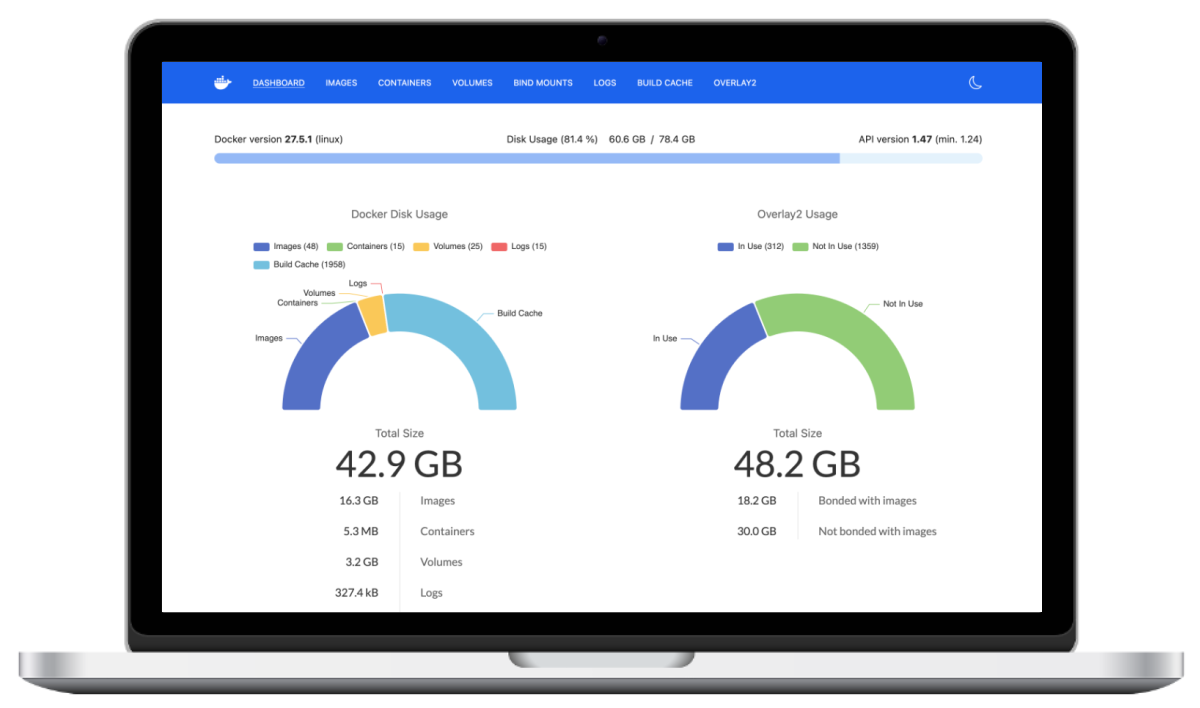
Features
Doku monitors disk space used by:
- Images
- Containers
- Volumes
- Builder cache
- Overlay2 storage (typically the largest consumer of disk space)
- Container logs
- Bind mounts
Getting Doku
Pull the latest release from the Docker Hub:
docker pull amerkurev/doku:latest
Using Doku
The simplest way to use Doku is to run the Docker container. You'll need to mount two key resources:
- The Docker Unix socket with
-v /var/run/docker.sock:/var/run/docker.sock:ro - The top-level directory (
/) of the host machine with-v /:/hostroot:ro
The root directory mount is critical for Doku to calculate disk usage of logs, bind mounts, and especially Overlay2 storage. Without this mount, many key features of Doku will not function properly.
docker run --name doku -d -v /var/run/docker.sock:/var/run/docker.sock:ro -v /:/hostroot:ro -p 9090:9090 amerkurev/doku
Important: All host mounts are in read-only (ro) mode. This ensures Doku can only read data and cannot modify or delete any files on your host system. Doku is strictly a monitoring tool and never performs any cleanup or disk space reclamation actions on its own.
For more advanced configurations, you can add SSL certificates, authentication, and environment variables:
docker run -d --name doku \
    --env-file=.env \
    -v /var/run/docker.sock:/var/run/docker.sock:ro \
    -v /:/hostroot:ro \
    -v $(PWD)/.htpasswd:/.htpasswd \
    -v $(PWD)/.ssl/key.pem:/.ssl/key.pem \
    -v $(PWD)/.ssl/cert.pem:/.ssl/cert.pem \
    -p 9090:9090 \
    amerkurev/doku
The --env-file=.env option allows you to specify various configuration parameters through environment variables. See the "Configuration Options" section below for details on all available settings.
Doku will be available at http://localhost:9090/. You can change -p 9090:9090 to any port. For example, if you want to view Doku over port 8080 then you would do -p 8080:9090.
Configuration Options
Doku can be configured using environment variables. You can set these either directly when running the container or through an environment file passed with --env-file=.env.
| Environment Variable | Description | Default |
|---|---|---|
| HOST | Interface address to bind the server to | 0.0.0.0 |
| PORT | Web interface port number | 9090 |
| LOG_LEVEL | Logging detail level (debug, info, warning, error, critical) | info |
| SI | Use SI units (base 1000) instead of binary units (base 1024) | true |
| BASIC_HTPASSWD | Path to the htpasswd file for basic authentication | /.htpasswd |
| SCAN_INTERVAL | How often to collect basic Docker usage data (in seconds) | 60 |
| SCAN_LOGFILE_INTERVAL | How frequently to check container log sizes (in seconds) | 60 |
| SCAN_BINDMOUNTS_INTERVAL | Time between bind mount scanning operations (in seconds) | 3600 |
| SCAN_OVERLAY2_INTERVAL | How often to analyze Overlay2 storage (in seconds) | 86400 |
| SCAN_INTENSITY | Performance impact level: "aggressive" (highest CPU usage), "normal" (balanced), or "light" (lowest impact) | normal |
| SCAN_USE_DU | Use the faster system du command for disk calculations instead of slower built-in methods | true |
| UVICORN_WORKERS | Number of web server worker processes | 1 |
| DEBUG | Enable detailed debug output | false |
| DOCKER_HOST | Connection string for the Docker daemon | unix:///var/run/docker.sock |
| DOCKER_TLS_VERIFY | Enable TLS verification for Docker daemon connection | false |
| DOCKER_CERT_PATH | Directory containing Docker TLS certificates | null |
| DOCKER_VERSION | Docker API version to use | auto |
Basic Authentication
Doku supports HTTP basic authentication to secure access to the web interface. Follow these steps to enable it:
- Create an htpasswd file with bcrypt-encrypted passwords:
htpasswd -cbB .htpasswd admin yourpassword
Add additional users with:
htpasswd -bB .htpasswd another_user anotherpassword
- Mount the htpasswd file when running Doku:
docker run -d --name doku \
    -v /var/run/docker.sock:/var/run/docker.sock:ro \
    -v /:/hostroot:ro \
    -v $(PWD)/.htpasswd:/.htpasswd \
    -p 9090:9090 \
    amerkurev/doku
- If you want to use a custom path for the htpasswd file, specify it with the
BASIC_HTPASSWDenvironment variable:
docker run -d --name doku \
    -v /var/run/docker.sock:/var/run/docker.sock:ro \
    -v /:/hostroot:ro \
    -v $(PWD)/custom/path/.htpasswd:/auth/.htpasswd \
    -e BASIC_HTPASSWD=/auth/.htpasswd \
    -p 9090:9090 \
    amerkurev/doku
Authentication will be required for all requests to Doku once enabled.
Supported Architectures
Doku container images are available for the following platforms:
- linux/amd64
- linux/arm64
License
Tag summary
Content type
Image
Digest
sha256:aceb961a7…
Size
76.4 MB
Last updated
7 months ago
docker pull amerkurev/doku