Automated bank sync for Actual Budget with web dashboard, multi-server support, and monitoring
10K+
Actual-sync is a production-ready Node.js service that automates bank transaction synchronization for Actual Budget servers, eliminating manual sync operations and ensuring financial data stays current across multiple budget instances.
/health, /metrics, /ready) and Prometheus metrics# Using Docker Hub
docker run -d \
--name actual-sync \
--restart unless-stopped \
-v ./config:/app/config:ro \
-v ./data:/app/data \
-v ./logs:/app/logs \
-p 3000:3000 \
-e TZ=America/New_York \
agigante80/actual-sync:latest
# OR using GitHub Container Registry
docker run -d \
--name actual-sync \
--restart unless-stopped \
-v ./config:/app/config:ro \
-v ./data:/app/data \
-v ./logs:/app/logs \
-p 3000:3000 \
-e TZ=America/New_York \
ghcr.io/agigante80/actual-sync:latest
Create config/config.json:
{
  "servers": [
    {
      "name": "Main",
      "url": "https://budget.example.com",
      "password": "your_secure_password",
      "syncId": "your_sync_id",
      "dataDir": "/app/data/main",
      "encryptionPassword": "MyBudgetEncryptionKey"
    }
  ],
  "sync": {
    "schedule": "0 2 * * *",
    "maxRetries": 5
  },
  "logging": {
    "level": "INFO",
    "format": "json",
    "logDir": "/app/logs"
  },
  "healthCheck": {
    "port": 3000
  }
}
Configuration Notes:
encryptionPassword is optional and only needed for E2EE encrypted budgetslogDir should be set to /app/logs to persist logs in the mounted volumelogDir to null to disable file logging (console only)
## Web Dashboard
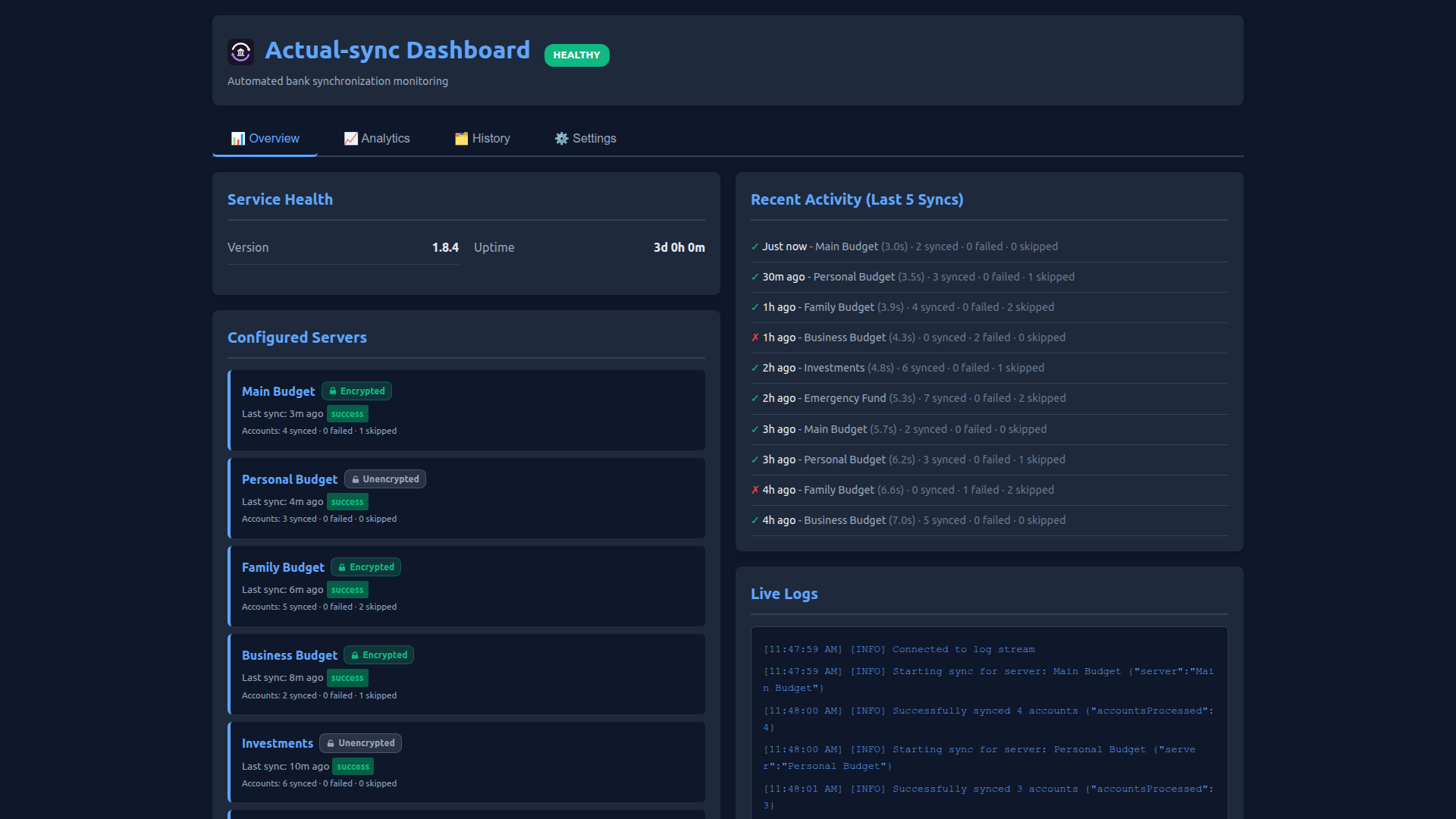
Access the modern web dashboard at `http://localhost:3000/dashboard`:
- **Overview Tab**: 2-column layout showing service health, configured servers with status badges, recent sync activity, and live logs
- **Analytics Tab**: Interactive charts displaying success rates by server, duration trends, and sync timeline
- **History Tab**: Searchable sync history with server and limit filters, showing detailed error messages
- **Settings Tab**: Customize date formats (11 options), manage orphaned servers, reset history, and clear errors
## Monitoring & Health Checks
- **Web Dashboard**: `http://localhost:3000/dashboard` (interactive UI)
- **Health Check**: `curl http://localhost:3000/health`
- **Metrics**: `curl http://localhost:3000/metrics`
- **Prometheus**: `curl http://localhost:3000/metrics/prometheus`
- **View History**: `docker exec actual-sync npm run history`
## Docker Compose Example
```yaml
version: '3.8'
services:
actual-sync:
image: agigante80/actual-sync:latest # or ghcr.io/agigante80/actual-sync:latest
container_name: actual-sync
restart: unless-stopped
ports:
- "3000:3000"
volumes:
- ./config:/app/config:ro
- ./data:/app/data
- ./logs:/app/logs
environment:
- TZ=America/New_York
- NODE_ENV=production
healthcheck:
test: ["CMD", "wget", "--quiet", "--tries=1", "--spider", "http://localhost:3000/health"]
interval: 30s
timeout: 10s
retries: 3
Full documentation available at:
/app/config, /app/data, /app/logsBuilt with ❤️ for the Actual Budget community
Content type
Image
Digest
sha256:aae1a0b2d…
Size
94.5 MB
Last updated
17 days ago
docker pull agigante80/actual-sync